When you can't log into Facebook, the most frustrating thing isn't 'forgetting your password,' but your account is perfectly fine, but suddenly you encounter **Facebook unable to log in**. You might see 'login failed' messages, missing verification codes, or even a whole Facebook login issue—trying repeatedly won't help. This situation often isn't caused by a single reason—like browser caching issues, temporary account locks, device authentication errors, or even missing important notifications because Facebook accounts can't log in, which in turn affects work or marketing schedules.
Many people's first reaction is to change their password or log in with a different phone, but this easily misses the real key: sometimes the problem isn't the wrong password at all, but the platform detecting abnormal login behavior, expired cookies, or the device's fingerprint being identified by Facebook as an unfamiliar device. If you only focus on the account itself, it's easy to overlook the impact of browser, network, and even regional IPs, which can actually make the issue even harder to fix.
What truly matters most is whether these seemingly "login anomalies" can be gradually investigated through browser settings, device verification, network environment adjustments, and Facebook's official complaint process. Each cause has a corresponding solution. The key is not to just stop at the surface; check every possible step once to have a chance to find the root cause all at once.
Let's first look at some common Facebook login scenarios and how to determine whether it's an account issue or a device or network environment error.
Why can't I log in to Facebook? The most common reasons and ways to judge them
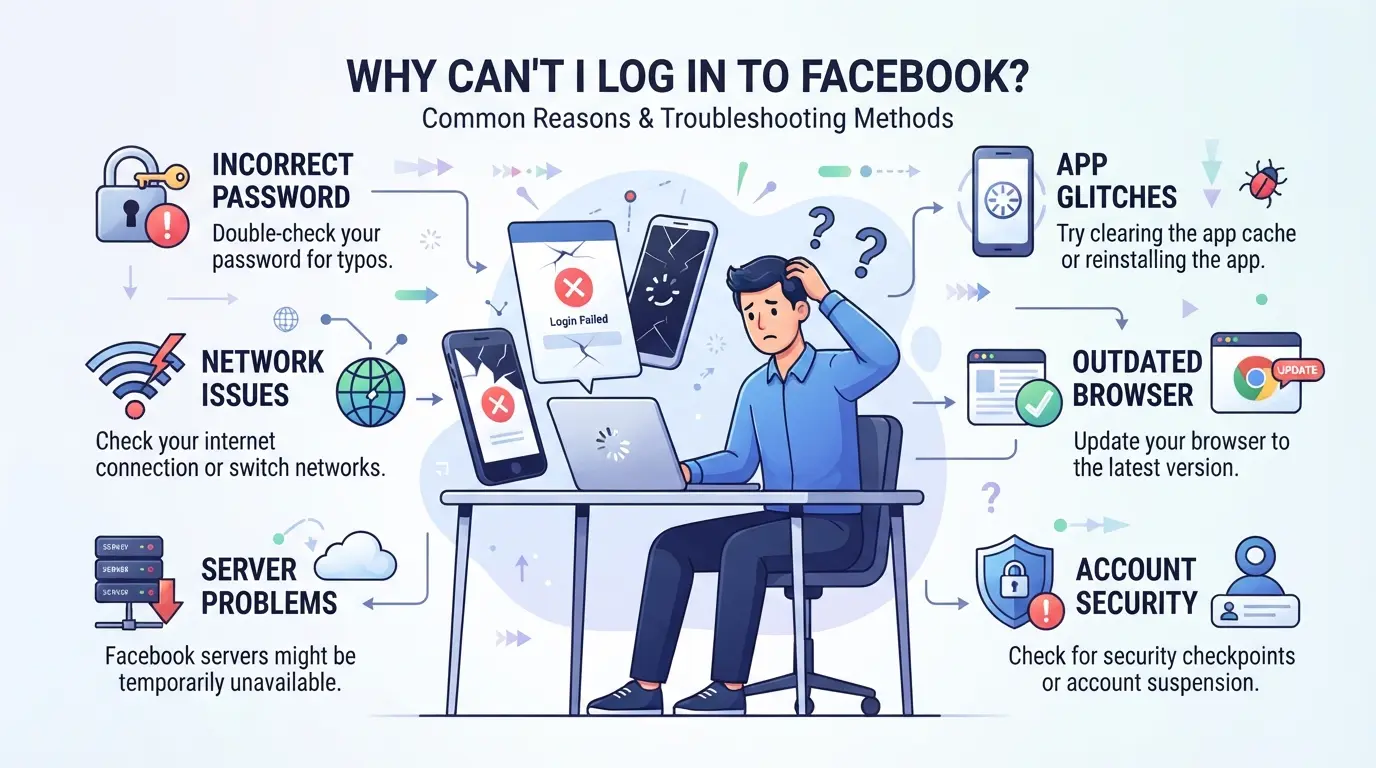
When encountering abnormal Facebook logins, the most common issue isn't a single issue—it's that the account, network, and device can all malfunction. Quickly identify the root cause—first identify which layer is causing the problem, then address it accordingly—your efforts won't be wasted.
Incorrect account passwords or being locked
If you enter the wrong account password, the system will immediately show "Password Error"; If you encounter "Your account has been disabled" or "Identity verification required," it is likely that your account has been locked by Facebook or triggered a security check, and no matter how much you change your password, you won't be able to log in.
Network environment anomalies and IP changes
If your network isn't stable, or when you switch between Wi-Fi and mobile networks, Facebook will determine if you're using a new location or even suspect your account has been hacked. If you've used it once at work and immediately change your IP at home, the system may pop up a 'Please verify identity' or ask you to enter an extra verification code. The verification code page often goes missing, which is a typical sign of rapid IP switching. Sometimes, switching to a proxy or multiple people logging into the same account on the same network can make Facebook's system seem suspicious, leading to the error message 'Facebook can't log in.' In such cases, simply restarting your phone or changing your password isn't enough, because Facebook detects an abnormal login environment. If you log in in from different regions in a short period, Facebook may lock your account directly, or even require you to upload ID to unlock it.
Device or browser issues
For quick troubleshooting, you can first check these three details:
- Cookies or browser caches are outdated, causing Facebook to keep asking you to log in again
- If your phone's operating system is too old or the app hasn't been updated, it's easy to get stuck at the login verification stage
- Repeatedly switching accounts on the same device can easily be judged by Facebook as suspicious behavior, forcing users to log out or requiring verification
These device issues are often overlooked; in reality, simply clearing the cache, switching phones, or updating the app version can resolve them immediately.
Next, when entering the troubleshooting process, clarify exactly which link is causing the problem so you can address the problem accordingly. If you are still unsure which stage is problematic, it is recommended to start with the easiest step to follow.
If you encounter Facebook login issues, what is the first step to troubleshoot?
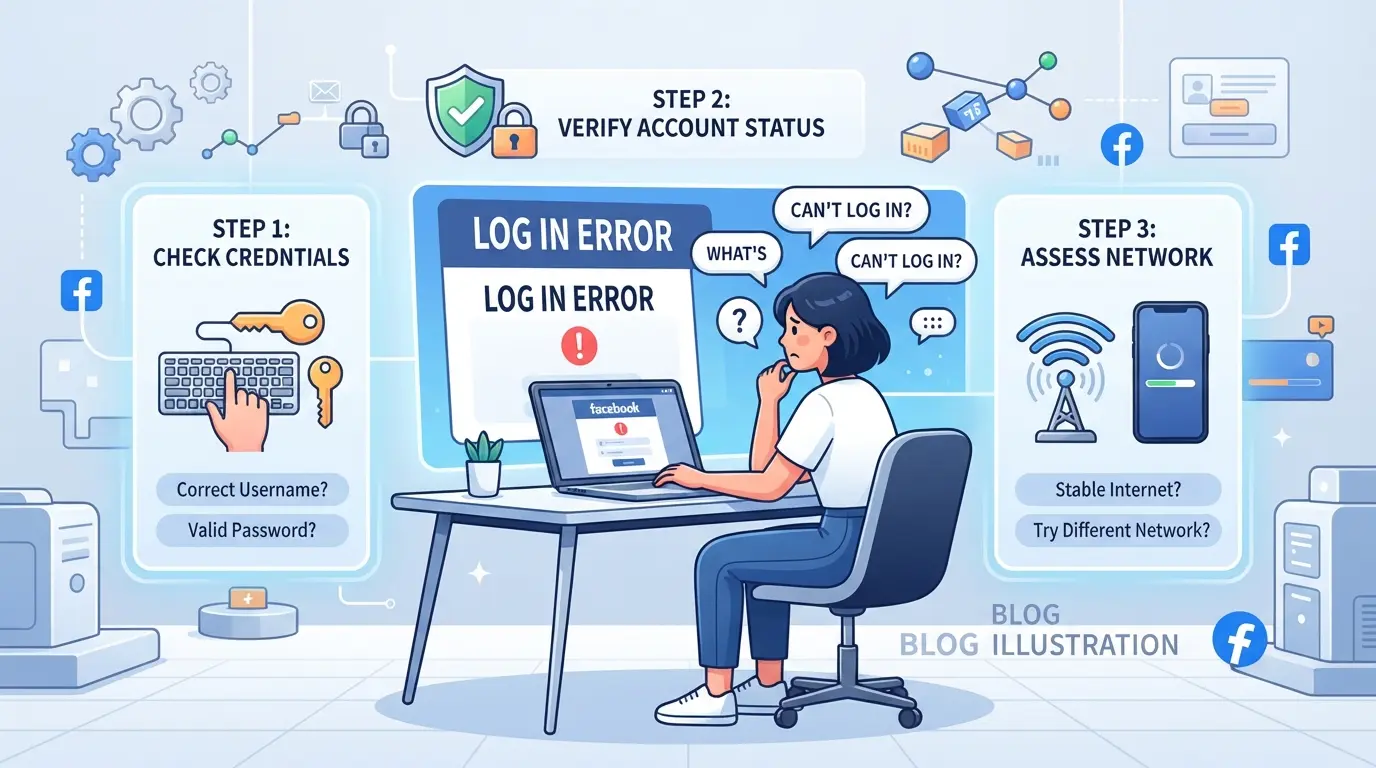
If you encounter abnormal Facebook logins, don't rush to change your password or reinstall the app. What you really need to do first is a systematic check—check your account, network, browser, and device environment one by one, so you won't miss any hidden issues. Many people only check one thing, only to end up lagging even longer.
Confirm account information and password entry
- Re-enter the password: First, make sure your typing is correct. Mobile input methods tend to auto-complete or skip spaces, but the actual password is completely different.
- Check if your account is locked: If you see 'Account disabled' or 'Identity verification required' when logging in, Facebook has detected an abnormality. In this case, you need to unlock through the official process; simply changing your password won't help.
- Check if there are multiple failed records: After repeatedly entering the wrong password, Facebook will temporarily block login. It's recommended to wait a few minutes before trying again and avoid repeatedly tapping.
Check your network connection and IP status
- Switch between Wi-Fi and mobile networks: Sometimes unstable or disconnected connections can cause login failures. Switching networks once can resolve LAN issues.
- Check if your IP is abnormal: If you previously used a different region or proxy, Facebook may consider it a remote login and prompt additional verification. Try again on your usual network.
Clear browser cache and cookies
- Open your browser settings and clear cache and cookies: Old data can cause Facebook to misdiagnose your device, leading to repeated authentication or inability to log in.
- After completion, reopen the browser: If it still fails, try incognito mode to eliminate local data interference.
Update the app and system version
- Check Facebook on the App Store or Google Play to see if it's the latest version: Older apps sometimes fail to verify login.
- Check if your phone system supports the new version of Facebook: If the system is too old, compatibility errors may occur, preventing proper login.
If these basic checks are not resolved, the problem is mostly due to account anomalies, device environments, or network duplication. Next, higher-risk login scenarios will arise, such as multi-account operations or team collaboration, which require further investigation.
High-risk scenarios where Facebook cannot log in: multi-account operations, team collaboration, and IP duplication
Many people think that as long as their account isn't locked, switching devices or logging in again will solve login issues. In fact, team collaboration, mixing multiple accounts, and proxy configuration errors are the common causes of FB login failure. Once these scenarios appear, simply checking passwords or devices is no longer enough; you must also check the environment and operation methods.
During team collaboration, repeated IPs and devices cause anomalies
Multiple people sharing the same account often causes Facebook to detect duplicate IP and device fingerprints. In such cases, the platform will detect abnormal behavior on your account and directly trigger verification or temporary locking. To avoid this risk, teams should consistently use the same device or operate separately with separate accounts, avoiding mixing IP and device data.
Multiple accounts operating simultaneously can lead to account linking or blocking
When the same computer logs into multiple Facebook accounts at the same time, the platform can easily detect cookie and fingerprint duplication. This can lead to accounts being labeled as automated or illegally linked, and in severe cases, may result in a total block.
- Common issues with login issues include: not receiving verification codes, temporary account restrictions, or even being locked outright.
- To reduce risk, it is recommended to use a dedicated browser profile, regularly clear cookies, and avoid switching large numbers of accounts on the same device in a short period. This can reduce the chances of being linked by the platform or detected as automated behavior.
Incorrect proxy configuration or poor quality causing login failure
If a proxy IP is listed by Facebook as high risk or does not match the account registration location, the platform will directly block login. Common situations include unstable proxy quality or excessive region fluctuations, which can cause login anomalies. To ensure stable login, choose proxies with higher quality and regions close to the registered location, and regularly check your IP status to reduce the chance of being blocked.
2026 Latest Facebook Login Troubleshooting Method: Step-by-Step Tutorial
If you encounter abnormal Facebook logins, don't rush to reset your password or change devices. Here is a summary of the latest 2026 repair procedures, providing targeted solutions to reduce repeated actions and wasted time. Each issue can be troubled with corresponding steps; the key is to check in order without skipping steps.
Account and password reset and verification process
- On the login page, click "Forgot Password," enter your full account information (phone number, email), and the system will send a reset link.
- If you don't receive the verification code, first check if your phone number or email is correct, and check your spam folder. Sometimes the verification code may take 5-15 minutes, so don't rush to request it repeatedly.
- If the system prompts "Too many verifications," pause the operation for at least 30 minutes before retrying. Excessive operation can easily be judged by Facebook as machine behavior.
- If even the reset fails, it's recommended to jump straight to the appeal process to avoid getting stuck in an endless loop.
Unlocking accounts and appeal procedures
- If you see messages like "Account Deactivated" or "Security Check" during login, click the appeal link to enter the official form.
- Complete the required information and upload clear identification documents (passport, front and back of ID card). Photos must be unobstructed and free of glare; otherwise, the appeal may be rejected.
- After submitting a complaint, you will usually be notified within 24-48 hours. Complaints submitted on Friday may be processed until the following Monday morning.
- If your appeal fails, you must reapply with a new photo and verify your information. Repeated appeals are likely to be automatically rejected by the system.
Network environment and proxy settings adjustments
- Switch between different Wi-Fi and mobile networks first to avoid abnormal Facebook login caused by large IP changes. After each switch, restart your browser or app.
- Check whether proxy settings are correct, especially when operating with multiple accounts; duplicate IPs can be identified as abnormal by the platform. Proxies should match the registered region of the account; remote proxies are more likely to trigger security checks.
- If you still can't log in after switching networks, use an IP lookup tool to check whether your current IP has been blocked by Facebook or frequently changed.
- Avoid repeatedly logging in from multiple locations within a short period, as such actions will be classified as risky by the system.
Browser cache, cookie clearing, and app reinstallation
- In your browser settings, find 'Clear cache and cookies', check 'All data', and restart the browser after cleaning. Chrome's cache can be stored for 30 days, and sometimes old data may block login.
- If your mobile app is logged incorrectly, uninstall the Facebook app first, then reinstall it to ensure all cached and outdated data are cleared thoroughly.
- After reinstalling the app, it is recommended to log in with a single account first to avoid multiple accounts logging in at once and causing verification failures.
- If you still cannot log in after completing the operation, it is recommended to return to your network environment to check or proceed with the account appeal process.
These repair steps can basically eliminate common Facebook login failures by checking them in order. More advanced isolation methods such as multi-account management and proxy operations are recommended to be explored in detail later.
Multi-account management and social marketing: How to securely isolate Facebook account environments with DICloak
Most people only check their account or password when encountering login issues on Facebook. But in social media marketing, team collaboration, or situations where managing multiple accounts is needed, simply switching devices or clearing cache is far from enough. When Facebook logins fail, it's often because the multi-account environment is not isolated, causing platforms to identify "links" or duplicate IPs between accounts. These issues are not only common to beginners; even experienced users can encounter them within teams or when switching multiple platforms. For operators who need to securely manage multiple Facebook accounts long-term, establishing a dedicated browser profile and assigning a dedicated proxy to each profile is a basic approach to reduce the risk of environmental links.
Create a standalone browser profile and adjust fingerprint parameters
When you need to manage multiple Facebook accounts simultaneously, simply using incognito mode or multiple browsers makes it difficult to avoid data cross-section. DICloak allows operators to create independent browser profiles for each account and adjust fingerprint parameters such as operating system, language, time zone, and screen resolution. This allows each account group to operate on different devices and regions, with cookies, cache, history, and sessions not interfering with each other. When doing social marketing or advertising, this isolation reduces the chance of accounts being mistakenly identified as operating in the same operating environment. **If you switch accounts repeatedly on one computer without isolation, the platform can easily detect anomalies and may actually cause login issues or verification requests more quickly. **This operation is only at the browser level and does not change the Facebook account settings or content itself.

Assign dedicated proxies for each profile to avoid IP duplication and regional anomalies
One of the most common risks when operating with multiple accounts is that multiple profiles share the same IP or proxy, resulting in the platform discovering that many accounts come from the same exit and directly mark them as anomalies. DICloak allows you to configure proxies individually for each profile. Whether it's HTTP, HTTPS, or SOCKS5, operators can select the appropriate proxy based on the account registration region and test connection status in real time. This design ensures that each profile's IP, time zone, and country can be independent when logging into Facebook, reducing the need for verification or temporary locking due to IP duplication or region mismatches. Note that proxy quality and source must be self-checked. DICloak itself does not sell or recommend proxy services, only responsible for storing and applying the connection information you set. The scope is limited to the network connection settings of profiles and does not affect Facebook account content or security mechanisms.

Such environment isolation and proxy configuration only reduce the risk of being "associated" or "regional anomalies" when multi-account operations. There are also several common errors that often lead to permanent account restrictions.
What mistakes are most likely to permanently restrict your account when you can't log in to Facebook?
The biggest fear isn't being unable to log in immediately, but making a mistake that puts the account directly into permanent restrictions, making recovery nearly impossible. Many people, in their desperate attempts to save their accounts, end up stepping on high-risk actions that make the problem irreparable. These situations are often not caused by a single factor, but by the accumulation of several common traps.
Frequent IP or device switching causes exceptions
If you log in repeatedly in different regions and on different devices within a short period, Facebook can easily identify it as abnormal behavior. If the device fingerprints are inconsistent, the system will automatically conduct security checks, causing the account to be forcibly restricted or triggered for secondary verification. In such cases, the account may be locked or even unable to appeal.
Using poor quality or public proxies leads to account bans
If proxy IPs are of unknown origin or are used by a large number of users simultaneously, Facebook will quickly detect abnormal traffic and directly classify the account as high-risk.
- When proxies are widely abused, accounts may be instantly permanently suspended, and appealing is useless.
- Using unknown proxies to save accounts can actually lead to account bans. It is recommended to use reputable, exclusive proxies and ensure the source is secure.
Multiple accounts operating simultaneously without environmental isolation
If multiple accounts operate in the same browser and on the same device, and cookies or fingerprints are duplicated, Facebook will consider it as the same person controlling multiple accounts. This kind of interference easily restricts the synchronization of all accounts, making recovery difficult. Separate environments and complete data isolation are the safest approach.
2026 Facebook login inability FAQ
When you can't log into Facebook, the most common reason for getting stuck isn't the wrong password, but the platform's abnormal judgment. Below are some common questions to help you avoid detours.
Why can't I receive the verification code?
If your phone number is canceled, your SIM card is replaced, or a number that hasn't been used for a long time will all cause you to miss receiving the verification code. If you are temporarily blocked, the verification code may be delayed. It's recommended to wait 10 minutes before trying again.
Switching devices and logging in, still showing login errors?
If multiple devices log in to Facebook at the same time or suddenly change their regional IP, Facebook will determine the device is unfamiliar. In this case, first use your usual device and cooperate with the official complaint process to have a chance to recover.
How long does it take to unlock after a complaint?
Usually, responses are made within 24-48 hours, but weekend applications have to wait until next Monday, with an average wait of 72 hours being more common.
Frequently Asked Questions About Facebook Unable to Log In
How to tell if it's an account or a network issue when you can't log in to Facebook?
First, check if your account is disabled, locked, or showing an abnormal message. If your account is normal, try switching to a different WiFi or mobile data network for testing. If you can't log in in across multiple network environments, the problem may be with your account; If you can log in after switching networks, it's most likely due to unstable internet connection.
What should you do if Facebook doesn't receive a verification code?
Please check if your phone signal is good, turn off airplane mode, and then restart. Try resending the verification code; do not request multiple times in a row. If your phone still does not receive it, you can choose a backup email or other method to receive it. Some users can use Google Authenticator or similar tools to assist with login.
Will multi-account operations prevent you from logging into Facebook?
If you operate multiple accounts on the same device without environmental isolation or duplicate IPs, Facebook can easily detect anomalies and prevent Facebook from logging in. It is recommended to use different browsers or sockpuppet tools for each account and avoid switching accounts frequently in a short period.
What are the risks of using proxies to log in to Facebook?
Using poor-quality or public proxies can easily lead to Facebook blocking and resulting in abnormal Facebook logins. Please choose a trusted private proxy and ensure the proxy region matches the account registration location. Proxy errors may cause the system to suspect a risk of cross-region login, resulting in accounts being locked or requiring verification.
How can teams collaborate to manage Facebook accounts to avoid login errors?
It is recommended that each team member use an independent profile and dedicated proxy to avoid multiple accounts operating the same environment simultaneously. This helps prevent data interference, improves the security of Facebook accounts that cannot log in, and lowers the chance of system errors.
You can now experience and evaluate the practicality of this tool according to your own needs. With a free trial, you can gain deeper insights into whether its features meet your daily work or learning expectations. Try DICloak for free
 Web Proxy Tools
 Free Tools
 Cookie Plugin
 UA Generator
 MAC Address Generator
 IP Generator
 IP Address List
 2FA Code Generator
 World Clock
 Anonymous Check
 WebRTC Leak Test
 UUID Generator
 Free Web Proxy Site
 Proxy Checker
 FB Ad Checker
 AI Web Scraping
 Free SMM Tools
 Twitter Shadowban Checker
 Instagram Name Checker
 UTM Generator
 Username Generator
 AI Hashtag Generator
 LinkedIn Headline Generator
 Social Media Image Resizer