The Mechanics of TikTok Carousel Content in 2026
While traditional video remains a staple, "TikTok Photo Mode"—commonly referred to as carousel or slideshow content—has emerged as a primary driver for user engagement. This format enables the transformation of multiple static images into a unified, interactive post featuring synchronized audio and text overlays.
Industry observations indicate that carousels are currently favored for comprehensive storytelling, tutorials, and product showcases. The underlying mechanism centers on increasing "dwell time." By necessitating active "swiping" behavior from the viewer, the platform’s algorithm identifies higher engagement levels compared to the passive consumption of standard video. For professional teams, mastering this format through automated infrastructures is a necessary standard for high-volume growth.

Technical Asset Guidelines: Resolution and Safety Margins
To maintain visual integrity and ensure that content remains legible across the diverse spectrum of mobile hardware, strict adherence to technical specifications is required. Failure to comply with these parameters often results in degraded image quality or the obscuring of critical information by the platform's user interface.
Resolution and Aspect Ratio Requirements
- Optimal Resolution: 1080 x 1920 pixels.
- Aspect Ratio: A 9:16 vertical full-screen format is the recommended standard for algorithm compatibility and seamless display.
- File Formats: Use .JPG or .PNG to preserve visual clarity and minimize compression artifacts.
- Suboptimal Ratios: While 1:1 or 4:5 ratios are supported, they frequently result in black borders or unintended cropping, which diminishes the professional presentation of the asset.
Safe Zone Padding for UI Elements
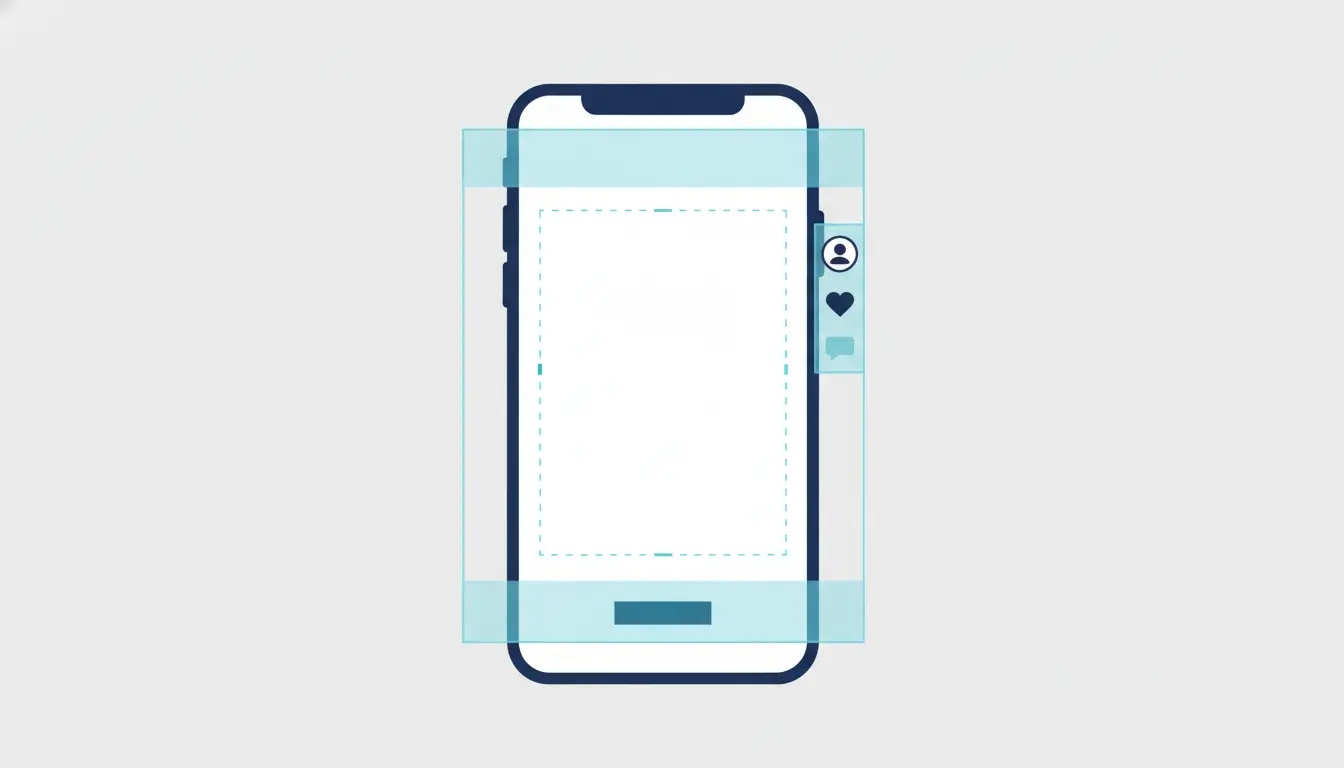
The TikTok interface includes persistent overlays such as profile icons, captions, and engagement buttons. Creative assets must be designed around these elements.
- Vertical Safe Zone: Maintain a minimum of 150 pixels of padding at the top and bottom of the image.
- Horizontal Safe Zone: Maintain a minimum of 64 pixels of padding on the left and right sides.
- Text Overlay Placement: All text elements must be centered and kept strictly within the safe zone to avoid being obscured by the UI.
- Operational Risk: Assets placed outside these margins are likely to be cut off, rendering calls-to-action or instructional text inaccessible to the end user.
Why Professional Teams Use TikTok API to Make Image Slideshow Post Workflows
Managing high-volume account infrastructures requires a transition from manual mobile uploads to API-driven or automated browser-based workflows. Manual management is inefficient for scaling operations; instead, professional teams utilize centralized systems to implement bulk scheduling across hundreds of profiles simultaneously.
This methodology prioritizes operational efficiency. By leveraging infrastructure that supports bulk uploads, teams can focus on the production of creative assets while the software handles the repetitive execution of posting.
Pro Tip: To maximize signal quality to the algorithm, match your beat drops to photo transitions. Incorporate quirky SFX, such as a "ding" or "whoosh," to highlight key visual moments and improve retention.
Architectural Security: Preventing Account Association
For organizations managing a large-scale digital footprint, the primary security risk is account association. Platforms use various telemetry data to link multiple accounts to a single device, which can lead to catastrophic network-wide suspensions.
Configuring Fingerprint Isolation for Multi-Account Stability
Platforms utilize "canvas fingerprinting," WebRTC leaks, and AudioContext analysis to identify the unique hardware signature of a device. To mitigate this, professional workflows employ isolated browser profiles. Each profile is configured with a unique digital fingerprint, simulating distinct operating systems including Windows, Mac, iOS, Android, or Linux. This ensures that each account appears to the platform as a separate, legitimate user on unique hardware.
Managing Proxy Pools for Regional Targeting
Network isolation is critical for maintaining the regional integrity of an account. Professional-grade infrastructure integrates proxy management to ensure each profile operates on a unique, dedicated IP address.
- Protocol Integration: Infrastructure must support HTTP, HTTPS, and SOCKS5 protocols for robust connectivity.
- Regional Specificity: If an account is intended to target a specific geographic market, such as the United States, a US-based proxy must be bound to that profile.
- Policy Note: High-security workflows avoid "VPN" terminology, instead focusing on "Network Isolation" and "Proxy Management" to prevent the detection of inconsistent traffic patterns.
Operational Comparison: Standard Posting vs. DICloak Infrastructure
| Feature |
Standard Methods (Physical/Emulators) |
DICloak Infrastructure |
| Account Limit |
Limited by physical hardware or RAM |
1,000+ accounts on one device |
| Hardware Cost |
High (multiple phones or high-end PCs) |
Low (centralized single-device management) |
| Fingerprint Control |
Minimal; high risk of detection |
Full customization (Chrome core/OS simulation) |
| Team Collaboration |
Manual credential sharing (Insecure) |
Profile sharing, permissions, & operation logs |
| Workflow Efficiency |
Manual or slow emulation |
Built-in RPA automation and bulk tools |
Automating the Grind: Scaling Your Content Workflow
Transitioning from manual labor to automated digital workflows is the only viable path for scaling growth. This transition is facilitated by two core technological components.
Streamlining Workflows with Custom RPA
Robotic Process Automation (RPA) allows for the automation of repetitive tasks associated with slideshow posting. Instead of manually navigating the interface for every profile, the RPA handles the upload, captioning, and scheduling. This allows the architect to focus on creative strategy while the software manages the mechanical execution.
Team-Based Permission and Data Isolation
Professional environments require granular control over data access. Advanced management tools allow for profile sharing and specific permission settings, ensuring that team members only interact with assigned accounts. Data isolation is a critical security measure that prevents cross-contamination between different client projects, ensuring that an issue with one profile does not jeopardize the stability of the entire network.
How Use TikTok API to Make Image Slideshow Post Strategies Enhance Engagement
Effective carousel strategies rely on the tactical application of interactive elements and narrative structure.
- Swipeable Mode: User-controlled navigation, recommended for interactive content such as quizzes. For these posts, auto-play should be disabled to prevent "rage-swiping."
- Auto-play Mode: Slides transition automatically, simulating a video. This is the recommended format for chronological stories. When using auto-play, it is essential to sync captions to each slide to maintain narrative flow.
- Tactical Visuals: Use animated stickers, such as pointing arrows or flashing emojis, to guide the viewer’s attention toward the swiping action or key information.
- The Mini-Story Framework: High-performing carousels identify a Problem, build Suspense (e.g., a "loading" screen), and deliver a Solution (the "glow-up" or result).
Strategic Pros and Cons of Automated Slideshow Management
Pros
- Scalability: The capacity to manage 1,000+ profiles from a single workstation.
- Cost Efficiency: Dramatic reduction in hardware overhead through centralized browser-based management.
- Risk Mitigation: Enhanced security through isolated browser fingerprints and network isolation.
- Operational Speed: Bulk templates and RPA eliminate the need for manual repetition.
Cons
- Initial Complexity: The technical setup for browser profiles and proxy integration is more complex than standard mobile usage.
- Proxy Quality Dependency: The success of the infrastructure is heavily reliant on the quality of the proxy pool.
- Technical Learning Curve: Staff must be trained to navigate RPA logs and manage automated deployment schedules effectively.
Step-by-Step Execution: Integrating DICloak into Your Workflow
- Profile Initialization: Create isolated browser profiles within the interface. Ensure each profile uses the Chrome-based core to simulate a unique operating system (e.g., Mac, iOS, or Android).
- Network Binding: Assign a specific HTTP/HTTPS or SOCKS5 proxy to each individual profile to ensure absolute IP isolation.
- Asset Preparation: Configure all images to 1080x1920. Ensure all text is centered and that all visual elements remain within the 150px/64px safe zones.
- Bulk Deployment: Utilize bulk templates to schedule carousel posts across the network. This includes the batch upload of photos, captions, and the designation of publication times.
- Execution Monitoring: Utilize "Task Logs" to verify the successful completion of automated tasks across all browser profiles.
FAQ: Mastering the Use TikTok API to Make Image Slideshow Post Process
What is the most effective way to schedule carousel posts?
The most reliable method is using bulk templates within an antidetect management platform. This facilitates the batch-scheduling of slideshows across hundreds of accounts simultaneously, allowing the software to handle deployments automatically.
When is the optimal time to post?
While strategy should be informed by account-specific analytics, the most effective engagement windows generally occur during weekday mornings (7:00 AM – 9:00 AM) and evenings (5:00 PM – 7:00 PM) when user activity is at its peak.
How many accounts can be managed?
With professional-grade antidetect infrastructure, a single hardware device can efficiently manage 1,000+ accounts, provided each is housed within an isolated profile with dedicated network isolation.
 Web Proxy Tools
 Free Tools
 Cookie Plugin
 UA Generator
 MAC Address Generator
 IP Generator
 IP Address List
 2FA Code Generator
 World Clock
 Anonymous Check
 WebRTC Leak Test
 UUID Generator
 Free Web Proxy Site
 Proxy Checker
 FB Ad Checker
 AI Web Scraping
 Free SMM Tools
 Twitter Shadowban Checker
 Instagram Name Checker
 UTM Generator
 Username Generator
 AI Hashtag Generator
 LinkedIn Headline Generator
 Social Media Image Resizer





