YouTube Shorts are everywhere. They are fast, engaging, and easy to scroll past. But many viewers want more than just a quick watch. They want to save useful Shorts, replay them offline, or reuse their own clips for work or study. This is where a youtube short downloader becomes helpful.
The problem is that YouTube does not make downloading Shorts as video files simple for everyone. New users often feel confused. Which tool should you use? Is it safe? Will the quality stay clear? This guide answers those questions in a clear and practical way.
In this step-by-step article, you will learn how a youtube short downloader works, how to download Shorts on different devices, and how to avoid common mistakes. Whether you are a casual viewer, a student, or a content creator, this guide will help you download YouTube Shorts easily and with confidence.
Introduction to YouTube Short Downloader
YouTube Shorts are short and fast videos. They are easy to watch, but not always easy to save. Many users want a simple way to keep Shorts for later use. This is where a youtube short downloader becomes useful. Before moving to the steps, it helps to understand what this tool is and why people rely on it in real situations.
What is a YouTube Short Downloader?
A youtube short downloader is a tool that allows you to save a YouTube Shorts video as a video file on your device. In most cases, the process is simple. You copy the Shorts link, paste it into the tool, and download the file.
These tools exist because YouTube does not offer a clear download option for Shorts for regular viewers. Official offline downloads are limited and mainly designed for in-app viewing. As a result, many users turn to a youtube shorts downloader when they need direct access to the video file for personal or creative use.
Why Download YouTube Shorts?
People download YouTube Shorts for many practical reasons. It is not only about saving videos. In many cases, it supports learning, creativity, and daily convenience.
Benefits of Offline Viewing
Offline access is one of the most common reasons. Shorts depend on a stable internet connection, which is not always available.
For example, people who travel often may save Shorts before a flight or long commute. Others live in areas with slow or unstable internet. By using a youtube short downloader in advance, they can watch videos smoothly without buffering or data use.
This is especially helpful for quick tutorials, workout clips, or short lessons that users want to replay anytime.
Content Creation and Sharing
Content creation is another key reason. Many creators download Shorts to reuse or study content.
For example, some creators download their own Shorts that perform well and repurpose them for other short-form platforms like TikTok or Instagram Reels. This saves time and helps keep content style consistent across platforms.
Others download Shorts for inspiration. Some creators build simple “mood boards” with saved Shorts to study pacing, captions, or editing style before creating new videos.
Educational use is also common. Students and DIY learners often save Shorts that explain quick steps, such as fixing a device or learning a shortcut. Having the video stored locally makes it easy to review without searching again.
In some cases, people download Shorts to share with friends or audiences who cannot access YouTube easily. This may happen in regions with network limits or platform restrictions. In these situations, downloading allows the content to reach viewers who would otherwise miss it.
No matter the reason, it is important to respect content ownership. If the Short is not yours, permission should always come first. This keeps your use safe and responsible.

Step-by-Step Guide to Downloading YouTube Shorts
Now that you understand what a youtube short downloader is and why people use it, the next step is learning how to download Shorts in real situations. The process depends on the device you use and whether the video belongs to you. Below is a clear and practical guide that follows common user behavior and current platform rules.
Using Online YouTube Short Downloaders
Online tools are the most common choice. They work in a browser and do not require installation. Many users prefer this method because it is fast and simple.
Step 1: Finding the Short URL
First, open the YouTube Short you want to save. Tap or click the Share button below the video. Then select Copy link. This link is required by every youtube short downloader, because it tells the tool which video to fetch.
For example, if you find a Short with a quick cooking tip, copying the correct link ensures the downloader loads the right video instead of a full-length YouTube page.
Step 2: Choosing a Reliable Downloader
Next, open a trusted youtube short downloader website in your browser. A reliable tool should be easy to use, show clear download options, and avoid forcing extra software installs.
Many users check for signs like HTTPS security, clear buttons, and simple layouts. If a site shows too many pop-ups or asks for login access, it is better to leave and choose another option.
Step 3: Downloading the Short
Paste the copied link into the input box on the downloader page. Click the download button. Most tools will then ask you to choose video quality, such as standard or HD.
Once selected, the Short downloads as a video file. You can usually find it in your device’s default downloads folder. At this point, the youtube shorts downloader has done its job, and the video is ready for offline use or editing.
Downloading YouTube Shorts on Mobile Devices
Many people watch Shorts on their phones, so mobile downloads are very common. The process is slightly different for Android and iOS.
Step 1: Recommended Apps
Some mobile users prefer apps instead of browsers. On Android, there are apps designed to work as a youtube short downloader by detecting copied links. On iOS, app options are more limited due to system rules, so browser-based tools are often used instead.
It is important to download apps only from official app stores and read recent reviews before installing.
Step 2: Download Process for Android
On Android, the process is usually smooth. Copy the Shorts link from the YouTube app. Open your downloader app or browser tool. Paste the link and choose download.
For example, a student may save a short with a math shortcut before class. After downloading, the video appears in the gallery and can be played without internet access.
Step 3: Download Process for iOS
On iOS, direct downloads are more restricted. Most users rely on online youtube short downloader websites through Safari. After downloading, the video is often saved to the Files app instead of the Photos app.
Some users then move the file into photos manually. This extra step is normal on iPhones and does not affect video quality.
Downloading YouTube Shorts via YouTube Studio
If you are the creator of the Short, YouTube offers an official and safe option.
Step 1: Accessing YouTube Studio
Log in to your YouTube account and open YouTube Studio. Go to the Content section and filter for Shorts. This area shows all Shorts uploaded to your channel.
Step 2: Downloading Your Own Shorts
Click the three-dot menu next to your Short and select Download. YouTube will save the video to your device, usually with a watermark.
This method is recommended for creators who want to edit their own content or reuse it on other platforms. It follows YouTube’s rules and avoids copyright concerns.
By following these steps, you can choose the method that fits your device and purpose. Whether you use an online tool, a mobile option, or YouTube Studio, a youtube short downloader helps turn Shorts into usable video files while keeping the process simple and clear.
Features to Look for in a YouTube Short Downloader
After learning how to download Shorts, the next question is how to choose the right tool. Not every youtube short downloader works the same way. Some give better quality. Others focus on safety or file options. Knowing what features matter will help you avoid problems and save time.
Supported File Formats
A good youtube short downloader should support common file formats. The most important one is MP4. MP4 works on almost all phones, computers, and video players. It is also easy to edit.
For example, if you plan to watch Shorts on your phone or share them with friends, MP4 is usually the safest choice. Some tools also offer audio-only formats like MP3. This can be useful if the short is a speech, podcast clip, or music sample.
When a downloader shows clear format options, it gives you more control over how you use the video later.
Quality Options Available (HD, SD)
Video quality matters, even for short videos. A reliable youtube shorts downloader should let you choose between different quality levels, such as SD or HD.
For example, if you download a Short to study text on the screen or editing details, HD quality makes a big difference. The image looks sharper, and small details stay clear. On the other hand, if you only need quick offline viewing and want to save storage space, SD quality may be enough.
Many users prefer tools that show file size before downloading. This helps you decide what works best for your device and internet speed.
Privacy and Security Considerations
Privacy is a key feature that many users overlook. A safe youtube short downloader should not ask for your YouTube login or personal data. You only need to paste a video link. Nothing more.
For example, if a site asks you to sign in with your Google account, that is a warning sign. Trusted tools work without account access. They also use secure connections, which you can see from “https” in the browser address bar.
It is also smart to avoid tools that force extra downloads or open many pop-up ads. These often lead to security risks. Choosing a clean and simple downloader protects your device and your data.
By focusing on file formats, quality options, and privacy, you can pick a youtube short downloader that fits your needs and works safely. This makes the whole downloading process smoother and more reliable.
Tips for Enhancing Downloaded YouTube Shorts
After you use a reliable youtube short downloader to save videos, the next step is making sure those Shorts stay clear, usable, and safe to reuse. Downloading is only the beginning. Small checks and habits can greatly improve your final results and reduce future problems.
Choose the Right Format from the Start
File format affects both quality and compatibility. MP4 is the best choice in most cases. MP4 works on almost all phones, tablets, and computers. It also keeps video quality stable during compression. YouTube itself usually delivers videos in MP4, but not every youtube shorts downloader does this by default.
For example, if you plan to edit or share a Short later, choosing MP4 avoids playback issues and saves time converting files.
Select High Resolution for Better Viewing
Resolution matters more than many users expect. Choosing 720p or higher helps keep the video sharp, especially on larger screens. Lower options like 420p may look fine on a small phone, but they often appear blurry or choppy on laptops or TVs.
If your youtube short downloader offers multiple quality options, it is safer to choose HD first. You can always reduce file size later, but you cannot restore lost detail.
Check Audio and Video Sync
After downloading, always play the video once before using it. Some tools compress videos in a way that causes audio delay. This is easy to miss at first, but very noticeable when sharing or editing.
For example, creators often test one downloaded Short before saving many more. This quick check helps confirm that sound and visuals match properly.
Test Tools Before Bulk Downloading
Not all downloaders perform the same. Before downloading many videos, test a few files with your chosen youtube short downloader. Check clarity, format support, and audio sync. If the results are poor, switching tools early saves time and storage space.
This step is especially important for users who download Shorts for study collections or content planning.
Organize Videos Right After Download
Downloaded Shorts can quickly become hard to manage. Creating folders by topic, purpose, or creator helps keep files easy to find. Some users group videos by “Ideas,” “Education,” or “Editing Projects.” Others organize by account when working with multiple sources.
Good organization is a simple habit that makes long-term use much easier.
Protect Your Privacy and Device
A trustworthy youtube shorts downloader should not ask for extra permissions. Avoid tools that request access to contacts, notifications, or account logins. These permissions are not needed to download a video link.
Choosing simple tools with clear functions reduces security risks and keeps your device clean.
Respect Copyright and Use Official Options When Possible
Enhancing a video does not change ownership. Downloaded Shorts should be used for personal viewing, learning, or inspiration unless you have permission to reuse them publicly.
If you are the creator, the safest option is downloading your own content through YouTube Studio or the YouTube app. Third-party tools work well as backups, but official tools help avoid copyright concerns.
Enhancing YouTube Short Downloader Workflows with DICloak
When downloading YouTube Shorts becomes part of a daily routine, browser setup starts to matter. This is especially true for users who handle many shorts at once, manage multiple accounts, or work across different projects. In these cases, using a standard browser can quickly lead to clutter, session overlap, or account risks.
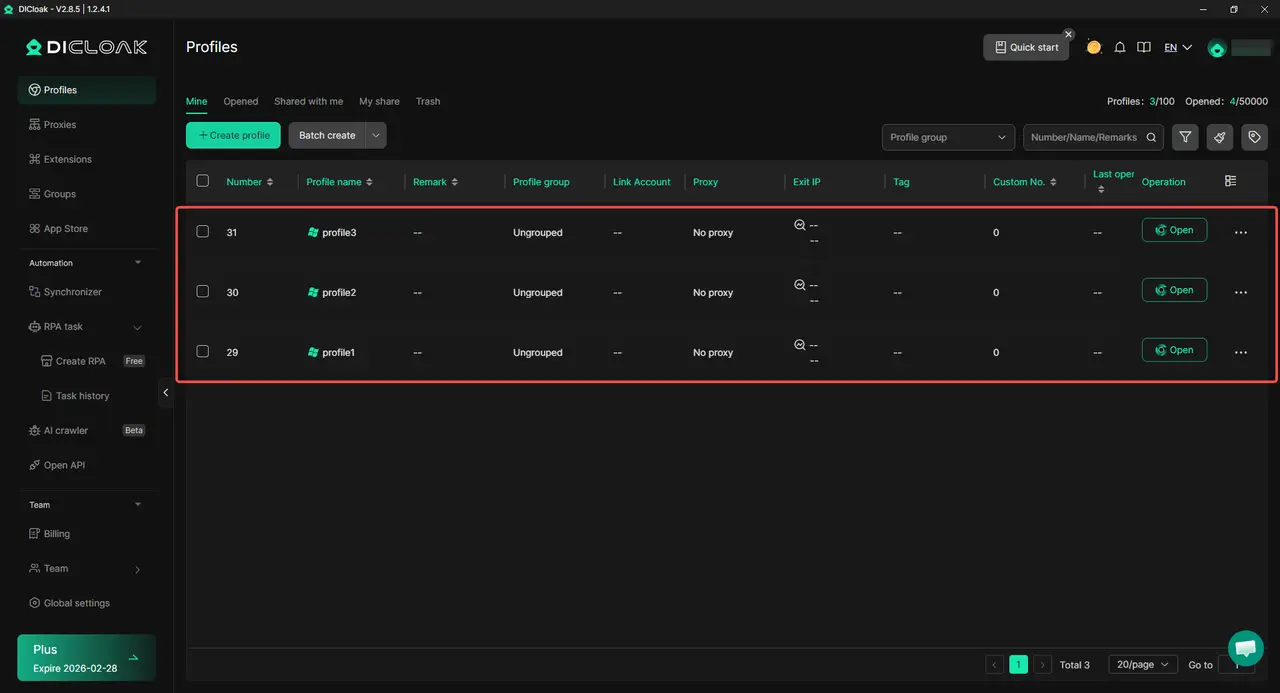
To improve this workflow, many professionals choose to run their YouTube short downloader tasks inside isolated browser profiles provided by the DICloak Antidetect Browser.
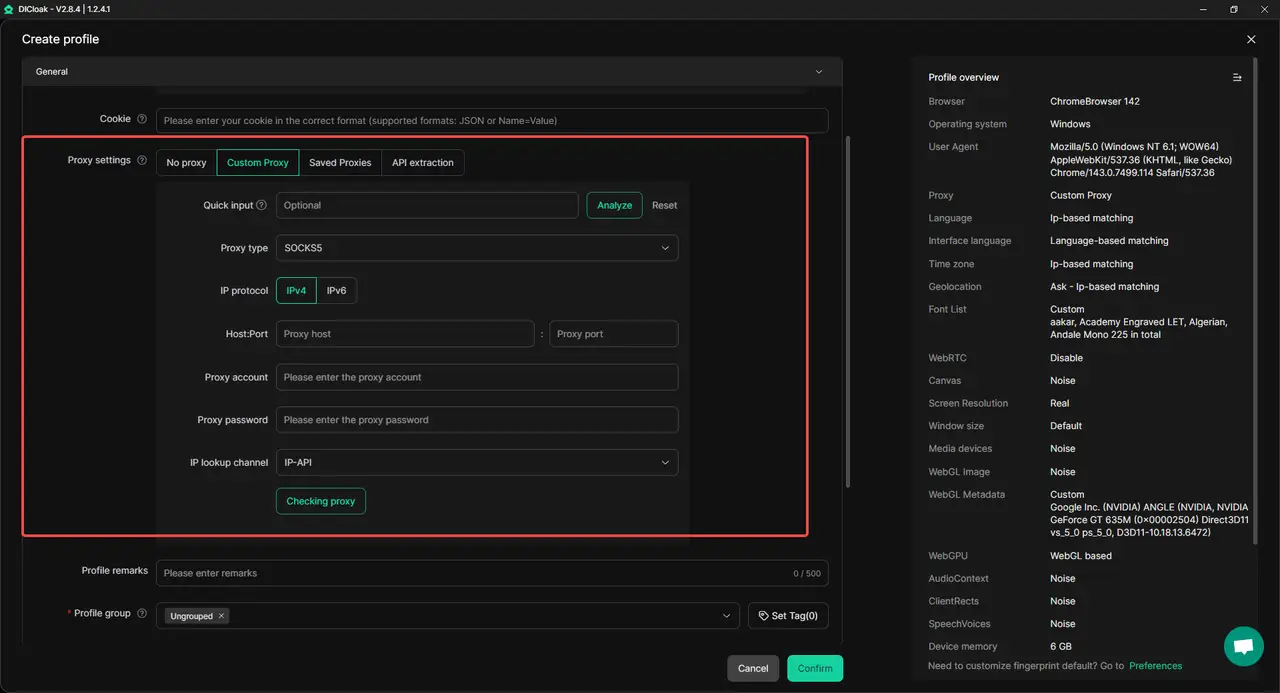
Instead of opening many tabs in one browser window, each download task can run inside a separate profile. Every profile has its own cookies, user agent, time zone, and proxy settings. This means downloading Shorts, switching accounts, or testing different tools can happen without sessions mixing together.
Safer Multi-Profile Browsing for YouTube Shorts
When working with multiple YouTube accounts, separation is important. Logging in and out of accounts in a normal browser often causes warnings or unexpected restrictions.
With isolated browser profiles, each YouTube account used for Shorts downloading stays independent. For example, one profile can be used to collect Shorts for research, while another handles content editing or brand work. This keeps activities clean and reduces the chance of accounts being linked.
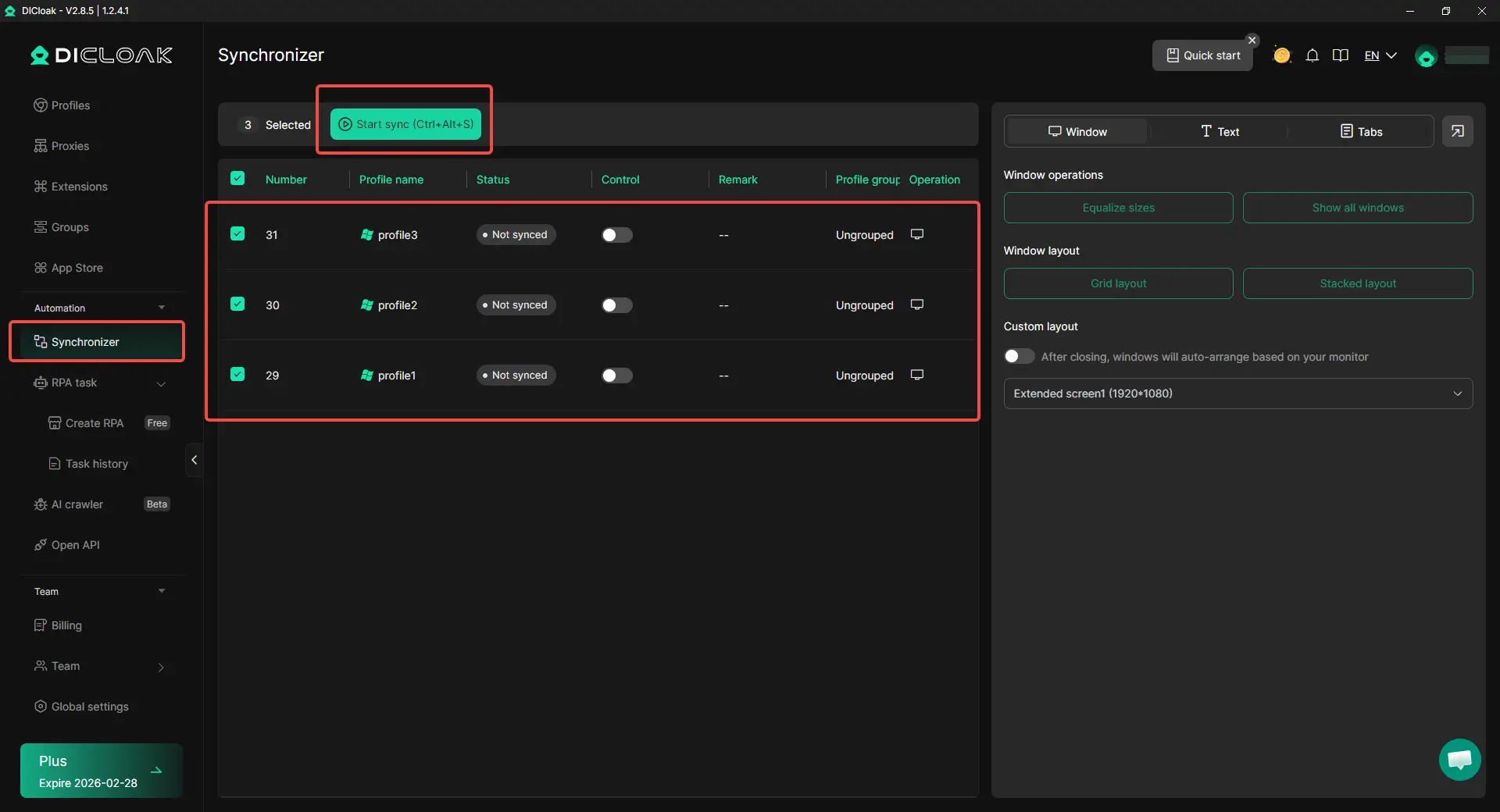
Faster Batch Actions with Synchronizer
For users who download many Shorts every day, repetitive steps can slow things down. Opening links, pasting URLs, and clicking download again and again takes time.
Using DICloak’s Synchronizer feature, the same action can be performed across multiple browser profiles at once. For example, several YouTube Shorts links can be opened in different profiles, pasted into a youtube short downloader simultaneously, and downloaded together. This turns manual repetition into a fast, coordinated process.
Many platforms track more than IP addresses. Device fingerprints, cookies, and browser behavior are also monitored.
By keeping each browser profile fully isolated, Shorts downloading activities do not affect other browsing sessions. This is useful when mixing research, downloading, and account management tasks on the same machine. Each profile behaves like a separate device, which helps keep workflows stable and predictable.
Better Organization for Team or Project Work
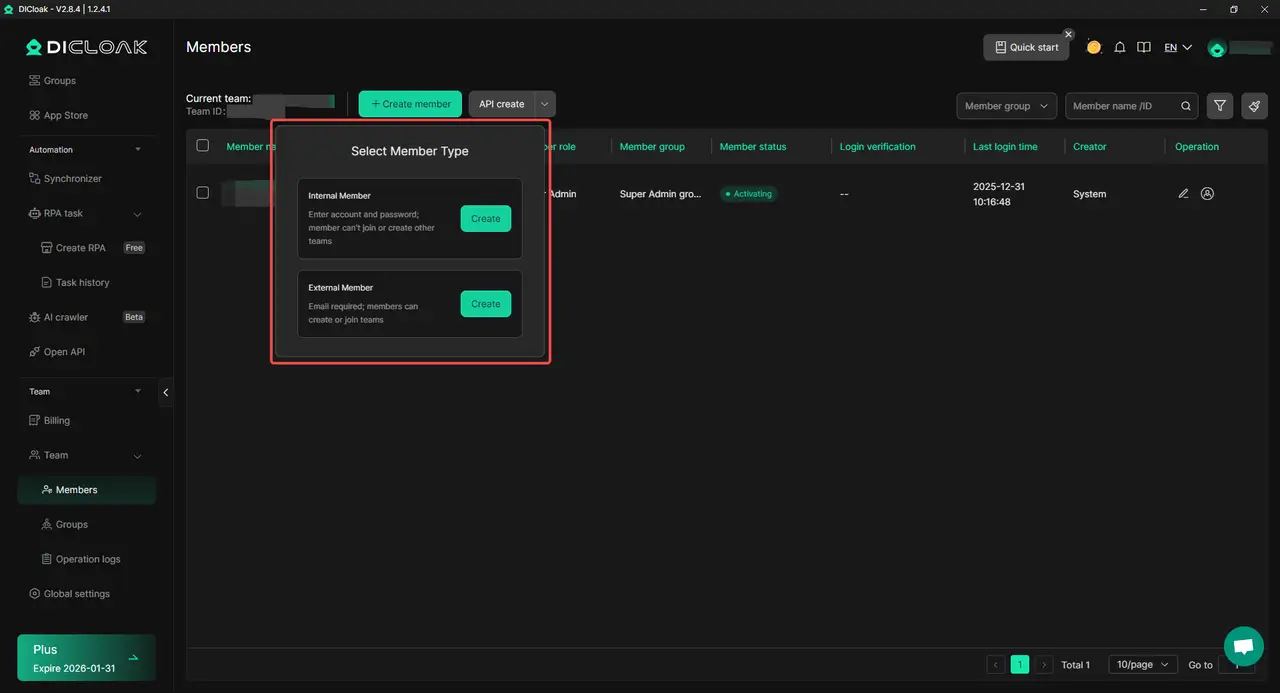
In team environments, downloaded Shorts are often part of a larger content pipeline. Research, editing, and publishing may be handled by different people.
With role-based access and shared profiles, work can be divided clearly. One person gathers Shorts using a youtube shorts downloader, while another edits or reviews content in a separate profile. Login details remain protected, and session data does not leak between users.
Practical Value in Daily Use
When paired with a YouTube Shorts downloader, this setup offers clear benefits:
- Faster handling of multiple download tasks
- Cleaner separation between accounts and projects
- Reduced risk from mixed sessions
- More control over automation and organization
For users who download Shorts only once in a while, a regular browser may be enough. But for creators, marketers, or teams working with Shorts at scale, adding structured browser profiles can make the entire process smoother and safer.
Conclusion
A youtube short downloader gives users more control over YouTube Shorts. It makes it easy to save videos for offline viewing, learning, or creative use. With the right steps, anyone can download shorts quickly on desktop or mobile devices.
Choosing a reliable tool is important. Support for MP4, clear quality options, and strong privacy protection all help ensure a smooth experience. Simple habits like checking audio sync and organizing files can also improve results.
For users who download Shorts often, keeping workflows clean and organized saves time and reduces risk. When used properly, a youtube short downloader turns short videos into flexible content that is easy to manage and reuse.
Frequently Asked Questions (FAQs)
Is it safe to use a youtube short downloader?
In most cases, a youtube short downloader is safe if you choose a reliable tool. A trustworthy downloader only asks for the video link and does not require account login or extra permissions. To stay safe, avoid sites with aggressive pop-ups, forced downloads, or requests to sign in with your Google account.
Can I download YouTube Shorts without installing any software?
Yes. Many people use an online youtube short downloader that works directly in a web browser. These tools let you paste a Shorts link and download the video without installing apps or extensions. This option is popular because it is fast and works on both desktop and mobile devices.
What video quality should I choose when using a youtube short downloader?
Most users should choose HD, such as 720p or higher, when using a youtube short downloader. HD keeps text and details clear, especially on larger screens. If you only need quick viewing and want smaller file sizes, SD may be enough, but quality will be lower.
Why does my youtube short downloader fail to download some videos?
A youtube short downloader may fail for several reasons. The video could be private, restricted by region, or temporarily unavailable. Sometimes the tool itself is outdated. If a download fails, try refreshing the page, checking the link, or using another reliable downloader.
Can I legally reuse videos downloaded with a youtube short downloader?
Downloading a video does not change ownership. A youtube short downloader should be used mainly for personal viewing, learning, or inspiration. If you plan to re-upload or publicly share a Short, you should get permission from the original creator. Creators can safely download and reuse their own Shorts through YouTube Studio.
 Web Proxy Tools
 Free Tools
 Cookie Plugin
 UA Generator
 MAC Address Generator
 IP Generator
 IP Address List
 2FA Code Generator
 World Clock
 Anonymous Check
 WebRTC Leak Test
 UUID Generator
 Free Web Proxy Site
 Proxy Checker
 FB Ad Checker
 AI Web Scraping
 Free SMM Tools
 Twitter Shadowban Checker
 Instagram Name Checker
 UTM Generator
 Username Generator
 AI Hashtag Generator
 LinkedIn Headline Generator
 Social Media Image Resizer