You are trying to sign in to Etsy, open Shop Manager, edit a listing, browse a product, or complete checkout. Instead, Etsy suddenly shows a vague message such as Etsy An Error Has Occurred Please Try Again.
Etsy An Error Has Occurred is a general technical message. It does not reveal one exact cause or automatically mean your account has been suspended or flagged. The issue may come from Etsy, your browser, the mobile app, your internet connection, an expired login session, or the action you are trying to complete.
This guide explains what the message means, why it appears, and the correct troubleshooting order. It also covers login, Shop Manager, listing, checkout, and mobile errors, when to contact Etsy Support, and how sellers can organize separate shop sessions.
What Does “Etsy An Error Has Occurred” Mean?
This broad message may appear when Etsy cannot complete a page request, login session, shop action, payment process, or mobile app operation. It describes a failed action, not one confirmed cause.
Where and when it appears provides the first clue.
Where the Etsy Error Usually Appears
The message can appear while signing in, opening Shop Manager, creating or editing a listing, uploading photos, saving shop settings, opening a product or shop page, adding an item to the cart, completing checkout, using the mobile app, or signing in through Google, Facebook, or Apple. Etsy supports these connected sign-in methods, so a failure may occur during either Etsy’s process or the provider’s sign-in step.
The location of the error helps narrow the possibilities. A login error may involve the current session or account verification. A checkout error may involve payment, billing, or shipping information; Etsy’s checkout guidance tells users to review their billing and shipping details when an order error appears. An error limited to the mobile app may instead involve the app version or local app data.
Does This Error Mean Your Etsy Account Is Suspended?
No. The generic error message alone does not prove that an Etsy account has been suspended, flagged, or restricted.
An account-specific restriction is more likely when you also see a clear warning, an identity or account verification request, an email from Etsy, missing access to Shop Manager or seller features, or a login problem that follows the account across different browsers and devices.
Etsy says suspended users will usually receive an email explaining the issue, while sellers may also see a notice in Shop Manager. Still, those signs must be considered together. A browser error, mobile app problem, temporary outage, or expired session can produce a similar message without proving an account penalty. The generic message is therefore not enough to determine the account’s status.
Why Does the “Etsy An Error Has Occurred Please Try Again” Message Appear?
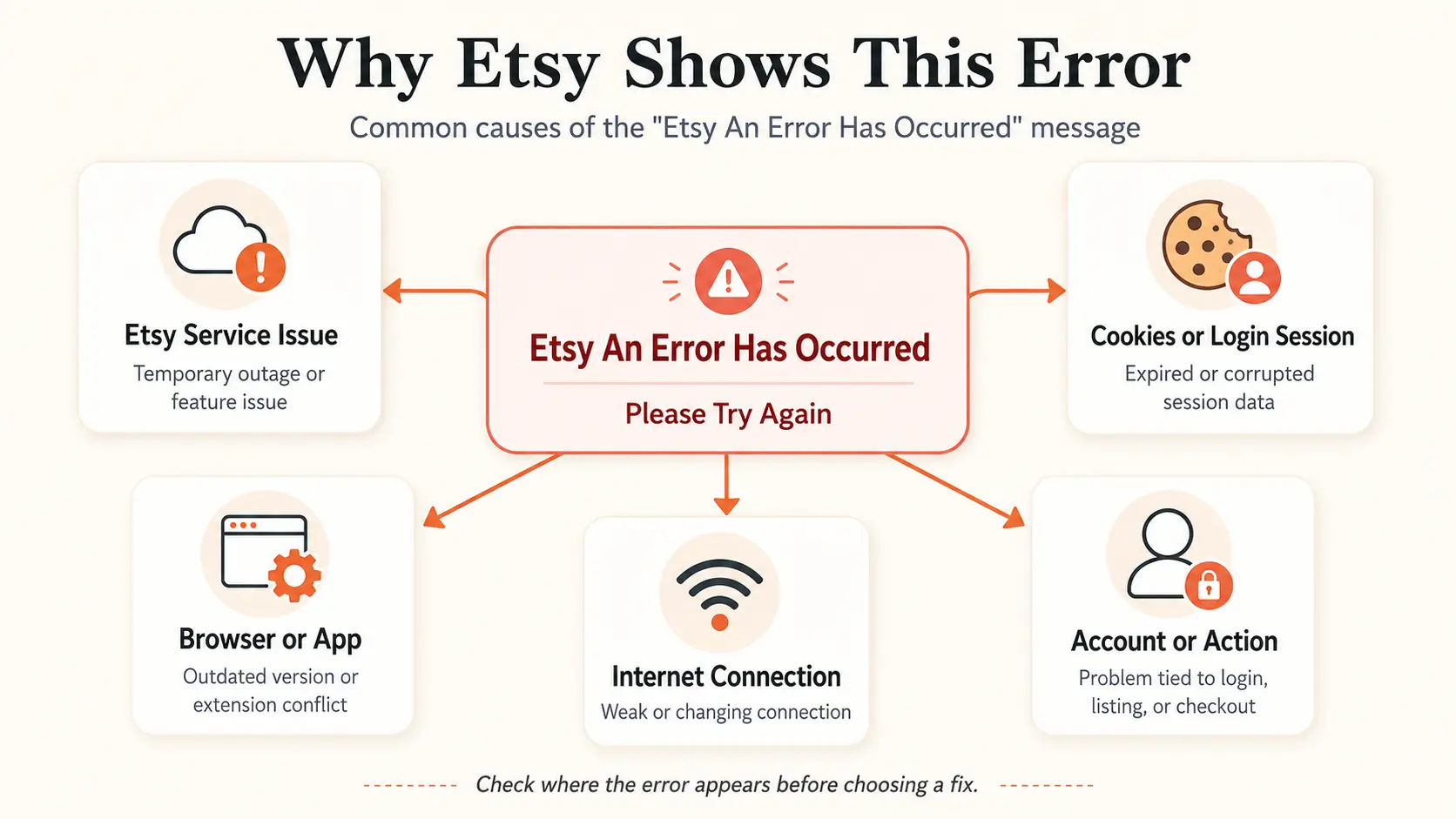
The message can appear because of a temporary Etsy service issue, damaged browser data, an expired login session, an outdated browser or app, an extension conflict, an unstable connection, or a problem with the specific action being performed. It does not identify which cause is responsible. The best clues are where the error appears and whether it affects one browser, one device, one account, or many Etsy users. This section explains possible causes only.
A Temporary Etsy Service or Request Failure
Some errors can begin on Etsy’s side rather than on your device. A temporary outage, maintenance period, heavy traffic, or failed page request may stop Etsy from completing an action.
The problem could affect the whole site or only one feature, such as Shop Manager, checkout, listings, or sign-in. Other pages may continue to load normally. Etsy’s troubleshooting guidance directs users to its status page for suspected site-wide outages and to the Technical Issues forum for known feature problems. However, a vague message does not confirm that Etsy’s systems are responsible.
Expired or Corrupted Cookies and Login Sessions
Browser session data may be involved when Etsy works normally until you sign in. Etsy uses cookies and local browser data to maintain login sessions and site preferences.
Possible signs include an error in only one browser, repeated redirects, Shop Manager failing to load, or Etsy asking you to sign in again. The problem may also begin after browser data, privacy settings, or stored login information changes.
An expired or damaged session may prevent Etsy from completing a request correctly. However, the same symptoms can have other causes, so cookies are not always the explanation.
Outdated Browsers, Apps, or Conflicting Extensions
An outdated browser, Etsy app, Etsy Seller app, or mobile operating system can cause compatibility problems. Etsy recommends using a current browser and the latest app version because updates may resolve technical issues.
Browser extensions can also change how a page loads. Ad blockers, privacy tools, script blockers, coupon extensions, security tools, or add-ons that affect cookies and network requests may interfere with part of Etsy.
An extension conflict becomes more likely when Etsy works in another browser or a test environment without the same add-ons. Still, not every extension causes problems, and the message cannot identify a specific one.
An Unstable or Frequently Changing Internet Connection
An unstable connection can interrupt Etsy while a page, login, listing update, or payment request is processing. Weak Wi-Fi, slow service, unreliable public networks, or switching between Wi-Fi and mobile data may cause a request to fail.
A network cause is more likely when the problem appears during connection changes or when other websites are also slow or unavailable. If Etsy is the only site affected on a stable connection, the issue may come from the browser, app, account, or Etsy itself.
Account- or Action-Specific Issues
The same general message can point to different causes depending on the action. A sign-in error may involve credentials, session verification, a security code, or an account confirmation request. Etsy supports sign-in through Google, Facebook, and Apple, so a connected login problem may involve either service.
A Shop Manager error may affect seller tools or one shop feature. A listing error may involve required information, an unsupported image type, an upload timeout, or a failed save request. A checkout error may involve billing details, shipping information, payment authentication, or the payment provider. A mobile error may affect only the app while Etsy.com still works.
An account-specific problem becomes more likely when the same error follows one account across different browsers, devices, and stable networks. Even then, the message alone does not confirm the cause.
How to Fix “Etsy An Error Has Occurred” Step by Step
Test one possible cause at a time, starting with Etsy’s service status before changing browser or account data. Follow the steps in order and retry the same page or action after each one. Stop when Etsy works again, and avoid changing several settings at once.
Check Whether Etsy Is Down
Start by checking whether the problem affects Etsy rather than your device. Review the official Etsy server status, open Etsy’s Technical Issues Forum, and look for similar reports from other users.
A status-page incident suggests an Etsy-side problem. Several similar forum reports may point to an issue with one feature. A problem limited to one browser, device, or account is less likely to be a full outage.
When asking Is Etsy down, wait before changing browser settings if an outage is confirmed. Save listing text outside Etsy and take screenshots of failed shop actions. Check whether a transaction succeeded before trying again. Do not repeatedly click payment, publish, or save buttons.
Reload Etsy or Restart the App
Reload the affected page once. On Etsy.com, close duplicate Etsy tabs, reopen the page, and restart the browser if it remains stuck.
On the Etsy or Etsy Seller app, force-close the app and open it again. Restart the phone if the app is still unresponsive.
Before repeating an action, check whether the order, payment, message, listing, or shop change already went through. Do not submit the same action several times.
Update the Etsy App and Your Browser
Install the latest Etsy or Etsy Seller app through the official app store. Also install the latest stable browser version, then restart the app or browser.
If the app no longer works correctly on an older phone, check for an operating-system update. If Etsy works after updating, the issue was likely related to compatibility or an outdated version. If the error remains, continue to the next step.
Try Another Browser or Device
Use another browser or device as a diagnostic test. Open the same Etsy page in another current browser, repeat the action on another trusted device, or use Etsy.com in a mobile browser when the app fails.
The result helps narrow the cause:
- If Etsy works in another browser, the original browser’s cookies, cache, settings, or extensions may be involved.
- If it works on another device, the first device or app may be involved.
- If the same account fails everywhere, the issue may relate to the account or action.
- If many users are affected, check Etsy’s status again.
Disable Browser Extensions Temporarily
Test likely browser extensions one at a time. Start with ad blockers, privacy extensions, script blockers, coupon tools, security extensions, and add-ons that change cookies, scripts, or network requests.
Disable one extension, reload Etsy, and repeat the action. Re-enable it if nothing changes, then test the next extension. This helps identify a conflict without removing useful tools. Not every extension interferes with Etsy.
Clear Etsy-Related Cookies and Cache
Only clear Etsy cache and cookies after testing another browser and likely extensions. Removing site data may sign you out and delete a working session.
Clear Etsy-specific site data first instead of deleting all browser history and cookies. Before doing so, save important listing text and confirm that you can sign in again.
After clearing the data:
- Close and reopen the browser.
- Return to Etsy.
- Sign in again.
- Test the affected page or action.
A new login alert or verification request may appear after the saved session is removed.
Check Your Internet Connection
Open another reliable website to see whether other sites are also slow or failing. Restart your router when using home Wi-Fi, or test another trusted connection. You can also compare Wi-Fi with mobile data.
Avoid unstable public Wi-Fi during login, checkout, or listing changes. Do not switch networks while a payment or shop update is processing.
If Etsy is the only site failing on a stable connection, the network may not be the main cause.
Sign In Again and Check Verification Messages
Sign out and back in only after testing browser and connection problems. Before signing out, make sure you can access your account credentials and any required security codes.
After signing in, check Etsy notifications, your inbox, spam and junk folders, recent sign-in alerts, verification requests, and payment or billing notices.
If the same account still fails across current browsers, trusted devices, and stable networks, move to action-specific troubleshooting or Etsy Support.
If these general steps do not work, the next section provides targeted fixes for login, Shop Manager, listings, checkout, and mobile use.
Fix the Etsy Error Based on Where It Appears
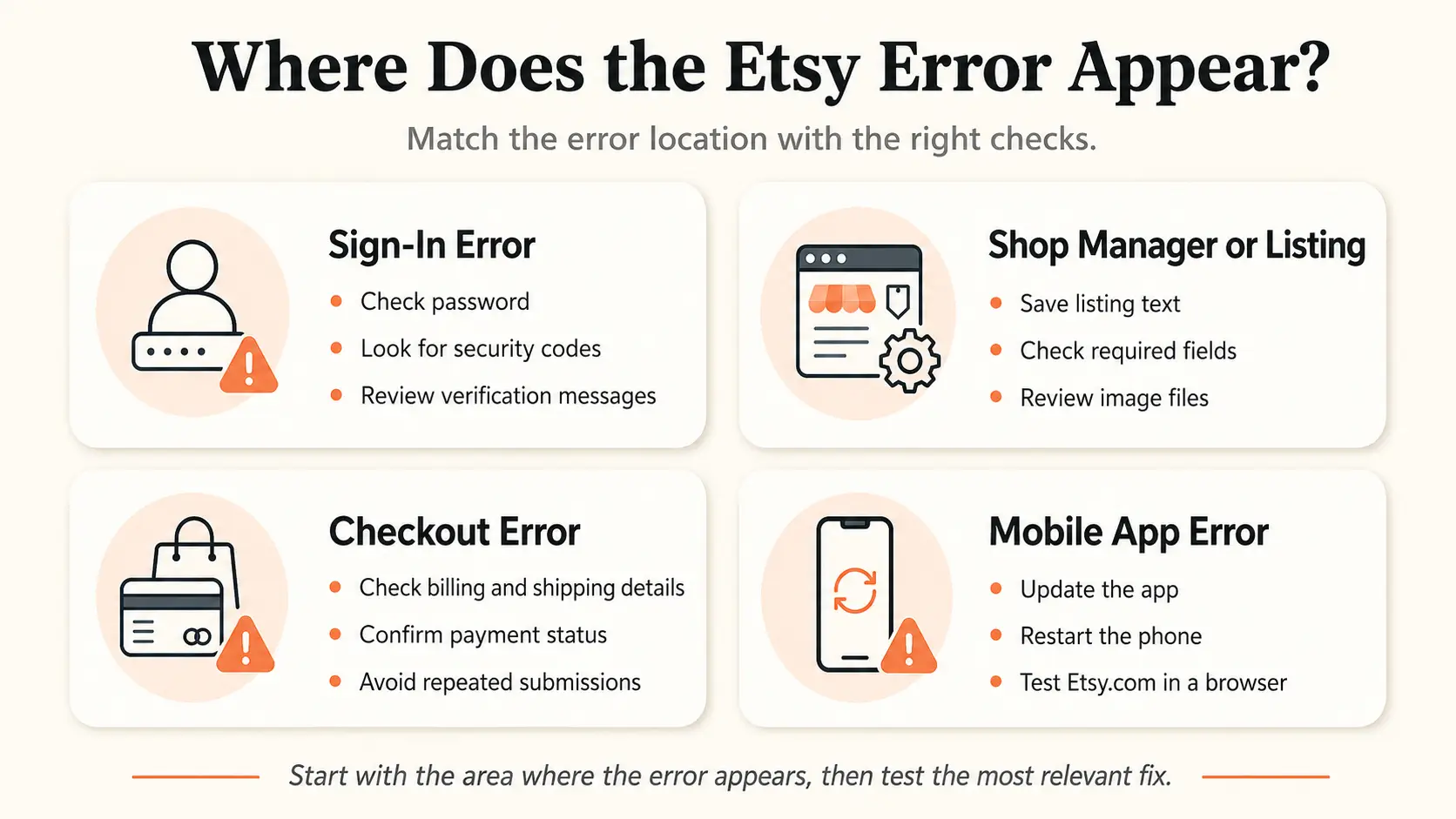
If the general troubleshooting steps did not work, focus on the exact action that triggers the message. Login, Shop Manager, listing, checkout, and mobile errors each require different checks.
Etsy Shows an Error When You Sign In
A sign-in error should be treated as a login, verification, or account-access issue after general browser problems have been ruled out.
For an Etsy login error, check that you entered the correct email address and that saved autofill details are not outdated. Reset the password when needed. Etsy password resets must be completed through Etsy.com rather than the Etsy or Etsy Seller app.
Check your inbox, spam, and junk folders for a security code. If two-factor authentication blocks access, use an available one-time backup code. Etsy currently supports sign-in through Google, Facebook, and Apple. When a connected method fails, Etsy recommends disconnecting and reconnecting that account through its supported process.
A clear notice that Etsy has limited account access is different from a generic technical message. If the account still cannot sign in through several current browsers and trusted devices, move to Etsy Support.
Etsy Shop Manager or Listing Errors
When the error appears only in seller tools, protect the listing data first and then check the exact field or file involved.
For an Etsy Shop Manager error or Etsy listing error, copy unsaved titles, descriptions, tags, and other text before refreshing. Confirm that required listing information is complete, including the category, price, quantity, variations, shipping details, and production information.
If a photo fails to upload, try a smaller or compressed file. Etsy notes that large image files may time out, especially on slower connections. Test whether the issue affects one listing or every listing.
When a listing appears missing, check its status in Shop Manager. It may be inactive, expired, sold out, or removed. Review Etsy emails if a listing was removed or made inactive. A missing listing is not always a browser problem and may have a separate listing-status or policy explanation. Check Etsy’s Technical Issues Forum when several seller tools fail together.
Etsy Checkout and Payment Errors
A checkout error requires you to verify the order and payment information before repeating the transaction.
For an Etsy checkout error, review the billing and shipping addresses. Confirm the card number, expiration date, security information, and any saved payment details. Complete any authentication request from the card issuer.
Check Purchases and your email before trying again. The checkout may have failed, the card may have been declined, the order may still be processing, or the transaction may have succeeded without the page refreshing. Do not click the payment button repeatedly.
Contact your bank or card issuer when it declines the transaction. Contact PayPal Support when the failure occurs through PayPal. You can try another payment method when one is available. If the billing and shipping information is correct but checkout still fails, contact Etsy Support.
Etsy App Errors on Mobile
If Etsy works in a browser but not in the mobile app, the problem is more likely limited to the app, phone, or mobile connection.
For an Etsy app error, first confirm whether the problem affects the Etsy shopping app, Etsy Seller app, or both. Force-close and reopen the affected app. Install the latest version from the official app store, then restart the phone.
Clear the app cache where your operating system supports it. Check that the phone has enough storage and that the app has permission to access photos when uploads fail. Test Etsy.com in the phone’s browser and compare Wi-Fi with mobile data.
Reinstall the app only after simpler steps fail. Reinstallation may remove local data and require you to sign in and verify the account again. If both the app and mobile browser fail for the same account, the issue may not be limited to the app.
Contact Etsy Support when the problem follows the same account across browsers, devices, and stable connections, or when Etsy displays a specific account notice.
When Should You Contact Etsy Support?
Contact Etsy Support when the problem continues after browser, app, connection, and action-specific checks, especially when it follows the same account across several devices or Etsy displays a specific account notice. Support may not be necessary during a confirmed platform-wide outage.
Signs the Problem May Be Account-Specific
The issue is more likely to require Etsy Support when it follows the account rather than one browser, device, or network.
Look for these signs:
- The same account fails in several current browsers.
- The problem continues on trusted devices and stable connections.
- Other Etsy accounts work on the same browser or device.
- You cannot access Shop Manager or a seller feature.
- Etsy requests identity, account, tax, payment, or security verification.
- You receive a suspension, restriction, or policy email.
- A banner or specific warning appears in Shop Manager.
- A listing or shop action remains unavailable without a clear technical cause.
- Checkout still fails after you confirm the billing, shipping, and payment details.
Etsy says suspended sellers may receive an email explaining the issue or see a banner in their Shop Manager Dashboard. A specific notice is more useful than a generic error when identifying an account-related problem.
What Information to Include in Your Support Request
A detailed report helps Etsy understand what happened and prevents unnecessary back-and-forth.
Include the exact error message, affected page, action you were attempting, and the approximate date and time. State whether you used Etsy.com, the Etsy app, or the Etsy Seller app. Add your browser or app version, device, operating system, and whether the problem also appears on other browsers, devices, or networks.
List the troubleshooting steps already attempted. Include relevant shop, listing, order, or transaction details. Attach a clear screenshot or short screen recording when it helps show the problem.
Cover or remove sensitive details from images. Never send your password, full card information, two-factor authentication codes, backup codes, or security codes received by email or text.
How to Contact Etsy Through the Official Help Center
Use Etsy’s official Help Center and Contact Support flow rather than phone numbers or support accounts found through search results or social media.
Follow this general process:
- Open Etsy’s official Help Center.
- Sign in when possible.
- Choose the category that best matches the issue.
- Follow the prompts to the available support options.
- Submit your prepared details and screenshots.
The available options may depend on whether you are signed in, the type of issue, your country, and current support availability. Etsy does not provide a general customer-service phone number to call directly. A legitimate phone-support option can only be requested through Etsy’s official Contact Support form. Do not trust phone numbers found in search results, comments, forums, or unsolicited messages.
For suspension or policy issues, follow the instructions in Etsy’s email or Shop Manager notice. If Etsy confirms a permanent suspension, use the official appeal process after addressing the issues described in the notice.
Sellers managing multiple authorized Etsy shops can also reduce session confusion by keeping browser profiles and team access organized.
How DICloak Helps Troubleshoot and Organize Etsy Sessions
A separate browser Profile can help you compare browser profiles when an Etsy error appears in only one browser. The same setup also helps sellers keep several authorized Etsy shop sessions organized.
Test Etsy in a Clean Profile Before Clearing Your Main Browser
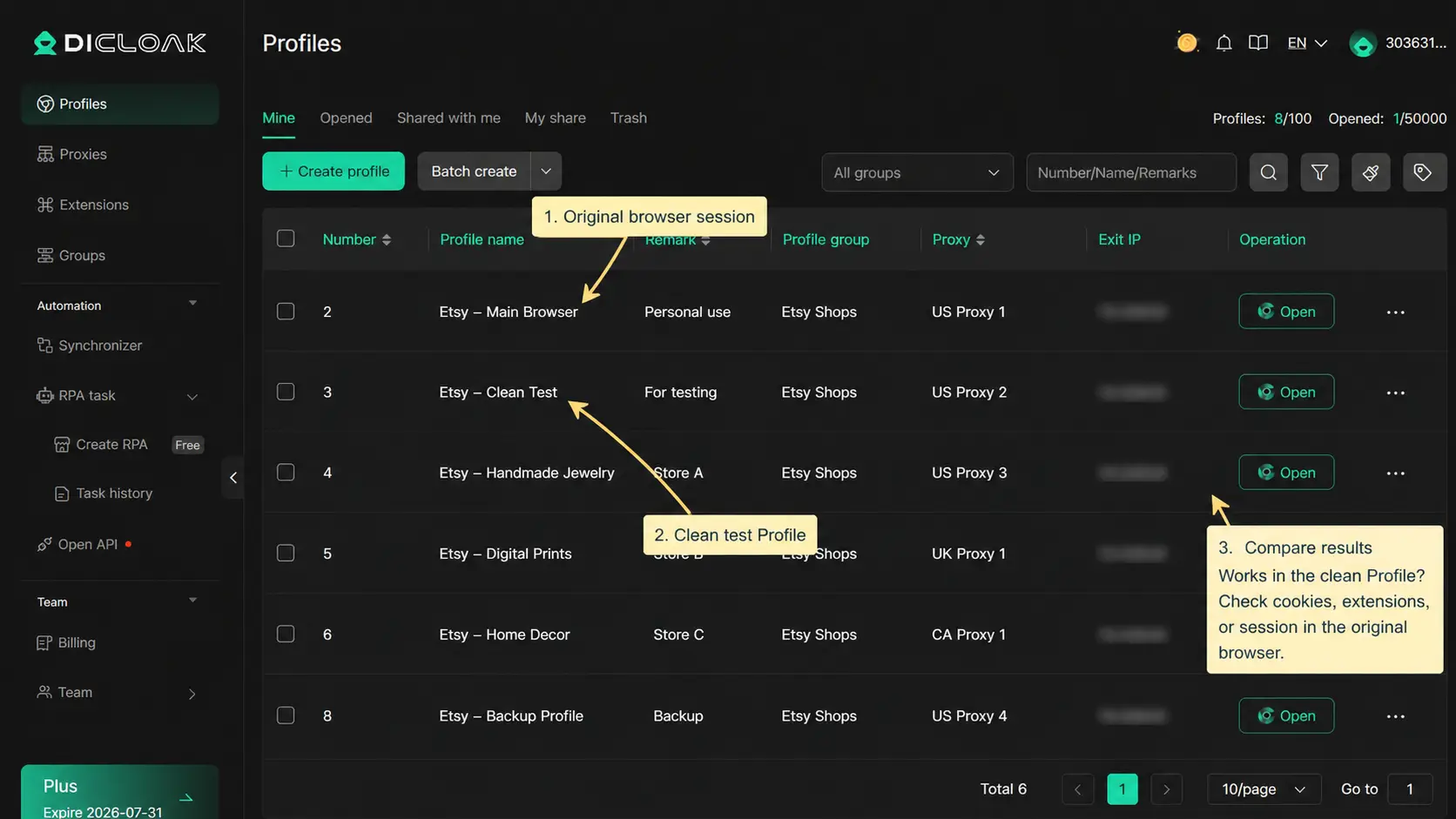
You can use a fresh DICloak Profile to check whether the original browser profile may be involved.
Open Etsy in a clean Profile without importing the original browser’s cookies, extensions, or saved session. Then test the same page or action.
If Etsy works in the clean Profile, the original browser’s stored data, extensions, or login session may be contributing to the problem. You can then focus on that browser instead of clearing everything immediately.
If the same error remains, you can continue checking Etsy’s status, account notices, network, or the specific action being performed. This gives you another test environment before removing useful login data from your main browser.
Keep Each Etsy Shop in Its Own Saved Profile
You can keep each authorized Etsy shop in a separate DICloak Profile.
Each Profile can retain its own cookies, login session, and local browser data. You can also use Profile names and notes to identify the shop, region, or owner.This makes it easier to return to the correct shop without signing out of one account and signing in to another.
Separate Profiles also reduce the chance of opening the wrong shop or mixing cookies from different Etsy accounts in one browser session. When one shop has a browser-related issue, you can troubleshoot that Profile without affecting every other saved shop session.
You can organize Profiles by shop, brand, region, or owner. A clear naming format could be: Etsy – Shop Name – Region – Owner
Give Team Members Access to the Correct Etsy Shop Profile
You can assign each Etsy Profile only to the team members responsible for that shop.
You can assign specific Profiles to specific members, set member permissions, and share access to an existing saved Profile. You can also limit each person to the Profiles they need, review operation logs, and remove access when responsibilities change.
This helps reduce wrong-shop access and avoids giving every team member access to every shop. Responsibilities are easier to review because each person works only with the Profiles assigned to them.
It also makes staff handoffs more organized. A new team member can receive access to the correct saved shop Profile without repeated login and credential handoffs across the whole team.
The shop owner remains responsible for account activity, so Profile access should be limited to authorized team members.

FAQ about etsy an error has occurred
Can I Fix the Etsy Error Without Clearing My Cache?
Yes. First check whether Etsy is down, refresh the affected page, restart or update the app, test another browser, and disable likely extensions. Clear Etsy-related site data only if those checks fail. Clearing it signs you out and may trigger another login or account verification step.
Why Does the Error Only Happen on My Phone?
A phone-only error may involve an outdated Etsy or Etsy Seller app, damaged app data, missing permissions, low storage, the mobile connection, or an app-specific problem. Test Etsy.com in your phone’s browser. If the website works but the app does not, the issue is more likely limited to the app.
Does “Etsy An Error Has Occurred” Mean My Account Is Flagged?
No, not by itself. A generic error does not confirm that Etsy has suspended, flagged, or restricted your account. Look for a specific Etsy email, Shop Manager notice, verification request, missing account access, or clear suspension or policy message. Without one of these signs, the error alone cannot confirm your account status.
What Should I Do If the Error Appears During Checkout?
Check your billing address, shipping address, and payment details. Confirm whether the order already succeeded and complete any authentication request from your bank. Contact the payment provider if the transaction was declined. Do not click the payment button repeatedly. Contact Etsy Support if all details are correct but checkout still fails.
Keep each authorized Etsy shop in its own browser session, and give team members access only to the shops they manage. You can use separate DICloak Profiles to keep sessions and responsibilities easier to organize; Try DICloak for Free.
 Web Proxy Tools
 Free Tools
 Cookie Plugin
 UA Generator
 MAC Address Generator
 IP Generator
 IP Address List
 2FA Code Generator
 World Clock
 Anonymous Check
 WebRTC Leak Test
 UUID Generator
 Free Web Proxy Site
 Proxy Checker
 FB Ad Checker
 AI Web Scraping
 Free SMM Tools
 Twitter Shadowban Checker
 Instagram Name Checker
 UTM Generator
 Username Generator
 AI Hashtag Generator
 LinkedIn Headline Generator
 Social Media Image Resizer