What are Aged Discord Accounts?
An aged Discord account is simply a Discord account that was created a long time ago and has some activity history. Instead of being brand new, the account may be several months or even years old. In online communities, older accounts often appear more trustworthy because they have existed on the platform longer and may have a record of normal activity. This is one reason why some people search for ways to buy Discord accounts that are already aged rather than creating a new one from scratch.
Importance of Aged Accounts in the Discord Community
In the last section, we explained what an aged Discord account is. Now here is why it matters inside real servers. Many Discord communities fight spam every day. So moderators often use bots and rules that slow down new accounts. Some servers limit chatting, linking, or DMs until an account is older or has verified steps. That helps protect members from scams and mass-made accounts.
This is why some people try to buy Discord accounts instead of waiting. For example, a community manager joining a partner server may get blocked from posting in key channels if the account is too new. An older account can sometimes pass those new user gates faster and look less suspicious to automated checks.
Benefits of Using Aged Discord Accounts
Since many servers use anti-spam rules and verification checks, aged accounts can bring practical benefits in day-to-day Discord use.
- Smoother entry into strict servers: Some communities block or limit brand-new accounts to reduce raids and spam. An older account may be less likely to get stopped at the door.
- Fewer new account limits after joining: Servers can require extra steps before members can message. These settings exist to slow down bots and spam. Older accounts sometimes face fewer delays in real use.
- More stable trust signals over time: In many online platforms, account age and activity history may influence how trust or safety checks are applied. That makes “account history” a meaningful concept on the platform.
- A clearer line between “aged” and “free” accounts: People may search buy Discord accounts to save time. Some also search buy free Discord accounts, but free accounts are often shared or recycled, which can lead to sudden lockouts or recovery issues.
Is It Safe to Buy Multiple Aged Discord Account?
In the previous sections, we explained why aged accounts are valuable in many Discord communities. However, an important question remains: is it actually safe to buy Discord accounts, especially when you need multiple aged ones? The answer is not simple. While some users look for ways to buy Discord accounts to save time or bypass new-account limits, there are real risks related to security, platform rules, and account ownership.
Security Concerns and Account Safety
The biggest risk when you buy Discord accounts is security. When someone else created the account, they may still control important recovery details such as the original email or phone number. If they keep access to those details, they can reset the password and take the account back at any time. This is known as an account recovery attack.
For example, some buyers report losing accounts weeks after purchase. The seller simply recovers the account using the original email. The buyer loses both the account and the money. In addition, accounts that suddenly log in from new locations or devices may trigger Discord’s security systems, which can lead to account locks or verification checks.
This is also why searching for buy Discord accounts free can be risky. Free accounts are often recycled, shared, or created by automated scripts. These accounts are more likely to be flagged by moderation systems or banned quickly.
Legal and Ethical Implications
Another issue is that buying or selling accounts can violate Discord’s official rules. Discord’s Terms of Service clearly state that users cannot sell, license, or transfer their accounts without written approval.
Because of this rule, accounts that change ownership may be suspended or permanently banned if the platform detects the transfer.
From an ethical point of view, many communities also discourage account trading. Server moderators often view purchased accounts as suspicious, especially if they appear suddenly with little real interaction history.
Potential for Account Recovery Attacks
A common problem with purchased accounts is the recovery loophole. Even if a seller gives you the login credentials, they may still keep the original recovery email or backup codes.
Here is a simple example:
- A buyer pays for an aged account that is two years old.
- The account works normally for several days.
- The original owner then submits a password recovery request.
- Discord sends the reset link to the original email owner.
- The seller regains control of the account.
This situation happens because the original creator often has the strongest proof of ownership. As a result, the buyer may have no way to reclaim the account.
In short, while some users try to buy Discord accounts to gain faster access to communities, the practice comes with serious risks. Understanding these dangers is important before making any decision. In the next section, we will look at practical tips that can help reduce these risks if someone still decides to purchase an aged Discord account.
How can I Reduce Risks when Buying Aged Discord Accounts?
If you decide to buy aged Discord accounts, it is important to follow safer practices and understand the possible consequences.
Check Ownership and Account Details Carefully
Before you buy Discord accounts, check whether the seller truly controls the account. The most important detail is the email address linked to the account. If the seller keeps access to the original email, they can recover the account later and take it back. This is one of the most common problems in account trading.
Avoid Extremely Cheap Accounts
You may see offers that claim you can buy Discord accounts free or at very low prices. In reality, these accounts are often shared, inactive, or created by automated tools. Such accounts can be flagged quickly by security systems or banned by servers that detect suspicious behavior. For example, many spam campaigns use large batches of cheap accounts to send mass messages. When moderators notice these patterns, they often block or report the accounts immediately.
Understand Platform Rules Before Buying
Another important step is learning the platform rules. Discord’s Terms of Service state that users may not sell, license, or transfer accounts without written permission. Because of this rule, accounts that change ownership may be suspended or permanently banned if the system detects the transfer. Knowing these policies helps users understand the real risks before making any purchase.
Secure the Account Immediately After Access
If you obtain access to an account, the first step should be improving its security. Discord recommends using strong passwords and enabling two-factor authentication (2FA) to protect accounts from compromise. If a buyer logs in and immediately changes the password, email, and security settings, it becomes harder for other people to regain access. While this does not remove all risks, it can reduce the chance of quick account theft.
Start Using the Account Gradually
Another useful practice is to avoid sudden behavior changes. Discord systems monitor things like login locations, device changes, and messaging activity. If an account suddenly joins many servers or sends large numbers of messages, it may trigger security checks or restrictions. Instead, it is safer to use the account slowly at first. For example, start by joining a few servers, chatting normally, and building activity history before doing larger actions.
Market Overview for Aged Discord Accounts
Types of Discord Accounts Being Sold
Not all accounts in the market are the same. Sellers often group accounts into several categories:
- Basic aged accounts – These accounts are simply old accounts that were created months or years ago. Their value mainly comes from account age.
- Verified accounts – These include email-verified or phone-verified accounts. Verification can increase perceived trust and may make the account more valuable.
- Accounts with Nitro or badges – Some accounts include premium subscriptions or rare badges, which can raise the price.
- Community-linked accounts – In some cases, accounts have roles in servers or long chat histories. These can appear more authentic.
Where to Buy Aged Discord Accounts
Aged Discord accounts are sold in many places online. Prices, reliability, and safety can vary widely depending on the seller and the account’s history. People who want to buy Discord accounts usually find them through several types of online platforms:
- Gaming account marketplaces – Some websites sell many types of digital accounts, including Discord profiles. Listings may include details such as account age, badges, or verification status.
- Digital asset trading forums – Online forums sometimes allow users to trade social media accounts directly with each other.
- Private seller groups – Some sellers advertise accounts in small communities or messaging groups.
Here are some platforms you can look for buying aged Discord accounts:
1. Eldorado Marketplace
A large digital marketplace for game assets and online accounts.
- Users can find Discord accounts for sale, including aged accounts.
- Listings usually show account age, verification status, or badges.
- The platform provides buyer protection and dispute support.
2. PlayerUp Account Marketplace
A well-known forum marketplace that allows trading of many digital accounts.
- Sellers post listings for Discord accounts, usernames, or server ownership.
- Buyers can view seller ratings and transaction history.
3. Claimer Username Marketplace
A specialized marketplace focused on rare or “OG” Discord usernames.
- Some accounts are sold mainly because the username is short or unique.
- The platform claims escrow protection and verified sellers.
4. Sebuda Social Media Account Marketplace
A platform designed for buying and selling social media accounts.
- Includes various account types from different platforms.
- Uses escrow systems to reduce fraud risk.
Dubious Sources to Avoid
Some sources carry much higher risk and should be avoided.
- Random social media sellers with no transaction protection
- Accounts sold in bulk at extremely low prices
- Listings that promise “buy Discord accounts free” or nearly free access
These offers are often linked to recycled, stolen, or automated accounts. In many reported cases, the original owner later recovered the account using the original email, leaving the buyer without access.
What Influences the Cost of Aged Accounts
Several factors affect the price:
- Account age – Older accounts are usually more valuable.
- Verification status – Email or phone verification can increase trust.
- Premium features – Accounts with Nitro subscriptions or rare badges may cost more.
- Server roles or activity history – Accounts active in communities may appear more legitimate.
Understanding Market Demand
Demand for aged accounts often comes from marketers, community managers, or users who want to join servers without facing new-account restrictions. Older accounts can appear more credible because they show a longer presence on the platform.
At the same time, the market also attracts risky activity, including scams and account theft. Because account trading may violate Discord policies, users should understand the potential consequences before they decide to buy Discord accounts.
After you buy aged Discord accounts, especially multiple ones, you may need a convenient and professional tool to help you manage the accounts. At this point, you can try anti-detect browser tools like DICloak to help you achieve managing multiple aged Discord accounts better.

Step 1: Proper Browser Fingerprinting
You can use DICloak to create completely isolated profiles where each Discord account has its own unique fingerprint. Discord sees five completely different users on five different devices, even though you are managing everything from one computer.
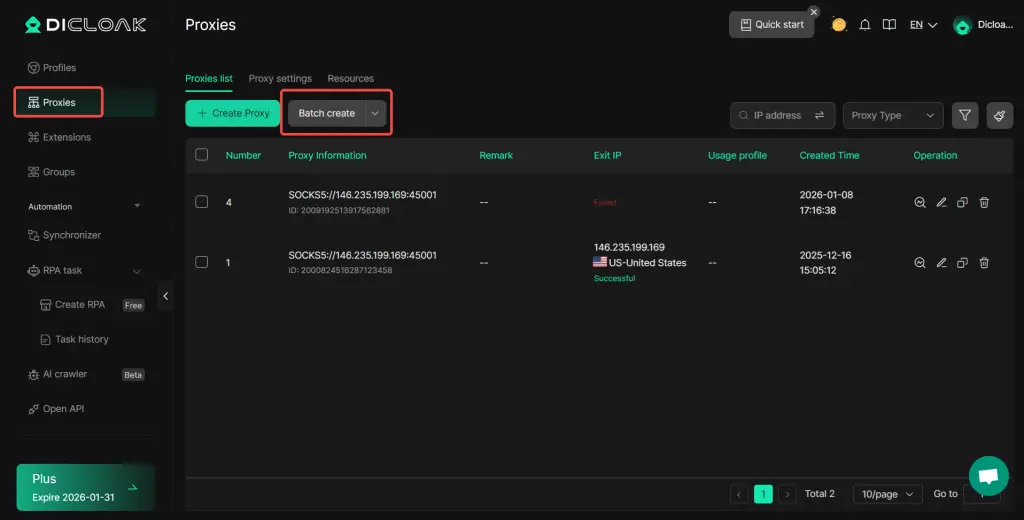
Step 2: Proxy Management (with your own purchased one)
Even with perfect fingerprinting, using the same IP address across multiple accounts links them. You need residential proxies with real ISP addresses that Discord trusts, geographic consistency where proxy location matches your cookies and timezone, dedicated IPs per account, and proxy health monitoring. You can use DICloak to help you manage your purchased proxies. Also, you can check the guide to know how to batch create, import, update, test, delete, and export proxy lists.
Step 3: Use Realistic Activity
If you manage many accounts at once, you can use DICloak’s Synchronizer to help you open the same workflow steps across windows, while still keeping the content and timing human-like per account.
Step 4: Control Credentials
If you are in a team setup, this tool helps you avoid passing passwords around. You can easily manage team accounts by controlling access through profiles and permissions, so operations stay consistent and auditable.
What Can You Do With Aged Discord Accounts?
Join Communities Without New-Account Limits
Many large Discord servers use verification levels and moderation bots to protect members from spam. These systems may restrict brand-new accounts from sending links, posting messages, or using direct messages right away.
An aged account can sometimes pass these checks more easily because it has existed longer on the platform.
For example, a gaming community with thousands of members may require accounts to be several days old before users can chat in public channels. A community manager who buy Discord accounts may be able to participate more quickly compared to starting with a brand-new profile.
Manage Multiple Communities or Projects
Some people run several Discord communities at the same time. These might include gaming groups, NFT communities, study groups, or tech support servers. Using multiple accounts can help separate roles.
For example:
- One account for moderating a community
- One account for customer support
- One account for marketing or announcements
Test Bots, Servers, or Community Features
Developers and server owners often need extra accounts for testing. For instance, when creating a new Discord bot, a developer may want to test how the bot behaves with different users. An aged account can be helpful in these situations because it may avoid the strict limits that apply to very new accounts.
Participate in Marketplace or Community Promotions
Some online communities run events such as giveaways, early product testing, or community promotions. Older accounts may appear more trustworthy in these situations because they have a longer history on the platform. This is another reason some people search for ways to buy Discord accounts instead of creating new ones.
Advanced Tips for Discord Multi-Account Success
- Profile separation is non-negotiable. Never log into multiple Discord accounts in the same browser profile, even with different proxies. Use completely separate Multilogin profiles for each account.
- Do not mix personal and business accounts. Keep personal Discord accounts completely separate from managed business accounts. Log into personal accounts on your regular browser, business accounts exclusively in DICloak profiles.
- Team security protocols. Use DICloak's profile sharing rather than credential sharing, set permission levels for different team roles, monitor profile access logs, and never share the same profile simultaneously.
Conclusion
Aged accounts can help you join strict servers with fewer new account limits, so some people choose to buy Discord accounts. But risks still exist. Sellers may recover the account later, trading may violate Discord rules, and offers like buy Discord accounts free are often unstable.
If you manage multiple accounts, keep them fully separated. You can use DICloak to run each Discord account in its own isolated browser profile, with separate fingerprints and settings. This helps you manage multiple accounts more safely and consistently.
Frequently Asked Questions (FAQs)
Is it legal to buy Discord accounts?
Many users search online to buy Discord accounts, but it is important to understand Discord’s rules first. According to Discord’s Terms of Service, accounts should not be sold or transferred without permission. Because of this, purchased accounts may face suspension if the platform detects ownership changes.
Why do people buy Discord accounts instead of creating new ones?
Some users choose to buy Discord accounts because aged accounts may pass certain server checks faster. Many Discord communities limit new accounts to prevent spam or raids, so older accounts may join conversations or communities with fewer early restrictions.
Is it safe to buy Discord accounts from online marketplaces?
Safety depends on the seller and the account history. When people buy Discord accounts, the biggest risk is that the original owner still controls the recovery email. This means the seller could regain access later. That is why buyers should carefully verify ownership details before making a purchase.
Can I buy Discord accounts free online?
You may see offers that claim you can buy Discord accounts free, but these are often unreliable. Free accounts are usually shared, recycled, or created by automated tools. Because of this, they may be banned quickly or lose access unexpectedly.
How can I manage multiple accounts after I buy Discord accounts?
After you buy Discord accounts, it is important to keep each account separate and secure. Many users manage multiple accounts by using isolated browser profiles and different proxy settings. This helps prevent account linkage and keeps each account running in its own profiles.
 Web Proxy Tools
 Free Tools
 Cookie Plugin
 UA Generator
 MAC Address Generator
 IP Generator
 IP Address List
 2FA Code Generator
 World Clock
 Anonymous Check
 WebRTC Leak Test
 UUID Generator
 Free Web Proxy Site
 Proxy Checker
 FB Ad Checker
 AI Web Scraping
 Free SMM Tools
 Twitter Shadowban Checker
 Instagram Name Checker
 UTM Generator
 Username Generator
 AI Hashtag Generator
 LinkedIn Headline Generator
 Social Media Image Resizer