Scaling a multi-account infrastructure in 2026 is no longer a matter of simple automation scripts; it is an arms race against Google’s advanced security stack. If you are still attempting to manually create accounts for business outreach or account farming, you are facing a massive operational bottleneck. Google’s 2026 security algorithms have moved beyond simple IP checks, utilizing deep-layer behavioral analysis and hardware-level attestation to identify and throttle non-genuine creation patterns.
The search for a "Gmail Creator" in this environment is a search for operational efficiency. The goal is to bypass verification hurdles and avoid immediate "shadow-bans" by mimicking the fingerprint of a legitimate, high-trust user. Success hinges on your ability to manage technical trade-offs—specifically between speed, cost, and the long-term "stickiness" of the account assets you produce.
Why manual Gmail creation is no longer viable for scaling in 2026
Manual creation is statistically inconsistent and technically transparent. In an era where Google monitors the timing of every keystroke and the integrity of the browser profile, a human operator cannot reliably produce accounts at scale without leaving a massive digital footprint.
The friction of Google’s modern verification layers
Google’s 2026 verification layers utilize server-side behavioral analysis to flag "human-speed" entry that lacks the randomness of a genuine user. More importantly, Google now employs Device Attestation protocols. When you create an account manually on a standard desktop, you are often providing a static, easily identifiable hardware signature. Without the ability to rotate device metadata or spoof low-level hardware attributes, you will hit mandatory phone verification or "high-risk" flags before you even reach the inbox.
The risk of footprinting and immediate "shadow-banning"
Footprinting is the primary killer of bulk operations. If you create five accounts on the same machine, Google’s 2026 filters link them via WebRTC leaks, Canvas/WebGL noise, and TLS fingerprints. Even if the accounts are "successfully" created, they are often shadow-banned—restricted in sending capacity or disabled within 48 hours—because they share a common creation signature. Manual cleanup of these fingerprints is impossible at any meaningful scale.
How do automated Gmail creator tools actually work?
Modern automated creators function by simulating the precise actions of a human user within a highly controlled, virtualized environment. They don’t just fill forms; they navigate the signup logic to bypass heuristic detection.
The core technical functions include:
- Form Filling: Using randomized typing speeds to avoid "instant" data entry flags.
- Username Generation: Utilizing dictionary-based strings rather than randomized gibberish to ensure the account handle passes basic spam filters.
- Password Customization: Assigning high-entropy, unique credentials for each asset to prevent cross-account compromise.
Simulating browser fingerprints and behavioral patterns
Advanced creators in 2026 adjust the Document Object Model (DOM) interactions to appear legitimate. This involves matching specific Android 14 builds with corresponding GPU vendor strings—mimicking real-world hardware like the latest Samsung or Pixel models. By rotating through ~30 device models and Android versions (10–15), the software ensures that every creation session presents a unique hardware profile to Google’s telemetry.
Batch processing and data export
The operational value lies in the transition from creation to deployment. These tools allow for batch processing of dozens of accounts simultaneously, each isolated in its own thread. Once created, the assets are exported to a database or CSV, containing the username, password, recovery email, and the specific JSON string of the digital fingerprint used during the "birth" of the account.
Which types of Gmail creator tools are leading the market?
The 2026 market is segmented into DIY creation engines and managed asset providers.
Direct bulk account creators (PVA Creators)
Tools such as PVA Creator and AIO Account Creator are the industry standards for DIY builds. They automate the entire signup flow, including the integration of proxy rotations and SMS APIs. These are technical tools that require the user to manage their own "raw materials"—proxies and numbers—to generate Phone Verified Accounts (PVA).
Email automation and management layers
Layers like Gmass or specialized AIO suites focus on the operational lifecycle after creation. They are designed for high-volume outreach and management. While they don't "create" the account, they provide the logic for "warming up" accounts and managing sending limits to prevent the infrastructure from burning out.
Managed account providers (AccFarm model)
For engineers who value time over granular control, the AccFarm model is the standard. Instead of managing the creation stack, you purchase pre-verified, high-authority assets. This bypasses the technical risk of the creation phase entirely, providing accounts that have already survived the initial 72-hour "purge" window.
Solving the phone verification (PVA) and captcha hurdle
Phone verification remains the most significant hurdle. In 2026, Google’s filters have become adept at identifying recycled VoIP numbers.
Integrating third-party SMS verification services
Creators integrate via API with SMS hubs. The software requests a number, waits for the Google-sent OTP, and inputs it automatically. To succeed in 2026, you must use non-VoIP, "fresh" mobile numbers. Using cheap, recycled numbers from public pools is a guaranteed way to have your accounts flagged as high-risk within days.
Automating the captcha-solving process
Captcha hurdles are handled via integrated solver services (like 2Captcha or CapMonster). When the script encounters a challenge, it sends the site key or image to the solver, which returns the token. Professional-grade creators use these integrations to maintain a 95%+ success rate in the signup flow.
Technical Trade-offs: Virtual Numbers vs. Real SIMs * Virtual Numbers (Non-VoIP): High availability and lower cost. Ideal for large-scale operations where a 10-15% burn rate is acceptable. * Real SIMs (Mobile Farm): High cost and low scalability, but they provide the highest level of "stickiness." These are required for accounts intended for high-value business use or primary social media identities.
The hidden risks of using low-quality bulk account generators
Low-quality tools are a trap that can lead to the total collapse of your business infrastructure.
IP blacklisting and the danger of poor proxy hygiene
In 2026, Google treats Data Center IPs as an immediate red flag for account creation. If your tool uses "leaky" proxies or poor-quality data center subnets, every account created will be linked and terminated. You must utilize 4G/5G Mobile Proxies or high-quality Residential Proxies to ensure your traffic is indistinguishable from legitimate consumer mobile traffic.
Terms of Service (ToS) violations and account suspension
Google's 2026 algorithms are aggressive toward automated spamming. If your generator leaves a "signature"—such as consistent logic flaws in the signup process—Google can retrospectively ban thousands of accounts in a single wave. This doesn't just kill the accounts; it can lead to the blacklisting of your recovery email domains and any payment methods associated with your operation.
Best practices for keeping your Gmail accounts from being banned
If the creator tool handles the "birth" of the account, an antidetect browser is what manages its "life." DICloak is the industry standard for this transition. Moving accounts into DICloak immediately after creation is the only way to prevent cross-session contamination.
Utilize DICloak to maintain long-term account health through:
Isolated Browser Profiles: Each Gmail account resides in a container that prevents Google from linking multiple accounts to a single physical device via hardware IDs.
Cookie-less Fingerprint Protection: DICloak masks WebGL, Canvas, and audio context signatures, ensuring each account appears as a unique user.
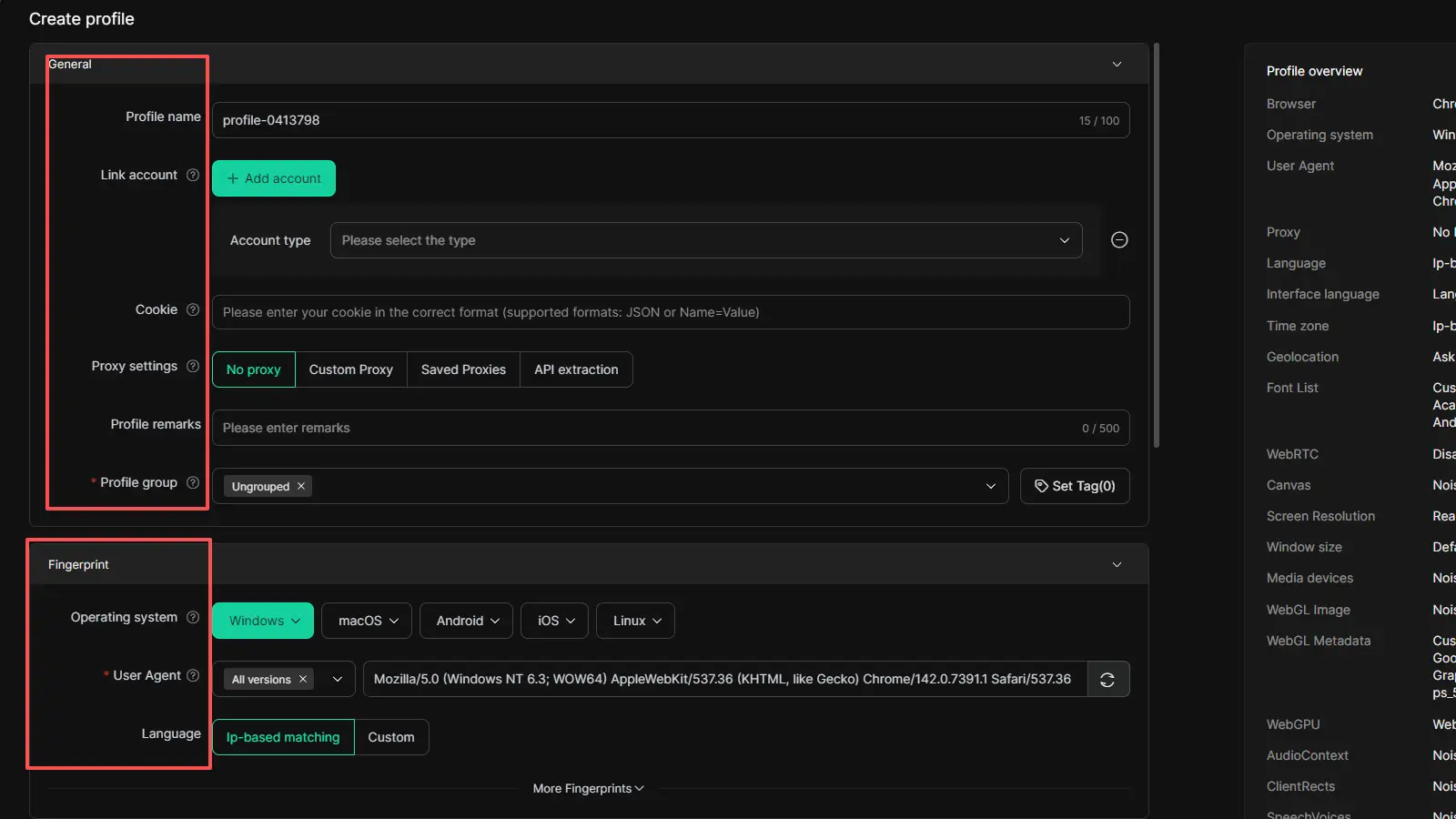
Persistent Session Management: DICloak saves your session data and cookies locally. This avoids the need for constant re-logins, which frequently trigger 2FA prompts and security audits in 2026.
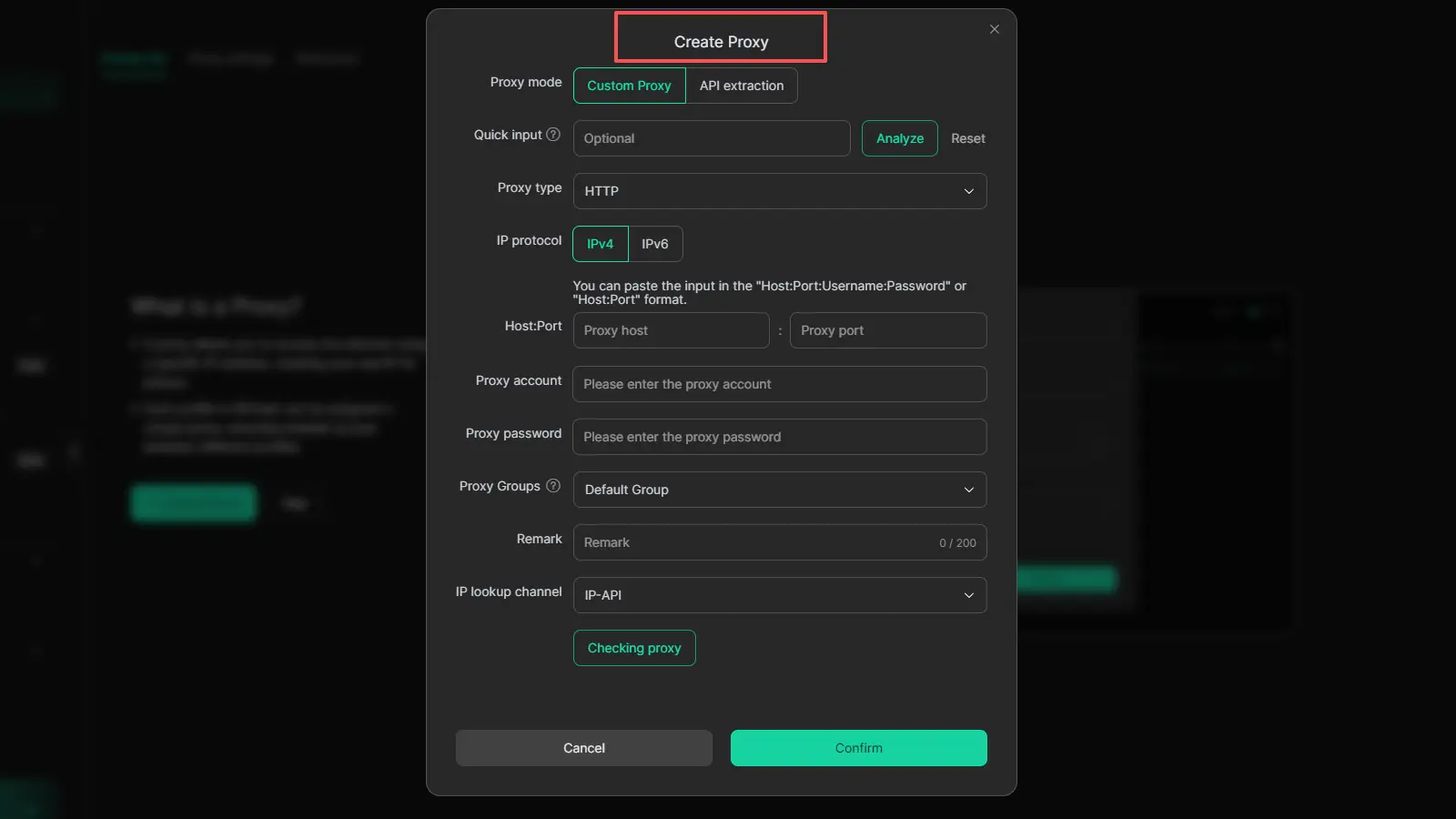
Integrated Proxy Mapping: Assign a dedicated mobile proxy to each DICloak profile to maintain geographical and IP consistency for every session.
Should you use a Gmail creator or buy aged accounts in 2026?
Your decision should be based on your Target Lead Value (LTV) and the speed of your operation.
When to choose DIY automation
Choose DIY if your target LTV per account is under $50. At this margin, you need the cost-efficiency of self-created accounts using mobile proxies and PVA services. This is the optimal route for massive, low-cost outreach where you can manage a 21-day "warm-up" schedule.
When purchasing aged accounts makes more sense
Buy aged accounts (e.g., from AccFarm) when you need immediate trust and higher daily sending limits. Aged accounts have a higher "authority score" in Google’s eyes, allowing you to bypass the warming phase and execute high-stakes campaigns immediately without the risk of an instant creation-purge.
FAQ: Common Questions About Gmail Creation
Q1. How many Gmail accounts can I safely make in a day?
There is no hard ceiling, but your limits are dictated by your proxy diversity and warm-up schedule. A single 4G mobile proxy can safely handle 3-5 creations per day. Attempting dozens on a single IP—even a residential one—will trigger a subnet audit.
Q2. Is it possible to create Gmail accounts without a phone number?
Not reliably at scale. Google’s 2026 security requires phone verification for almost all bulk attempts. "No-phone" bypasses are usually temporary logic flaws that result in accounts being disabled within 24 hours.
Q3. What is the best software for bulk email creation?
For the creation phase, PVA Creator and AIO Account Creator lead the market. For the management and "staying alive" phase, DICloak is non-negotiable.
Q4. Why does Google keep disabling my new accounts?
The most common reason is recovery email association. If you use the same recovery email for multiple accounts, or if that recovery email has a poor reputation, Google will link and ban the entire "family" of accounts.
Q5. What is a PVA account and why does it matter?
A Phone Verified Account (PVA) is one that has passed the SMS challenge. These are the gold standard for growth engineering because they possess a higher trust threshold, making them more resilient to automated security sweeps.
Final Practical Takeaway
Building a sustainable multi-account infrastructure requires a disciplined technical workflow:
- Creation: Use a specialized Creator Tool (like PVA Creator) with high-quality mobile proxies.
- Fingerprinting: Ensure you are matching Android 14+ builds and hardware signatures (GPU/Vendor).
- Isolation: Immediately migrate accounts into DICloak browser profiles to prevent cross-contamination.
- Longevity: Use a 21-day warm-up schedule with low-volume activity before moving to full outreach capacity.
This stack ensures your accounts aren't just created, but remain operationally viable for the long term.
 Web Proxy Tools
 Free Tools
 Cookie Plugin
 UA Generator
 MAC Address Generator
 IP Generator
 IP Address List
 2FA Code Generator
 World Clock
 Anonymous Check
 WebRTC Leak Test
 UUID Generator
 Free Web Proxy Site
 Proxy Checker
 FB Ad Checker
 AI Web Scraping
 Free SMM Tools
 Twitter Shadowban Checker
 Instagram Name Checker
 UTM Generator
 Username Generator
 AI Hashtag Generator
 LinkedIn Headline Generator
 Social Media Image Resizer