Many Twitter users suddenly lose access and start asking the same question: can you get IP banned on Twitter? This confusion is common, especially when logins fail or new accounts stop working on the same network. Before jumping to conclusions, it is important to understand what an IP ban really means and how Twitter handles abuse and restrictions behind the scenes.
What is an IP Ban?
Before answering can you get IP banned on twtitter, it helps to understand what an IP ban really is and how it works in practice.
Definition of IP Ban
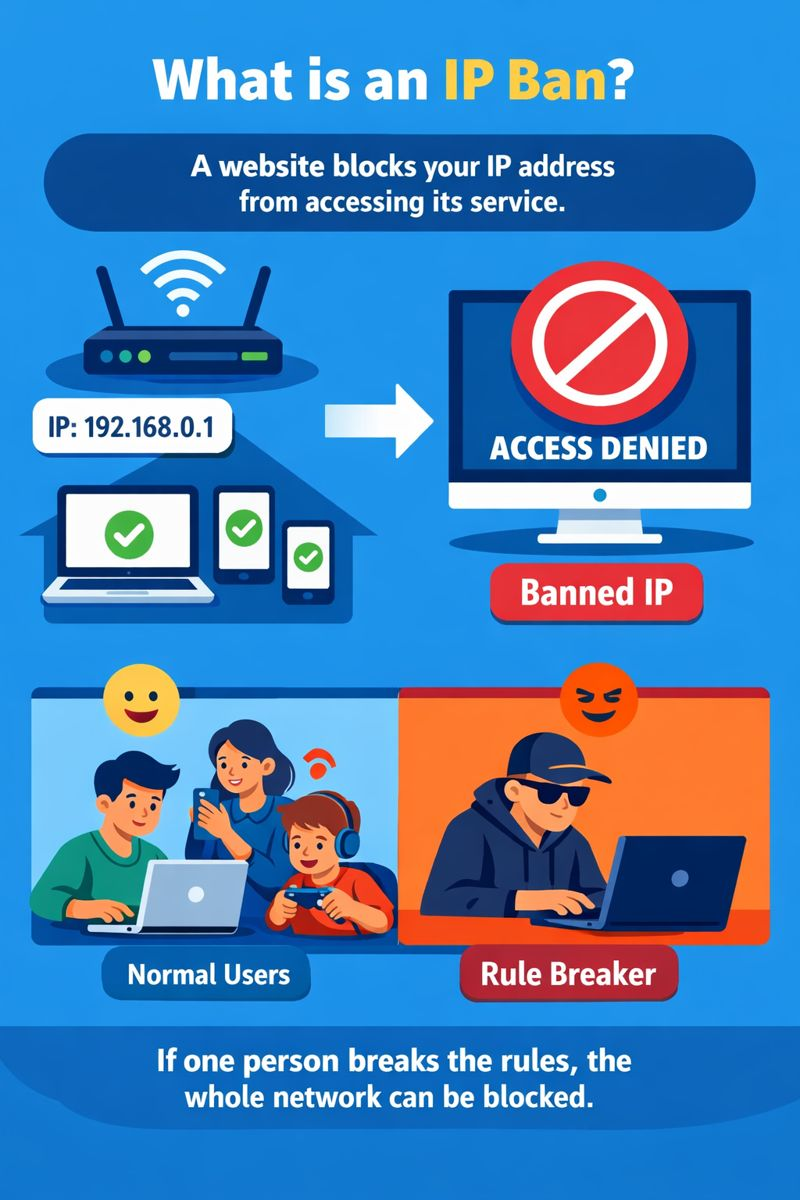
An IP ban means a website blocks your internet address from accessing its service. An IP address is a number your internet provider gives to your device. Websites use it to know where traffic comes from. If an IP is banned, any device using that same network may lose access. This is common on forums or gaming sites, where abuse often comes from the same source.
For example, if several people use one home Wi-Fi and one person breaks the rules, the whole network can sometimes be blocked.
How IP Bans Work on Twitter
Many users ask if they can get IP banned on Twitter after losing access to their account. In most cases, Twitter does not rely on simple IP bans. Instead, Twitter focuses on accounts and behavior.
Twitter usually limits or suspends specific accounts that break rules, such as spamming, aggressive automation, or repeated policy violations. Other users on the same Wi-Fi can often still log in without issues.
However, IP-related restrictions can happen in rare cases. For example, if someone keeps creating new accounts from the same network after repeated bans, Twitter may place broader limits tied to that network or device. To users, this may look like an IP ban, even though it is part of a wider abuse-prevention system.
Does Twitter Really Use IP Bans? How Twitter Detects Abuse
After understanding what an IP ban is, the next question becomes clearer: can you get IP banned on twtitter, or does Twitter rely on other signals? In reality, Twitter looks far beyond IP addresses. It tracks how accounts, devices, and actions connect over time.
Device Fingerprinting
Twitter can recognize devices using technical details like browser type, system settings, and login patterns. This is called device fingerprinting.
For example, if a suspended account logs out and a new account signs in from the same device minutes later, Twitter may still link them. Even if the IP changes, the device can look familiar to the system.
This is why many users feel “blocked” and start asking can you get IP banned on twtitter, even though the issue is tied to the device, not the network.
Account Linking
Twitter also connects accounts through shared behavior. Using the same email domain, phone number, cookies, or login habits can link accounts together.
For instance, if multiple accounts follow the same users, post similar content, and log in from the same setup, Twitter may treat them as related. When one account is limited, others may soon face issues too.
Behavioral Analysis
Behavior matters more than location. Twitter watches how fast you act and what you do. Liking hundreds of posts in minutes, following many users at once, or posting the same reply again and again can trigger limits. A user may think, can you get IP banned on twtitter, but the real cause is abnormal activity speed.
A common example is a new account that follows 200 people on day one. This often leads to temporary restrictions, even on clean IPs.
Suspension Evasion Detection
Twitter is strict about ban evasion. If a banned user creates new accounts to get around a suspension, Twitter actively looks for patterns.
When repeated attempts come from the same setup, Twitter may block sign-ups or logins linked to that environment. This feels like an IP ban, but it is actually enforced against repeat violations.
So when people ask can you get IP banned on twtitter, the answer is more complex. Twitter rarely blocks only an IP. It tracks devices, accounts, and behavior together to stop abuse more effectively.
Why Twitter Avoids Simple IP Bans
After seeing how Twitter tracks devices, accounts, and behavior, it becomes clear why many people asking can you get IP banned on twtitter are often looking in the wrong place. IP bans sound simple, but they cause more problems than they solve.
Shared IP Addresses
Many people share the same IP without knowing it. Homes, offices, schools, cafés, and mobile networks often use one public IP for many users.
If Twitter banned an IP outright, innocent users could lose access because of someone else’s mistake. For example, one person spamming on public Wi-Fi could affect dozens of normal users. This makes IP bans risky and unfair.
Dynamic IP Addresses
Most internet providers change IP addresses often. A user may have one IP today and a different one tomorrow. Because of this, blocking an IP does not stop bad behavior for long. A user who gets a new IP may return quickly. This is one reason Twitter does not rely on IP bans, even though users still ask can you get IP banned on twtitter.
IP Bans Are Easy to Bypass
IP bans are also easy to avoid. Restarting a router, changing networks, or switching to mobile data can result in a new IP.
Twitter knows this. Blocking only an IP would not stop repeat abuse. That is why Twitter prefers methods that follow the user’s setup and actions, not just their location.
Smarter Alternatives Work Better
Instead of IP bans, Twitter uses better tools. It watches devices, account links, and behavior patterns over time.
For example, if a banned user keeps creating new accounts and acts the same way each time, Twitter can limit those accounts quickly. This approach is harder to bypass and more accurate.
How Twitter Enforces Bans and Restrictions
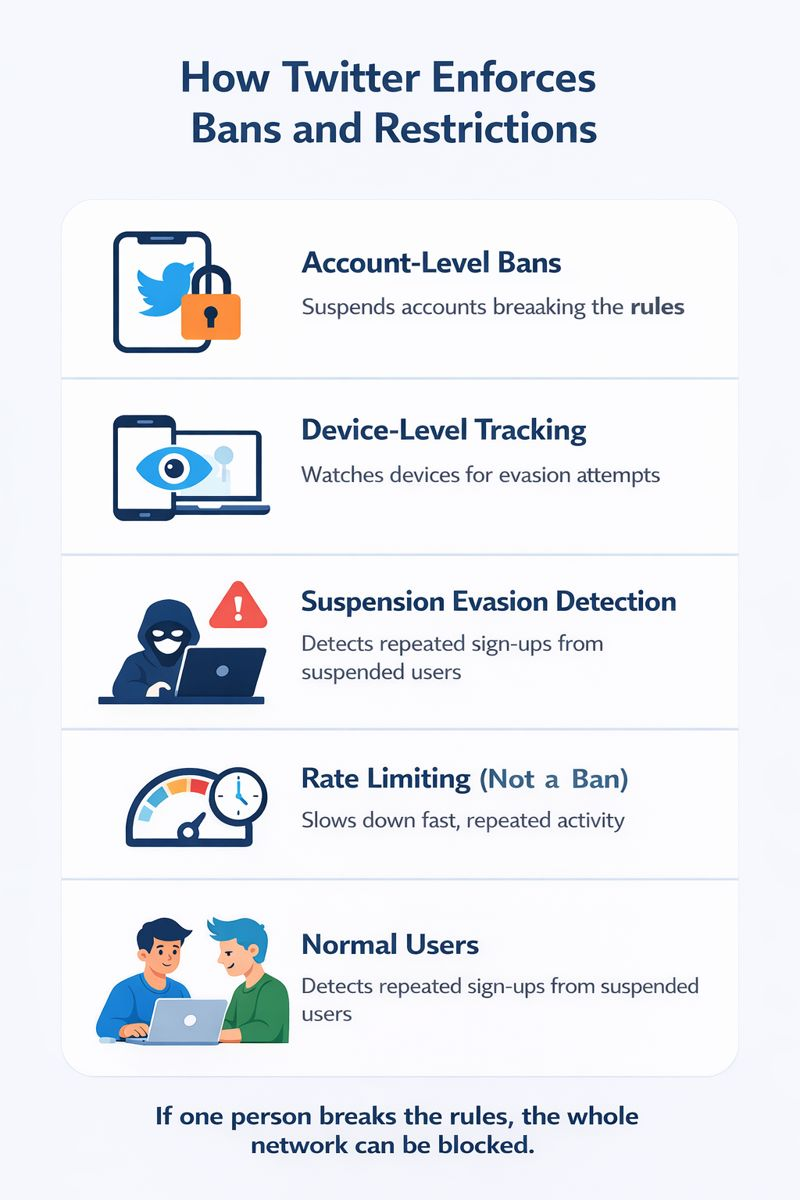
Since Twitter avoids simple IP bans, many users still wonder can you get IP banned on twtitter when access suddenly stops. In most cases, what looks like an IP ban is actually one of several other enforcement methods Twitter uses.
Account-Level Bans
The most common action is an account-level ban. Twitter suspends or limits a specific account when it breaks rules. For example, posting spam links, abusive replies, or misleading content can lead to a temporary lock or a permanent suspension. Other accounts on the same network usually remain unaffected, which often confuses users asking can you get IP banned on twtitter.
Device-Level Tracking
Twitter can also track devices, not just accounts. If a banned account logs out and a new account appears from the same device with similar behavior, Twitter may act fast.
A real-world case is when a user creates a new account right after a suspension and starts posting the same type of content. Even with a different IP, the new account may be limited within hours.
Suspension Evasion Detection
Twitter is strict about ban evasion. Creating new accounts to bypass a suspension is a direct rule violation. If Twitter detects repeated sign-ups tied to the same setup or behavior, it may block those accounts from posting or even from signing up. This often feels like an IP ban, which is why people keep asking can you get IP banned on twtitter, even though the system targets evasion patterns.
Rate Limiting (Not a Ban)
Sometimes the issue is not a ban at all. Twitter uses rate limits to slow down activity.
For example, if an account likes, follows, or posts too fast, Twitter may temporarily block actions. The account still exists, but features stop working for hours or days. Many users mistake this for an IP ban when it is simply a safety limit.
In short, when people ask can you get IP banned on twtitter, the answer is usually no. Twitter focuses on accounts, devices, and behavior, not simple IP blocking.
How to Tell What Kind of Twitter Restriction You’re Facing
After learning how Twitter enforces rules, the next step is understanding what is actually happening to your account. Many users quickly ask can you get IP banned on twtitter, but the signs usually point to other types of restrictions. Below are the most common cases and how to recognize them.
Signs of Account Suspension
- You see a clear message saying your account is suspended or locked.
- You cannot post, like, or follow anyone.
- Other users cannot view your profile.
For example, if an account posts spam links or abusive replies many times, Twitter may suspend it and show a notice about rule violations. This is a direct account action, not an IP ban, even though people often ask can you get IP banned on twtitter at this point.
Signs of a Shadowban
- Your tweets do not show up in search results.
- Replies are hidden behind “show more.”
- Engagement drops suddenly without a warning message.
A common case is a new account replying to many trending posts very fast. Posting still works, but replies get no views. This is a visibility limit, not an IP ban.
Signs of a Device or Fingerprint Restriction
- New accounts get restricted soon after creation.
- Posting works briefly, then actions stop.
- Multiple accounts on the same device face similar limits.
For example, if a banned user creates a new account on the same phone or browser, Twitter may limit the new account within hours. This often makes users ask can you get IP banned on twtitter, even though the device is the real reason.
Signs of Rate Limiting (Not a Ban)
- Messages like “Try again later” appear.
- Likes, follows, or posts stop working for a short time.
- Normal use returns after hours or a day.
This often happens when an account follows or likes too fast in a short period. Twitter slows the account down to protect the platform. It is a temporary limit, not a ban.
In most situations, when users wonder can you get IP banned on twtitter, the signs show account limits, behavior controls, or device-based restrictions instead of a true IP ban.
How to Run Multiple Twitter Accounts Safely
After learning how Twitter enforces bans, many users managing several profiles start asking can you get IP banned on twtitter. In reality, most bans happen because of how accounts are managed, not how many you have.
The Wrong Way to Manage Multiple Accounts
- Logging into many accounts from the same browser and device
- Switching accounts quickly without breaks
- Posting the same content across accounts
- Creating new accounts right after a suspension
For example, a marketer runs five Twitter accounts in one browser. After one account gets suspended, the others soon face limits too. This often leads to the belief can you get IP banned on twtitter, when the real issue is shared device signals.
The Right Way: Professional Multi-Account Management
- Keep each account isolated
- Use separate browser profiles
- Avoid shared cookies and sessions
- Act like a real user on each account
This is where a professional antidetect browser is commonly used. It creates separate browser profiles so each Twitter account looks independent. Accounts log in, post, and browse normally without linking signals.
For example, agencies managing client accounts use isolated browser profiles so one client’s issue does not affect others. This approach reduces bans and avoids situations that make people ask can you get IP banned on twtitter.
Managing multiple Twitter accounts is allowed. Problems start only when accounts look connected. Using the right setup focuses on separation, not IP tricks, and keeps accounts safer long term.
⚡The DICloak Antidetect Browser has become a global favorite for its unparalleled ability to efficiently and securely manage multiple accounts. Designed for professionals in social media management, and more, DICloak offers powerful features like RPA automation, bulk operations, and a synchronizer. Additionally, it allows you to customize fingerprints and integrate proxies for each profile, ensuring top-level security and operational efficiency. It’s the ultimate tool for seamless, secure, and scalable operations.

What Makes DICloak Stand Out?
✅ Manage 1,000+ Accounts on One Device: Stop wasting money on extra hardware! DICloak allows you to manage multiple accounts on a single device, cutting costs and boosting efficiency.
✅ Guaranteed Account Safety, No Ban Risks: Every account gets its own isolated browser profile with custom fingerprints and IPs, drastically reducing the risk of bans. Your accounts, your control!
✅ Flexible Proxy Configuration for Maximum Performance: Seamlessly integrate with all major proxy protocols (HTTP/HTTPS, SOCKS5) and manage your proxy pool with bulk operations. No more struggling with IP management—DICloak has you covered.
✅ Streamlined Team Collaboration for Better Results: Easily manage your team with advanced tools like profile sharing, permission settings, data isolation, and operation logs. Your team works smarter, not harder.
✅ Automate the Grind with RPA: DICloak's built-in RPA saves you hours of manual work. Automate repetitive tasks, streamline workflows, and focus on what really matters—growing your business.
✅ Powerful Bulk Tools to Scale Your Operations: Create, import, and launch multiple browser profiles in one click. DICloak makes scaling your business as easy as it gets.
✅ Compatible with All Major Operating Systems: Based on the Chrome core, DICloak supports simulating Windows, Mac, iOS, Android, and Linux operating systems. No matter what platform you need, DICloak has you covered.
🔗 Ready to Get Started?
Visit the DICloak website to explore more details and choose the plan that’s right for you. Start for free today and experience the power of secure, efficient, and scalable multi-account management!
What to Do After a Twitter Suspension
Even with careful management, suspensions can still happen. When that occurs, many users again ask can you get IP banned on twtitter. The key is knowing the right recovery path instead of making the problem worse.
Option 1: Appeal the Suspension
- Submit an appeal through Twitter’s official process
- Explain calmly and clearly
- Avoid creating new accounts during the appeal
For example, if an account was locked for aggressive following or repeated replies, an appeal may restore access after review. This works best for first-time or minor violations.
Option 2: Wait It Out
- Temporary locks often expire on their own
- Access may return in hours or days
- Do not change behavior during this time
A common case is rate limiting. Users think can you get IP banned on Twitter, but after waiting 24 hours, posting works again. Patience often solves these situations.
Option 3: Start Fresh with the Right Setup
- Only do this if the suspension is permanent
- Do not reuse the same device setup
- Avoid repeating old behavior
For example, users who immediately create new accounts on the same browser often get restricted again. Starting fresh means changing how the account is set up and used. This reduces the risk of quick detection and repeated limits.
Recovering from a suspension is about slowing down and choosing the right option. Rushing usually leads to more restrictions and keeps the question can you get IP banned on twtitter coming back again.
FAQs About Can You Get IP Banned on Twtitter
Can you get IP banned on twitter permanently?
In most cases, no. Twitter rarely uses permanent IP bans. It focuses on accounts, devices, and behavior patterns instead.
Why does it feel like an IP ban on Twitter?
It often feels this way when device or fingerprint signals are flagged. New accounts get limited fast, even on new IPs.
Can changing IP alone fix a Twitter ban?
No. Changing IP without fixing device setup or behavior usually does not work and may trigger faster restrictions.
Is managing multiple Twitter accounts allowed?
Yes. Managing multiple accounts is allowed if each account is clearly separated and behaves naturally.
How can I reduce ban risks in the long term?
Use environment isolation, proper proxy configuration, and avoid linking accounts through shared devices or behavior.
Conclusion
So, can you get IP banned on twtitter? In most situations, the answer is no. Twitter does not rely on simple IP bans. Instead, it uses account rules, device tracking, and behavior analysis to stop abuse. Many problems that look like IP bans are actually caused by shared devices, linked accounts, or aggressive actions. Understanding how Twitter really works helps you avoid mistakes, manage accounts safely, and recover faster when issues happen.
 Web Proxy Tools
 Free Tools
 Cookie Plugin
 UA Generator
 MAC Address Generator
 IP Generator
 IP Address List
 2FA Code Generator
 World Clock
 Anonymous Check
 WebRTC Leak Test
 UUID Generator
 Free Web Proxy Site
 Proxy Checker
 FB Ad Checker
 AI Web Scraping
 Free SMM Tools
 Twitter Shadowban Checker
 Instagram Name Checker
 UTM Generator
 Username Generator
 AI Hashtag Generator
 LinkedIn Headline Generator
 Social Media Image Resizer