Modern websites rely heavily on JavaScript rendering, dynamic interfaces, and bot-detection systems.
For many developers, simple HTTP requests are no longer enough to automate workflows or collect data.
This is why cloud headless browsers have become an important part of modern automation systems.
Instead of running Chrome locally, teams can launch remote browser sessions and control them through code. These sessions behave like real browsers but are optimized for automated workflows.
In this guide, we examine Browserbase, a cloud platform designed to run headless browsers at scale. The article explains:
- where Browserbase performs well
- where it struggles in real workflows
- how it fits into modern automation stacks
- when tools such as DICloak or Browserless may be better choices
Browserbase Quick Verdict
Browserbase is a strong option for teams that want managed headless browser infrastructure without maintaining their own browser servers.
It works particularly well for:
- Playwright or Puppeteer automation
- AI agents interacting with real browser sessions
- scheduled automation tasks
- workflows involving JavaScript-heavy websites
However, some limitations remain:
- Session startup usually takes 5–10 seconds
- captcha challenges can interrupt automation
- long browser sessions may occasionally become unstable
- identity-sensitive workflows may still trigger detection
If your main challenge is automation infrastructure, Browserbase is a solid solution. If your main challenge is account identity separation, a profile-based tool such as DICloak may be more appropriate.
What Is Browserbase?
To understand where Browserbase fits in automation workflows, it helps to start with what the platform actually provides. Browserbase is a platform that offers managed headless browser infrastructure in the cloud.
Instead of installing and maintaining browser profiles locally, developers can launch browser sessions remotely and control them through automation frameworks.
Each browser session runs in isolation, allowing multiple workflows to execute simultaneously without sharing session data.
This architecture simplifies deployment for teams that run large automation systems.
Where Browserbase Is Commonly Used
Based on testing and documentation patterns, Browserbase typically appears in three major workflow categories.
One important use case is AI agents interacting with websites through a browser.
Rather than executing a rigid script, the agent decides dynamically:
- which element to click
- what information to enter
- when to wait for page changes
This approach works best on websites where layouts change frequently.
However, reliable results require well-structured prompts.
In testing, vague instructions often caused incorrect page interactions.
Scheduled Automation Tasks
Browserbase is also useful for routine operational workflows such as:
- logging into dashboards
- exporting analytics reports
- running automated system checks
These tasks are typically scheduled using Playwright or Puppeteer scripts.
Because Browserbase manages the browser runtime, teams can run these scripts without configuring local browser profiles.
Automation for JavaScript-Heavy Websites
Many modern sites rely on client-side rendering.
In these situations, data may only appear after scripts execute inside the browser. A headless browser can wait for rendering events and interact with the page like a normal user.
Typical examples include:
- analytics dashboards
- interactive web applications
- platforms where data loads dynamically after page initialization
However, browser-based automation is more resource-intensive than simple HTTP scraping, and protected sites may still trigger CAPTCHA challenges.
To support these workflows, Browserbase provides several core capabilities designed for browser automation at scale.
Browserbase Core Features
Browserbase focuses on providing a reliable runtime environment for browser automation.
Serverless Browser Sessions
Browserbase launches browsers as disposable remote sessions.
Each session runs independently and can be created or terminated on demand.
This architecture allows multiple automation jobs to run in parallel while maintaining isolation between sessions.
The primary benefit is reduced operational overhead.
The main limitation is reduced control over low-level runtime configuration.
Beyond infrastructure management, Browserbase also determines how developers interact with these browser sessions in practice.
Browserbase: How You Control Browser Sessions
Browserbase runs headless browser sessions remotely and lets you control them through code. Most teams either connect with standard automation frameworks or add an AI layer for workflows that must adapt at runtime.
Integration with Automation Frameworks (Playwright and Puppeteer)
In practice, Browserbase is easiest to adopt if your team already uses Playwright or Puppeteer. You connect to a remote browser session and run your existing automation logic with minimal changes. This is a practical fit for predictable tasks like QA checks, dashboard exports, and scheduled workflows.
AI Automation with MCP and Stagehand
For workflows where the path changes based on page content, Browserbase can be paired with MCP-style tooling and Stagehand. Instead of relying only on brittle selectors, an agent can issue higher-level instructions and let Stagehand translate them into browser actions. Results are strongest when prompts are constrained and paired with basic checks, since vague instructions can cause drift or missed interactions on complex pages.
Browserbase Performance and Reliability
During testing, several performance patterns appeared consistently.
Cold Start Time
Launching a new browser session usually takes 5–10 seconds.
This delay is typical for serverless browser sessions but may impact very short automation tasks.
Runtime Performance
Once a session is active, page interactions are generally fast.
Navigation speed is comparable to local automation aside from network latency.
Common Failure Patterns
The most frequent issues observed were:
- page timeouts on slow websites
- CAPTCHA interruptions
- occasional instability in long sessions
Reliable automation systems should therefore include retry logic and recovery strategies.
Browserbase Pricing Overview
Browserbase pricing combines subscription tiers with usage-based billing.
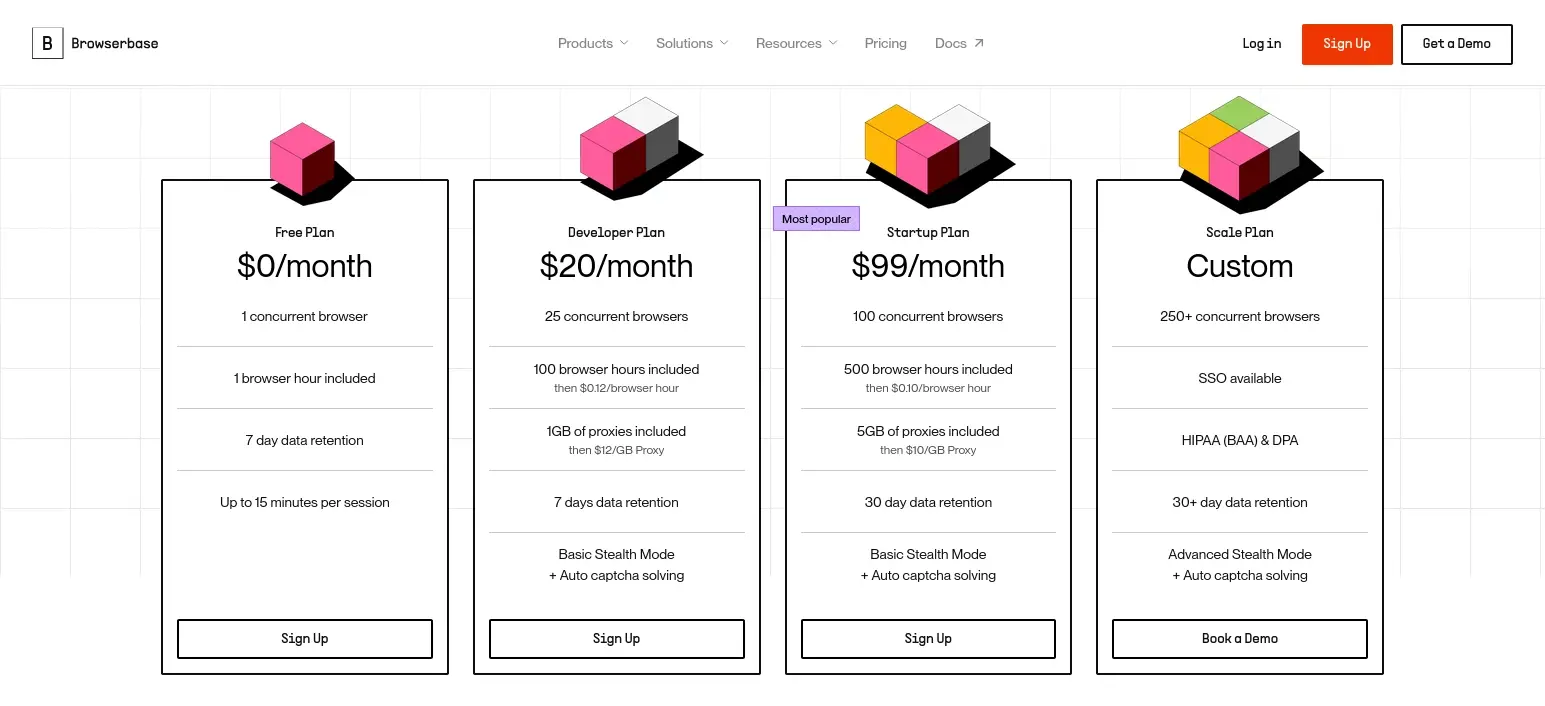
After pricing, the next question is usually why costs and results vary so much between tools.
The answer is that Browserbase is not trying to solve every part of the automation problem. It mainly covers the automation runtime (running browsers in the cloud). Other tools may focus on infrastructure scaling or identity separation.
To choose the right setup—and avoid paying for the wrong layer—you need to understand where Browserbase sits in the browser automation stack and how it differs from tools like DICloak and Browserless.
Browser Automation Architecture: How Browserbase, DICloak, and Browserless Fit Together
These tools are often mentioned together, but they are not direct competitors. They operate at different layers of the browser automation stack, and many teams combine them instead of replacing one with another.
| Layer |
Purpose |
Example Tool |
| Identity Layer |
Manage separate browsing identities through isolated profiles |
DICloak |
| Automation Runtime |
Execute browser automation workflows |
Browserbase |
| Infrastructure Layer |
Provide scalable browser execution environments |
Browserless |
Rather than competing directly, these tools solve different technical problems.
Browserbase: Automation Runtime Layer
Browserbase acts as the execution environment for browser automation scripts.
Its responsibilities include:
- launching browser sessions
- managing concurrent workflows
- running automation scripts
In this architecture, Browserbase functions as the runtime engine for automation systems.
Browserless: Infrastructure-Focused Automation
Browserless provides similar browser execution capabilities but emphasizes infrastructure stability and scalability.
It offers features such as:
- browser clusters
- API-based session control
- optional self-hosting
Teams that require deeper infrastructure control sometimes prefer Browserless.
DICloak: Identity, Profile Isolation, and Browser Automation
DICloak focuses on browser identity management while also providing tools that simplify repetitive browser automation workflows. Instead of acting as a cloud automation runtime like Browserbase, DICloak operates at the profile and identity layer, helping teams run automated or semi-automated workflows across multiple accounts.
Each DICloak browser profile runs as an isolated environment with its own:
- cookies and session data
- local storage
- fingerprint parameters
- proxy configuration
This separation helps reduce account correlation when automation interacts with login-based platforms.
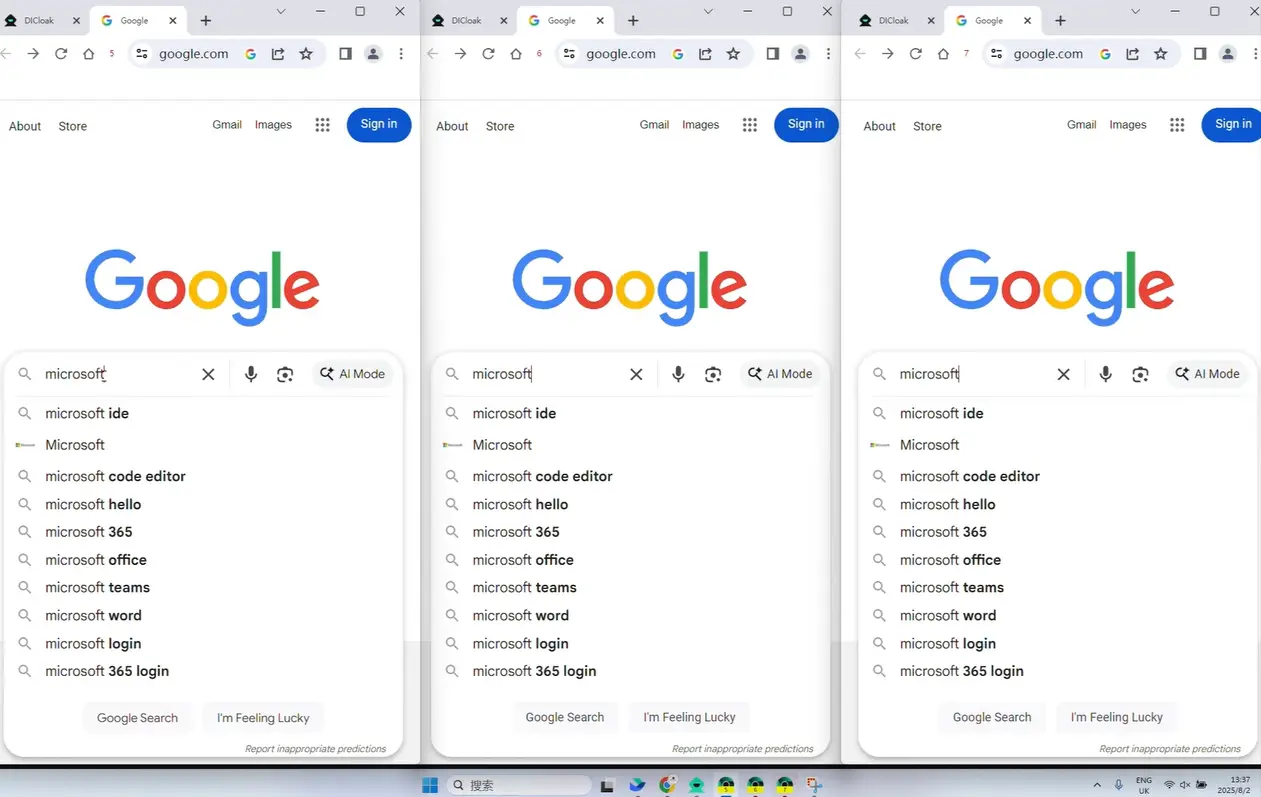
One of the most practical automation features in DICloak is the Multi-Window Synchronizer.
With the Synchronizer enabled, actions performed in a master window can be mirrored across multiple browser profiles at the same time. This includes actions such as:
- mouse clicks
- keyboard input
- page navigation
- scrolling and tab operations
This allows teams to execute repetitive browser tasks across dozens of accounts simultaneously instead of repeating each action manually.
For example, operators can open the same website across multiple profiles, perform login actions, and navigate dashboards across multiple accounts in parallel.
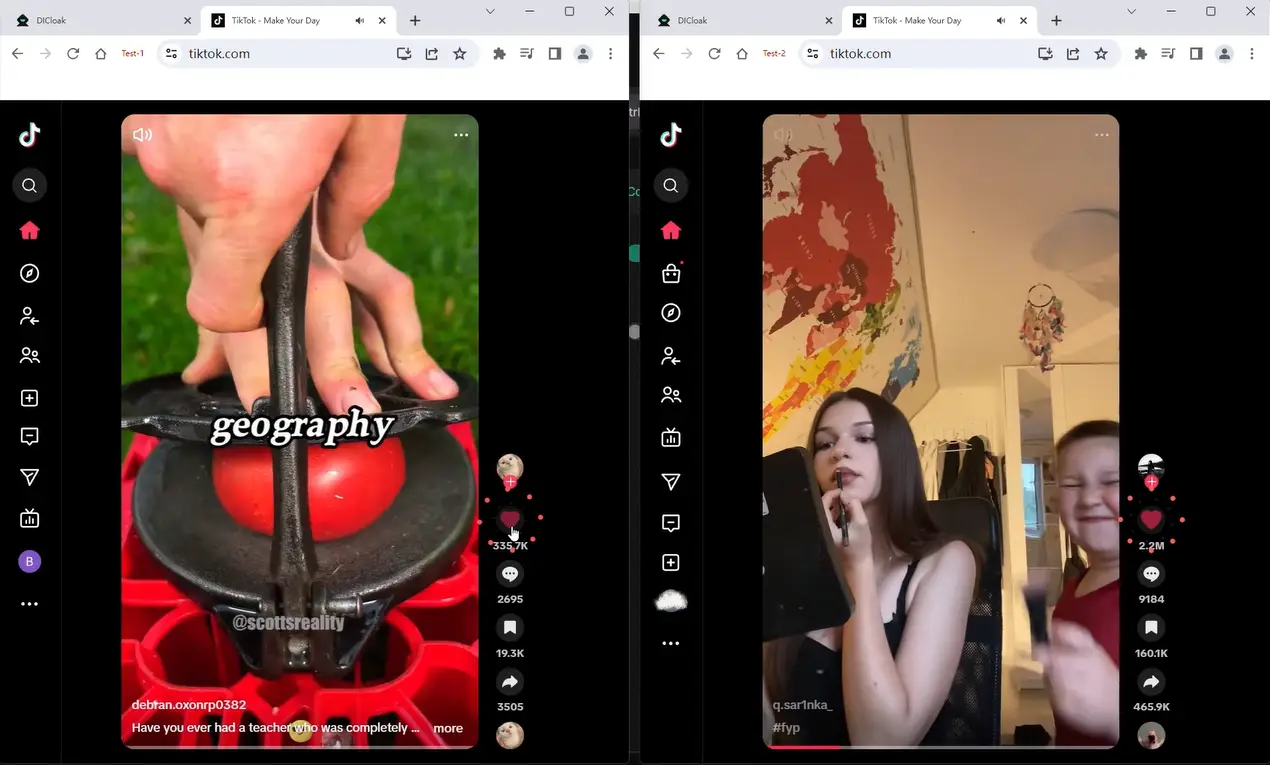
Usage Example: One-click like and follow on Douyin
Open the same TikTok video or creator page across all your browser profiles. When you like the video or follow the creator in one window, the action is instantly mirrored in all other windows, making your engagement look natural and consistent.
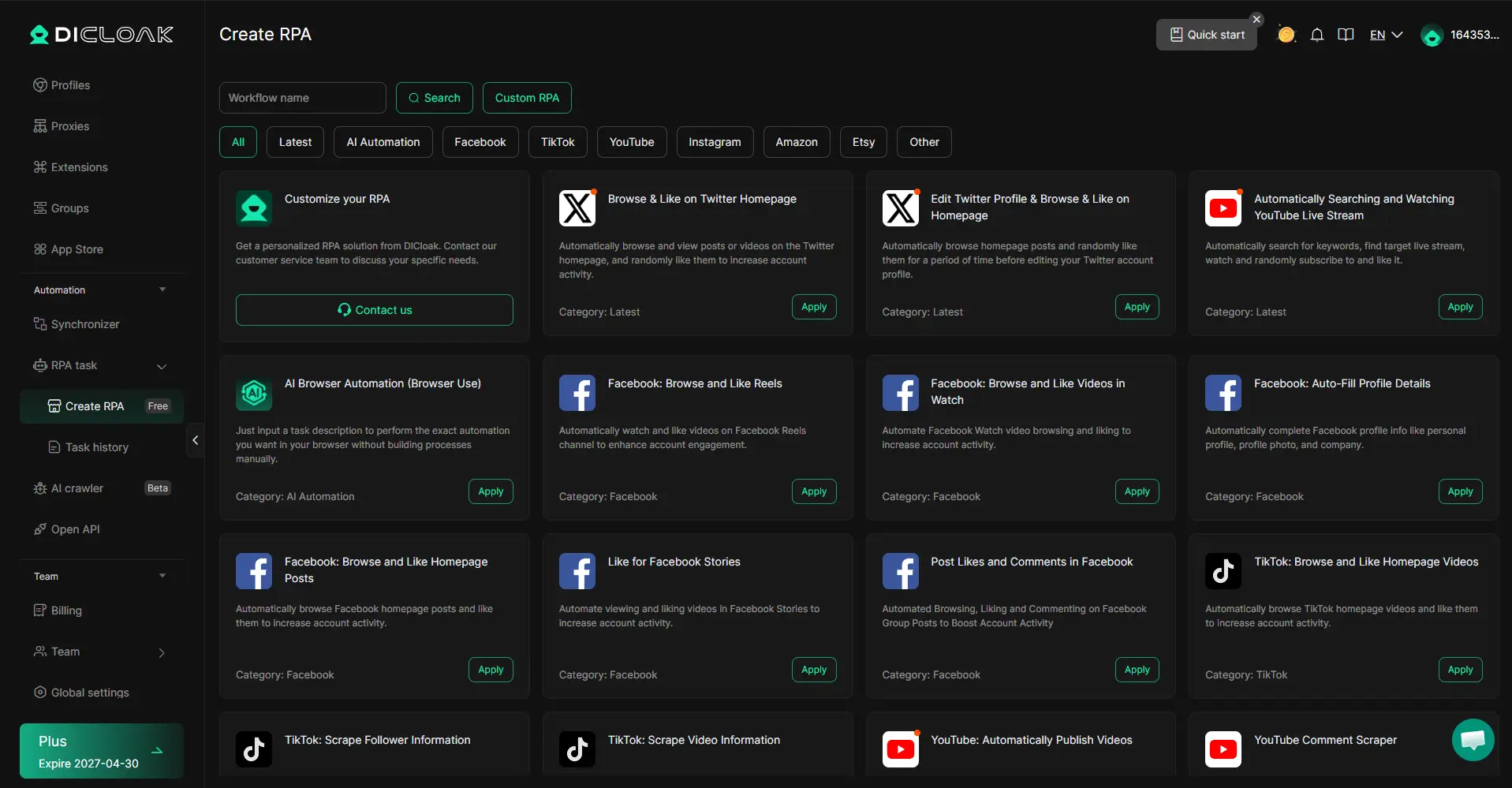
No-Code Automation and Bulk Task Execution
Beyond synchronized actions, DICloak also supports RPA-style browser automation and AI-assisted workflows. These tools allow users to automate tasks such as:
- data extraction
- ad account management
- social media operations
- automated browsing tasks
Many workflows can be executed without writing scripts, using built-in automation templates or API integrations.
Where DICloak Fits in an Automation Stack
In practice, many teams combine multiple layers of browser tooling:
- Browserbase runs headless browser sessions in the cloud and executes automation scripts
- Browserless focuses on scalable browser infrastructure
- DICloak manages browser identity and simplifies repetitive multi-account browser operations
This layered approach allows teams to run automation workflows while maintaining stable identities and isolated browser profiles.
In real-world automation stacks, tools like Browserbase execute the automation runtime, while DICloak simplifies multi-account operations by combining profile isolation with synchronized browser automation.
Browserbase Pros and Cons
Advantages
- no browser infrastructure maintenance required
- simple integration with existing Playwright or Puppeteer scripts
- suitable for JavaScript-heavy websites that require full browser rendering
- supports AI-driven automation workflows (for example, agent-style control layers)
Limitations
- cold start delays for new sessions (often noticeable in short jobs)
- CAPTCHA challenges may interrupt workflows on protected sites
- browser automation can become expensive at scale with long sessions and high concurrency
- identity separation is not its primary focus for multi-account or login-heavy workflows
Where DICloak Complements Browserbase
When automation involves multiple authenticated accounts, Browserbase handles the runtime, while DICloak adds the identity layer by keeping each account in an isolated browser profile with its own session data and fingerprint parameters. DICloak’s Synchronization feature can also help streamline repetitive UI actions across multiple profiles without scripting every step.
Conclusion
Browserbase makes it easier to run headless browsers in the cloud without maintaining your own browser infrastructure. For teams building Playwright or Puppeteer automation, scheduled jobs, or AI-driven workflows on JavaScript-heavy sites, it can reduce setup time and simplify deployment.
That said, cloud execution solves the runtime problem, not the entire trust and identity problem. On protected sites, automation can still fail due to CAPTCHA, timeouts, and session instability—especially when workflows run at higher concurrency or over long sessions.
This is where a profile-based identity layer can become useful. If your workflow involves multiple accounts or identity-sensitive tasks, tools like DICloak can complement Browserbase by keeping each account in its own isolated browser profile and letting you attach your own proxy configuration per profile. This can help teams keep sessions separated and workflows more organized when operating at scale.
In 2026, the most reliable setups are usually built as a stack: a solid automation runtime (like Browserbase) plus the right identity and operational controls (such as isolated profiles with DICloak), matched to the risk level of the platform you’re working with.
Browserbase Frequently Asked Questions
What Is Browserbase Used For?
Browserbase is used to run headless browser sessions in the cloud for tasks such as automation, testing, and scraping JavaScript-heavy websites.
Does Browserbase Support Playwright?
Yes. Browserbase integrates with Playwright and Puppeteer, allowing developers to control remote browser sessions through familiar frameworks.
Is Browserbase Good for Web Scraping?
Browserbase works well for websites that rely on JavaScript rendering. However, browser automation is resource-intensive and may trigger CAPTCHA challenges on protected sites.
Why Do Browserbase Sessions Fail?
Failures commonly occur due to page timeouts, CAPTCHA challenges, or instability during long browser sessions.
Is Browserbase Designed for Multi-Account Workflows?
Browserbase can run multiple browser sessions, but it does not primarily focus on identity separation. Tools such as DICloak provide stronger profile-based identity isolation.
 Web Proxy Tools
 Free Tools
 Cookie Plugin
 UA Generator
 MAC Address Generator
 IP Generator
 IP Address List
 2FA Code Generator
 World Clock
 Anonymous Check
 WebRTC Leak Test
 UUID Generator
 Free Web Proxy Site
 Proxy Checker
 FB Ad Checker
 AI Web Scraping
 Free SMM Tools
 Twitter Shadowban Checker
 Instagram Name Checker
 UTM Generator
 Username Generator
 AI Hashtag Generator
 LinkedIn Headline Generator
 Social Media Image Resizer





