Introduction: The Quest for an iOS Emulator for Windows
The search for a reliable iOS emulator for Windows has reached a fever pitch in 2026. As mobile and desktop worlds continue to merge, more people are asking the primary question: "Can you run iOS on a PC?" While Android users have enjoyed easy emulation for years, Apple’s ecosystem remains a "walled garden." Because Apple uses closed-source software, replicating the iPhone experience on a computer is much harder. However, for professionals who need to access iOS-specific environments, new tools have made this quest much easier.
Why Cross-Platform Compatibility Matters in 2026
In 2026, the digital world is more competitive than ever. Mobile marketers need to manage accounts that look like they are on real iPhones to avoid advanced bot detection. App testers must verify that their software works across different versions like iOS 17 or 18. Furthermore, web developers need to see how their sites look on Safari without buying a dozen different devices. Cross-platform compatibility isn't just a "nice-to-have" anymore; it is a requirement for professional efficiency in gaming, marketing, and development.
Understanding How an iOS Emulator for Windows Works
An iOS emulator is a specialized software tool designed to trick a Windows PC into thinking it is iPhone hardware. It recreates the internal environment of an Apple device so you can run apps or browse the web as if you were holding a physical phone. This process is technically complex because it requires the software to bridge two completely different worlds.
The Technical Challenge: x86 vs. ARM Architecture
The biggest hurdle in building an iOS emulator for Windows is the "language" of the hardware. Most PCs speak a language called x86, while iPhones speak a language called ARM. To run an iOS app on Windows, the emulator must act like a real-time language translator. Imagine a person translating a book from one language to another as you read it; it takes a lot of effort and speed. This is why many tools are actually "simulators." A simulator just mimics the look and feel (the UI) of an iPhone without translating the deep hardware instructions.

Is There a Free iOS Emulator for Windows for Free Use?
Many users are hunting for a free iOS emulator for Windows or an iOS emulator for Windows for free. While it is possible to find free options, you must be careful. Most high-quality tools that offer full virtualization cost money because they are expensive to maintain. However, some professional tools offer free trials or limited free versions that are perfect for basic tasks.
Simulators vs. Emulators: What You Need to Know
Before you download anything, you should know that most "free" tools are actually simulators.
- Simulators: These provide a visual "skin" of an iPhone. They are great for seeing how a website looks, but they cannot run native apps from the Apple App Store.
- Emulators: These try to replicate the actual hardware. They are much more powerful and are usually used by security experts or advanced developers.
Capabilities and Limitations: What Can You Actually Do?
While technology has improved, there are still things you can and cannot do when using these tools.
Real-Life Use Cases for iOS Simulation
- Web Development: You can ensure your website renders perfectly on Mobile Safari.
- Browser Fingerprinting: Marketers use these tools to hide their PC's identity and appear as a mobile user.
- UI Testing: Designers can check if their app's buttons and menus look right on a mobile screen.
On the other hand, high-end mobile gaming (like the iOS version of PUBG) is still very difficult to do on a PC emulator. Moreover, most tools do not have legal access to the official Apple App Store, meaning you cannot just download any app you want instantly.
Top Rankings: Best iOS Emulator for Windows 10 and 11
Here are the top tools available in 2026 for those who need to simulate an iOS environment on their Windows PC.
A Comparison of the Top 4 iOS Simulation Tools
| Tool |
Best For |
Type |
Cost |
| DICloak |
Marketing, Privacy, Multi-Account |
Antidetect Browser / iOS Environment |
Free / Paid |
| Smartface |
App Development |
Developer Simulator |
Paid |
| iPadian |
UI Experience |
UI Simulator (Skin) |
Paid |
| Corellium |
Security Research |
Cloud Virtualization |
Enterprise |
Smartface: A Developer-Focused iOS Simulator for Windows
Smartface is designed primarily for mobile app developers, offering a professional development environment that supports both iOS and Android workflows on Windows.
Rather than emulating consumer iOS devices for general app usage, Smartface provides:
- An iOS simulator for testing applications under development
- Visual UI tools and code-level debugging
- Cross-platform development support
Smartface allows developers to preview and test their own iOS apps without requiring a Mac for every stage of development. That said, it still does not function as a consumer emulator—you cannot install random iOS apps from the App Store or use it as a general-purpose iPhone replacement.
In short, Smartface answers the question “How can I build and test iOS apps on Windows?”, not “How can I run iOS apps like a user?”
iPadian: iOS UI Simulation Rather Than True Emulation
iPadian is often misunderstood due to its marketing. Technically, it is a UI simulator, not an iOS emulator.
It recreates the look and feel of iOS on Windows—icons, gestures, and layouts—but it does not virtualize iOS itself. The applications available inside iPadian are either web-based or custom-built for the platform, not genuine iOS apps.
iPadian is best suited for:
- Demonstrating iOS-style interfaces
- UI and UX concept presentations
- Users curious about how iOS looks and behaves
It does not support:
- Native iOS apps
- Apple App Store access
- System-level iOS functionality
However, iPadian should be seen as a visual simulator, not a solution for actually running iOS apps on a PC.
Corellium: Enterprise-Grade iOS Virtualization for Security and Research
Corellium represents the most technically advanced option on this list—and also the most specialized.
Unlike UI simulators or developer tools, Corellium provides true iOS virtualization, running real iOS builds on virtualized hardware. This capability makes it invaluable for:
- Mobile security research
- Vulnerability analysis
- Advanced application testing
- Enterprise-level CI/CD pipelines
Corellium is not aimed at everyday users. It is expensive, complex, and designed for professionals who need deep system access rather than casual app usage. While it can run real iOS environments, it is not intended to replace a consumer iPhone or serve as a simple Windows emulator.
For most users asking whether they can “run iOS apps on Windows,” Corellium is technically capable but practically inaccessible.
DICloak: The Premier iOS Browser Environment Emulator
For professionals, DICloak is the most efficient choice for simulating iOS. Instead of trying to emulate the heavy hardware—which often crashes—DICloak focuses on the browser profile. It is based on the Chrome core, which makes it incredibly stable and fast. It allows you to create browser profiles that websites see as genuine iPhones, such as the iPhone 13, 14, or 15.
Why DICloak is the Best Choice for Marketers
DICloak is built for users who need to manage over 1,000 accounts from a single device. You can simulate specific versions like iOS 17 or 18, and each profile is completely isolated. This means your accounts have their own unique fingerprints and proxies, providing Guaranteed Account Safety. Platforms like Facebook or TikTok will never know you are actually using a Windows computer.

Advanced Features of DICloak for Professional Use
DICloak goes beyond simple simulation by offering tools that help businesses grow. It is the perfect tool for social media management, affiliate marketing, traffic arbitrage, e-commerce, account farming, and even crypto airdrops.
Scaling Your Operations with RPA and Bulk Tools
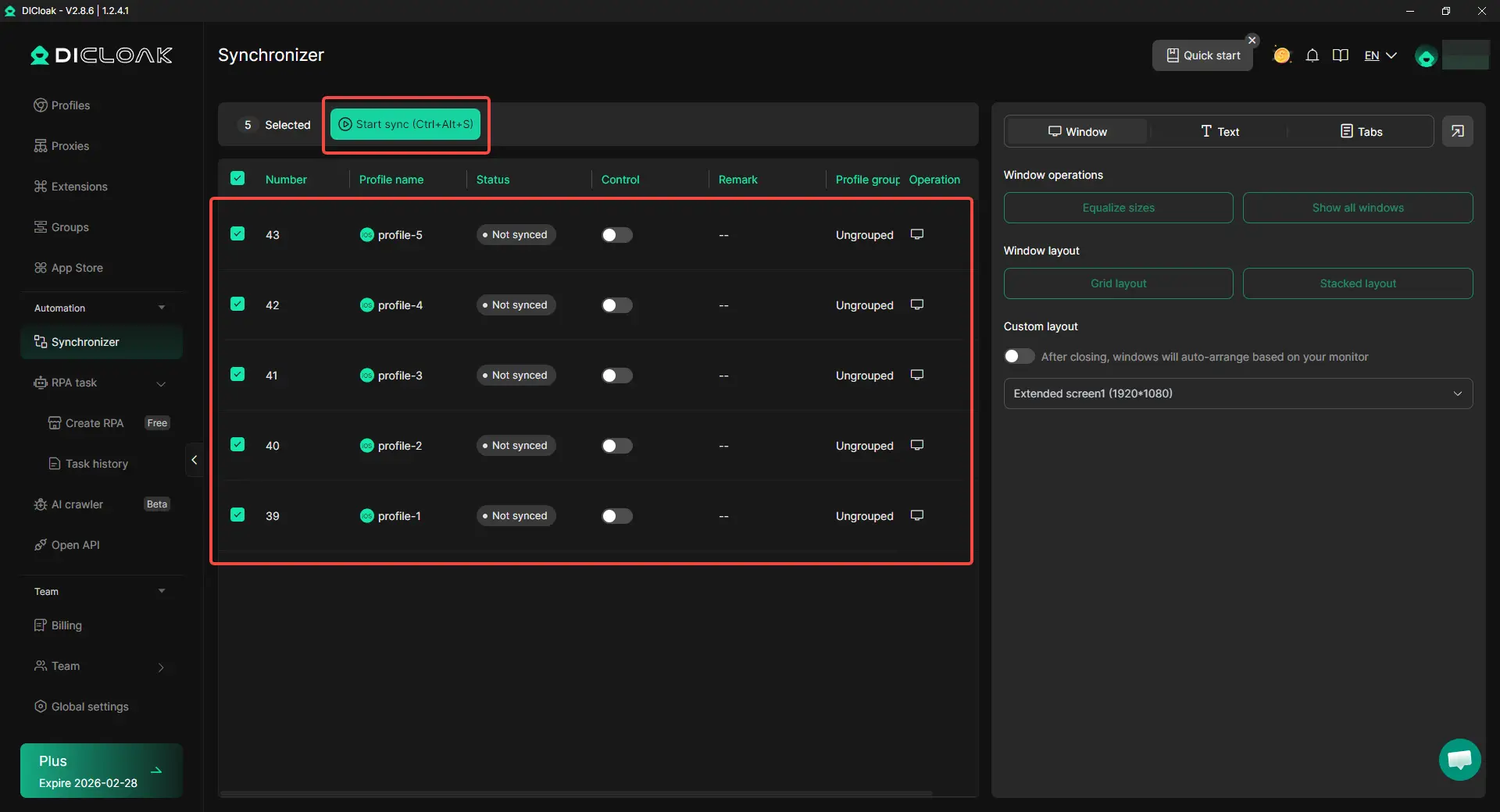
DICloak includes a built-in RPA (Robotic Process Automation) system that handles boring, repetitive tasks for you. Additionally, it features a "Synchronizer" tool. This tool allows you to control multiple browser windows at once. For example, if you click a button in your main window, the Synchronizer repeats that click in 100 other windows simultaneously. Therefore, you can manage bulk operations in seconds rather than hours.
Step-by-Step Guide: How to Simulate iOS on PC with DICloak
Setting up your first iOS environment is simple. Just follow this checklist:
Setting Up Your First iOS Browser Profile
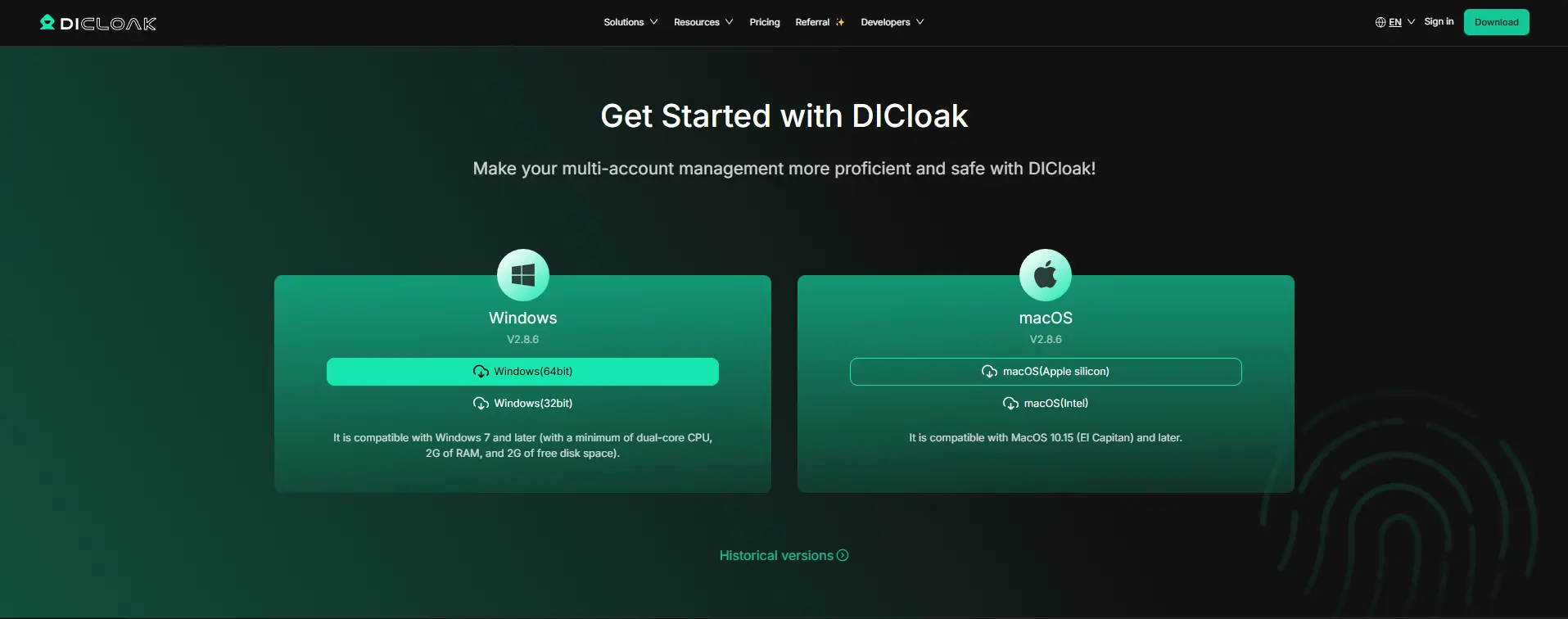
- Download and Install: Get the DICloak software from the official website and install it on Windows.
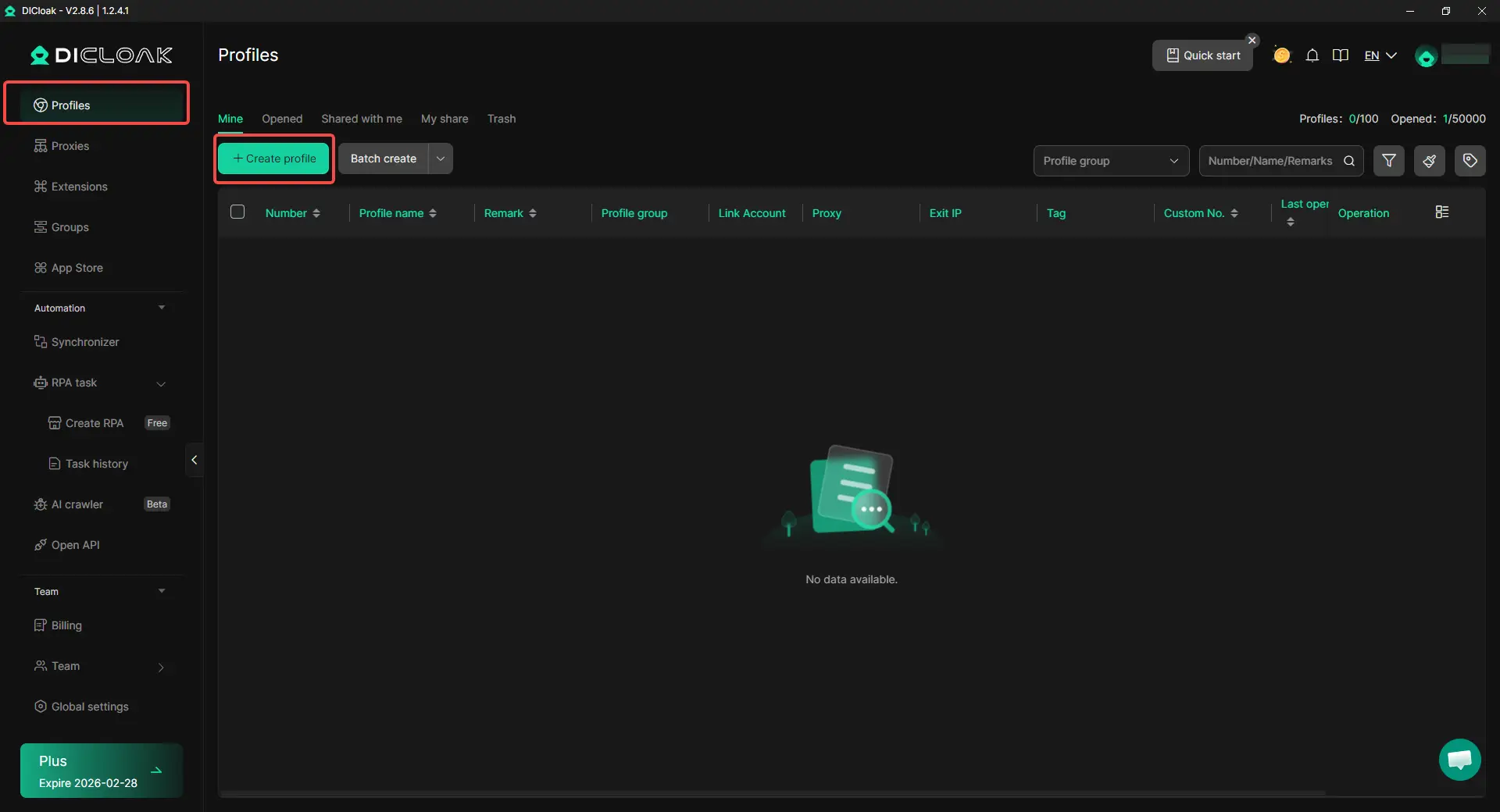
- Create New Profile: Open the dashboard and click the "Create Profile" button.
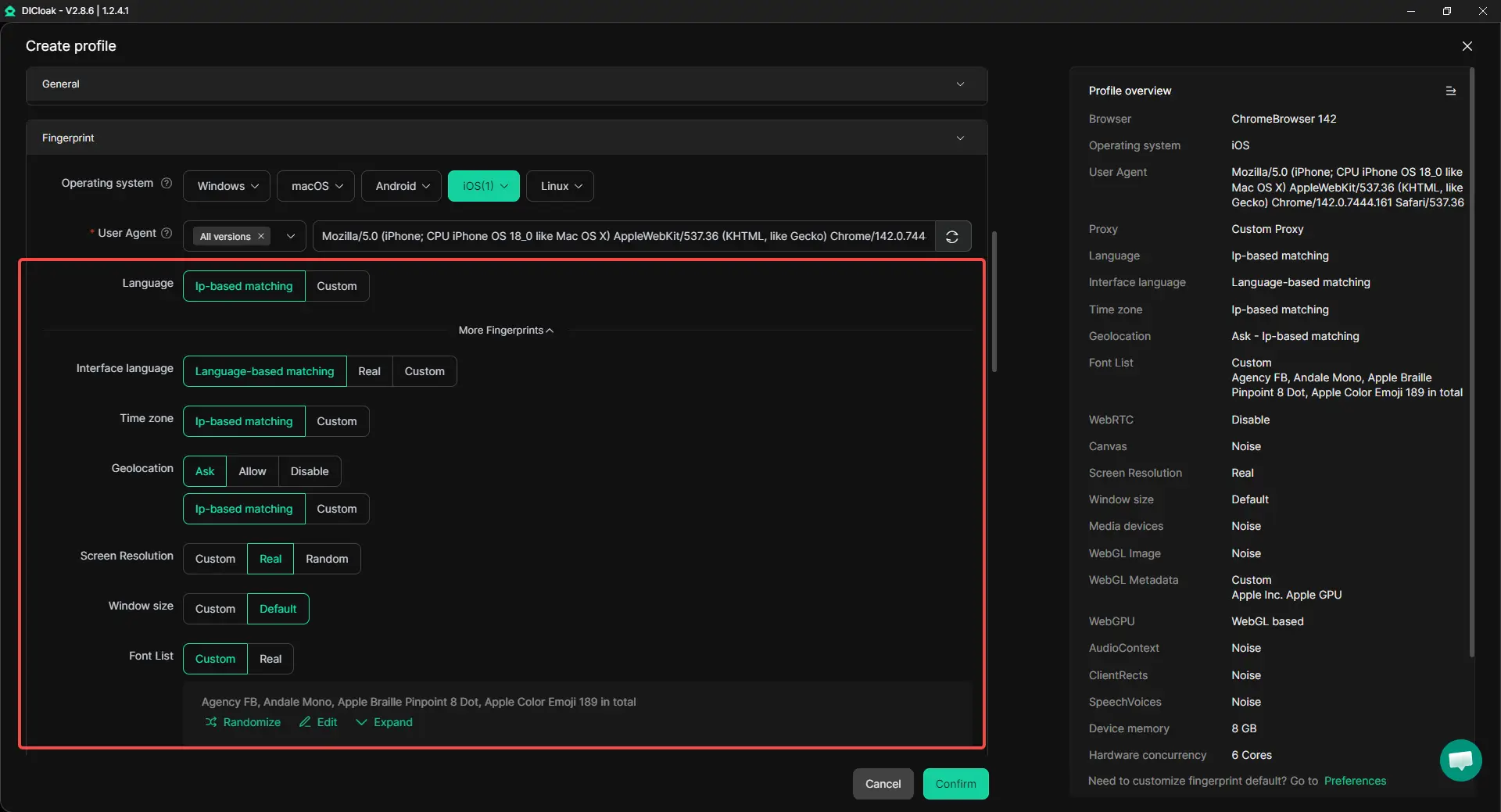
- Select iOS as an OS: Under the browser settings, choose iOS and select your version (e.g., iOS 18).
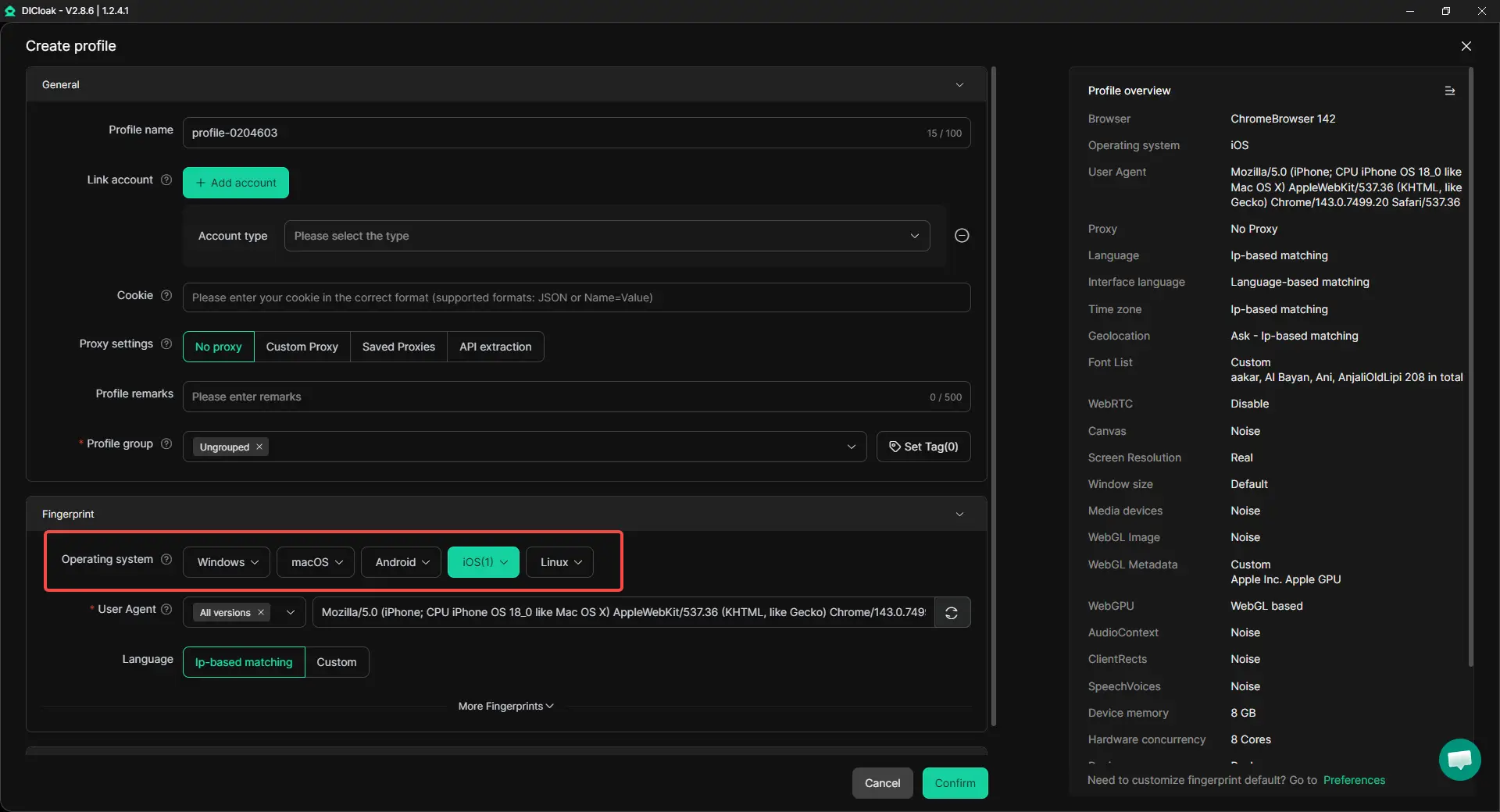
- Choose Hardware: Pick a hardware profile like iPhone 15 to match your simulation needs.
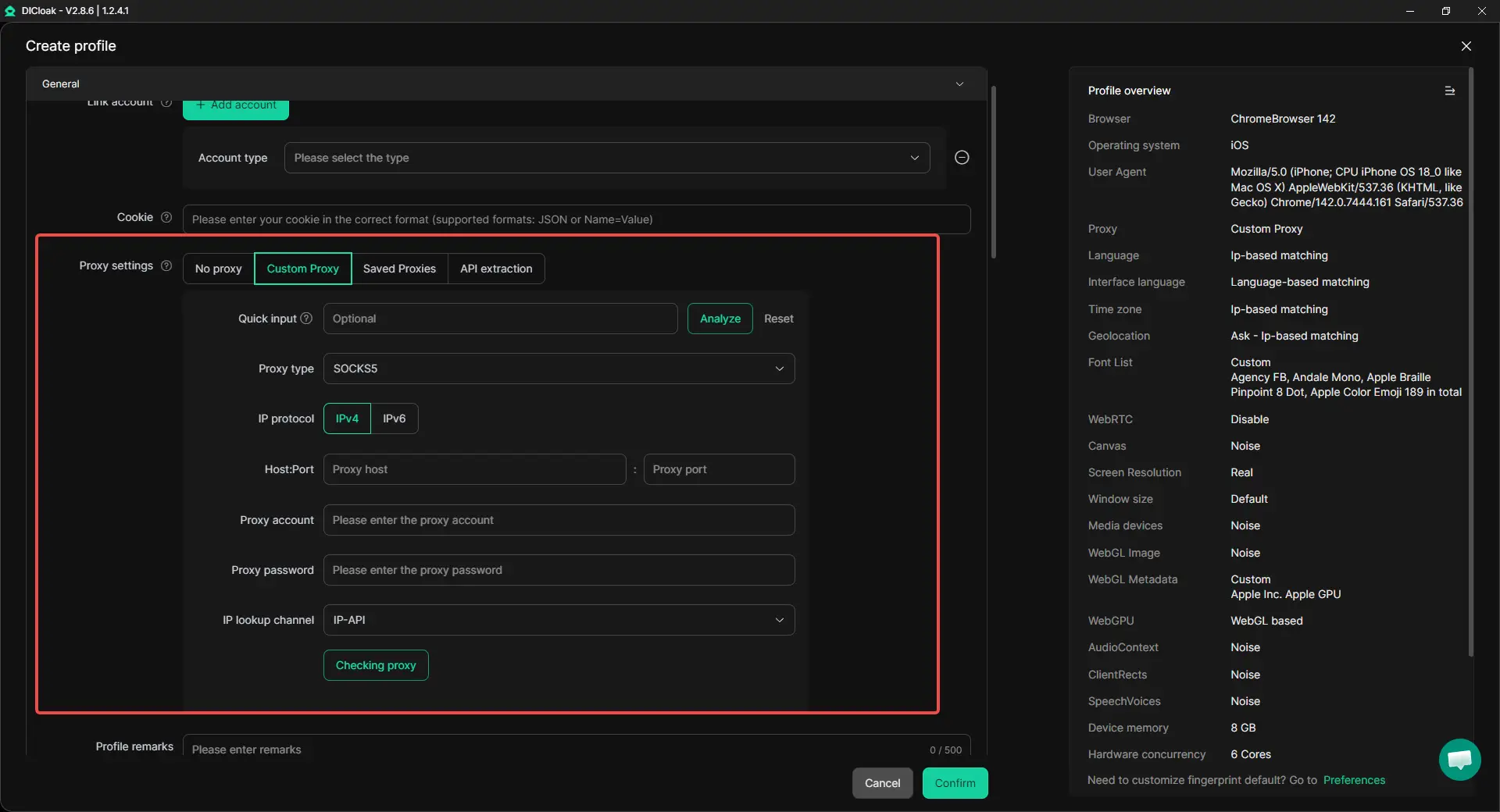
- Set up Proxy: Add your proxy details so your IP address matches your target location.
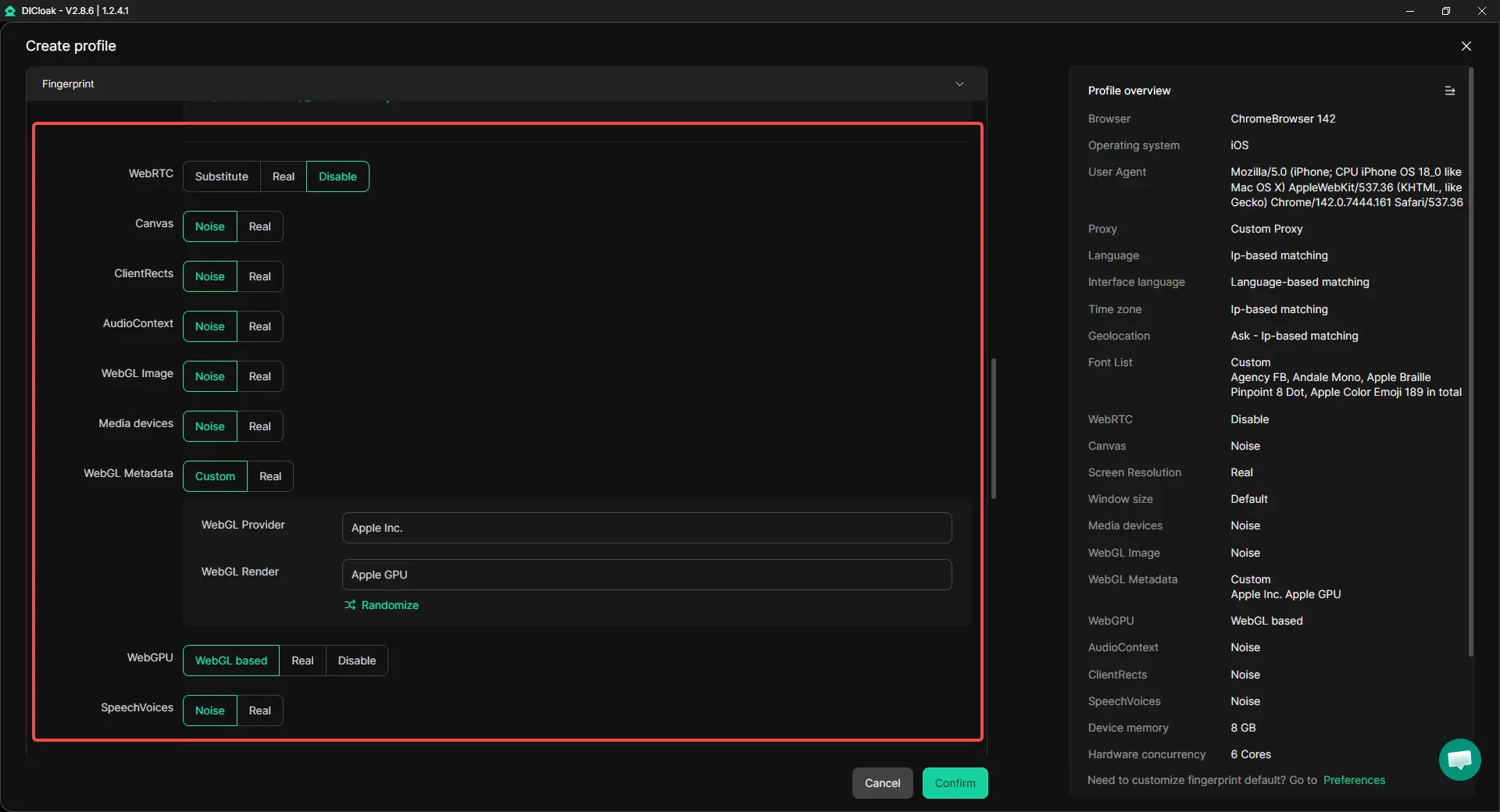
- Build Fingerprint: Customize WebRTC and screen resolution for a unique identity.
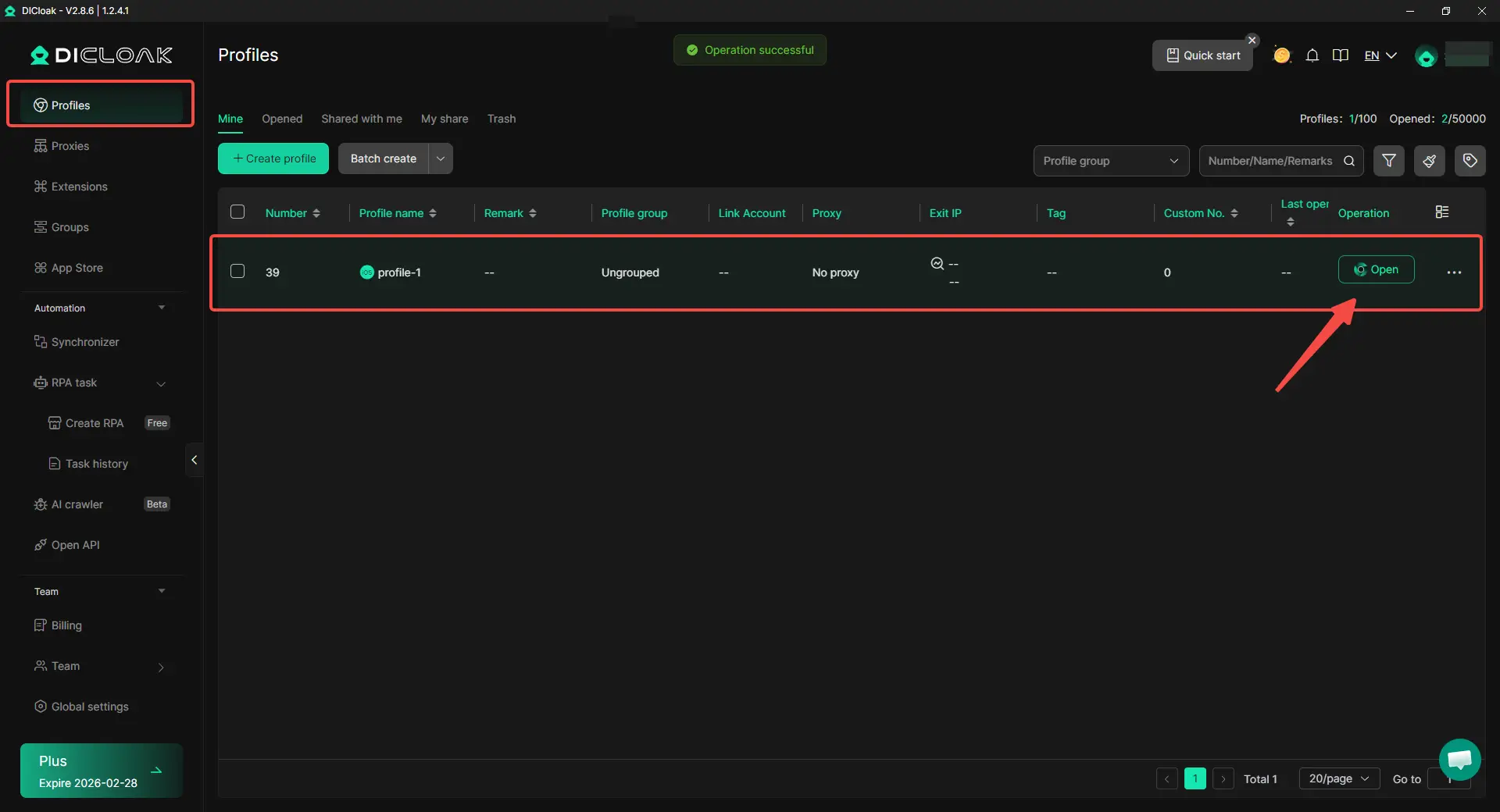
- Launch: Click “Confirm” to save the profile, then return to the dashboard and press “Open” to launch your secure iOS browser window.
Security Warning: The Dangers of Fake iOS Emulators
When you search for an iOS emulator for Windows, you will see many tempting offers. Be very careful! Many sites promise a "free" way to play any iPhone game, but these are often traps.
Protecting Your Data from Malware and Spyware
- Trojans and Viruses: Fake emulators often contain hidden software that steals your passwords or credit card info.
- Unwanted Adware: Some tools will flood your PC with ads and slow it down to a crawl.
- Non-functional Software: Most "free" emulators on shady sites simply don't work and exist only to get you to click on ads.
Always stick to professional, well-known brands like DICloak to keep your data and your PC safe.
Conclusion: Choosing the Right Tool for Your Needs
While a perfect 1:1 emulator for iOS gaming on Windows is hard to find, tools like DICloak provide the perfect answer for marketing and web testing. If you need to manage multiple accounts, protect your privacy, or test how mobile users see your work, a simulated browser profile is the most secure and effective path.
Start Your Secure iOS Simulation Today!
Ready to scale your business and manage multiple mobile environments from your PC? Visit the DICloak website to find the plan that works for you. You can start for free today and see how easy it is to manage 1,000+ accounts with total peace of mind.
Frequently Asked Questions (FAQs)
Is there any iOS emulator for Windows that runs App Store games?
Most Windows tools are simulators meant for work and marketing, not gaming. If you want to play native iOS games on a PC, you might need a cloud-based service or a tool that mirrors your real iPhone screen.
Can I find a free iOS emulator for Windows?
Yes, some tools like iPadian have limited free versions, and DICloak offers a free trial for its browser simulation features. However, for professional-level security and features, most users eventually upgrade to a paid plan.
Is using an iOS emulator for Windows free legal?
Using an iOS emulator for Windows for free is legal for things like testing your own apps or managing your marketing accounts. However, using these tools to pirate apps or break Apple's rules can lead to account bans.
How does DICloak differ from a standard emulator?
A standard emulator tries to copy the whole iPhone hardware, which is often slow. DICloak is an antidetect browser that simulates the iOS browser profiles and digital fingerprints. It is much faster, safer, and better for professional account management.
Do I need a Mac to test iOS websites?
No! By using DICloak on your Windows PC, you can simulate a real iPhone browser profile. This saves you the high cost of buying Apple hardware while still giving you a mobile testing experience.
 Web Proxy Tools
 Free Tools
 Cookie Plugin
 UA Generator
 MAC Address Generator
 IP Generator
 IP Address List
 2FA Code Generator
 World Clock
 Anonymous Check
 WebRTC Leak Test
 UUID Generator
 Free Web Proxy Site
 Proxy Checker
 FB Ad Checker
 AI Web Scraping
 Free SMM Tools
 Twitter Shadowban Checker
 Instagram Name Checker
 UTM Generator
 Username Generator
 AI Hashtag Generator
 LinkedIn Headline Generator
 Social Media Image Resizer





