Running more than one eBay account feels like walking a tightrope, one slip, and you’re staring at a suspension notice with no warning. Sellers want new stores to survive, but the usual advice of “just change your IP” or “wait a week before listing” rarely works out as planned. Platform checks are stricter than ever, and eBay’s detection system can link accounts through browser fingerprints, device IDs, or even login timing, long before you list a single item.
It’s not enough to create a new account and hope for the best. Accounts opened on the same network, with similar device setups or overlapping activity patterns, often end up restricted or banned together. Even sellers who swap devices or clear cookies find that the real risk is getting flagged for “related accounts” or running into a “suspicious activity” block right after their first listing.
What actually makes a difference is having a clear workflow for how to warm up eBay accounts safely. That means more than spreading out logins or using a proxy. You need a step-by-step process for eBay multi-account warm-up: covering device isolation, session management, gradual activity, and manual verification. Skip any of these, and you’ll likely get all your accounts linked, or worse, lose them before they’ve made a sale.
So what works in 2026, and what do experienced sellers do instead of guessing? Here’s what separates accounts that survive from accounts that get suspended.
Why Warming Up Multiple eBay Accounts Matters for Suspension Risk
If you skip the warm-up process and jump straight into selling, eBay’s system will almost always spot the pattern, especially when you open several accounts at once. That’s why experienced sellers spend real time warming up each new account: it’s not about being paranoid, it’s about not losing all your stores before you even start.
What eBay Considers Suspicious Behavior
Rapid changes in activity, like listing lots of items or logging in from new places, stand out immediately. When eBay’s bot sees two accounts doing the same thing from the same IP, or both accounts logging in right after each other on the same device, it usually flags them for review.
Typical Triggers for Account Suspension
The most common way sellers get caught isn’t a manual review; it’s eBay’s automated risk detection. Suppose you register five accounts using the same laptop and WiFi, then list similar products within hours. eBay’s system logs the shared device fingerprint, IP, and even browser quirks. If one account triggers a warning, maybe a customer files a claim, the linked accounts are instantly checked for overlap. That’s when the dominoes fall. Even if you try to cover your tracks by using browser incognito mode or clearing cookies, eBay ties accounts together using device information, fonts, screen resolution, and local time settings. If you travel or use a mobile hotspot, sudden login location shifts can get an account locked on the spot. Bulk actions, like uploading multiple listings or sending dozens of messages right away, also trigger rate limits and “suspicious activity” holds. Once flagged, most new accounts get limited, and appeals rarely work if the risk signals are strong. Sellers often learn the hard way: a single missed detail, like leaving a browser session open or copying listing templates, can result in a wave of suspensions across every connected account.
Why Warm-Up Reduces Risk for Multi-Account Sellers
- Gradual activity builds a human-like history, accounts that ramp up slowly look real, not automated.
- Separate device and IP setups block the most common linking methods that trigger mass bans.
- Manual actions (browsing, watching items, small purchases) mix up your pattern and make each account stand on its own.
When you treat each account like a real user, with normal, spaced-out actions and unique device setups, you cut your odds of getting flagged by eBay’s automated systems. The biggest mistake is thinking you can skip the warm-up, most instant bans come from rushing or reusing the same setup across accounts.
Before you start any warm-up steps, it pays to get your basics in order. That means prepping devices, connection methods, and the right details for each new account.
What to Prepare Before Warming Up Multiple eBay Accounts
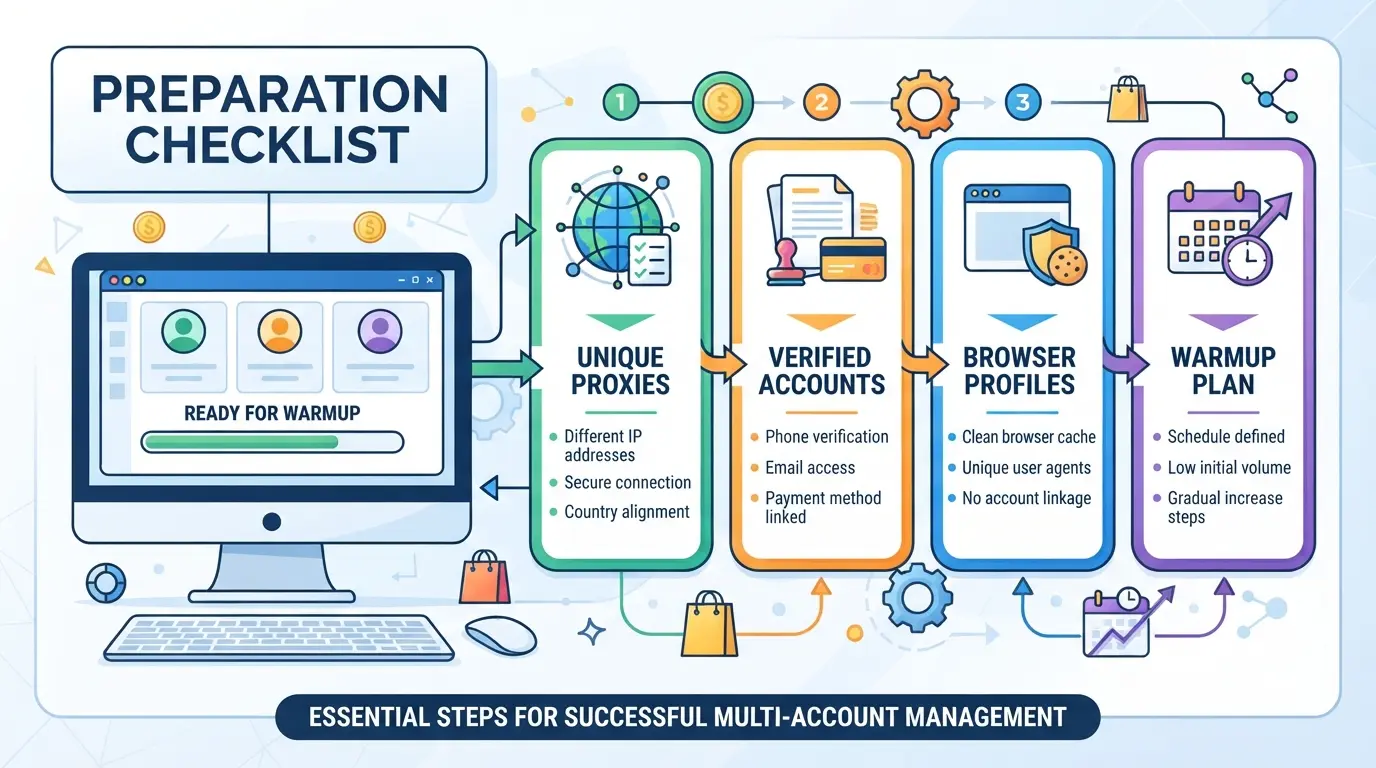
To warm up multiple eBay accounts to avoid suspension, you need more than just new emails and clean browsers. The real difference comes from separating every core identity, tracking each action, and not cutting corners on device or network setup.
Unique Identity and Contact Information for Each Account
Every eBay account must have its own email, phone number, and payment method. Sharing even a single contact detail across accounts often gets them linked and suspended within days. Use numbers that are not recycled and payment cards that haven’t been used on other eBay accounts.
Device, Browser, and Network Separation
- Assign one browser profile per account, never share cookies or logins across profiles.
- Use a separate proxy or residential IP for each account.
- Avoid overlap by not logging into two accounts from the same device, even by mistake.
Proxy and Fingerprint Planning
Choose proxies you control (not public or free IPs) and stick to one per account. Plan browser fingerprints, like timezone, language, and hardware details, so each account looks like a real, unique user. Randomizing these without a plan can cause more problems than it solves.
Record-Keeping and Monitoring Tools
Track every login, change, and listing per account. Use a spreadsheet, notepad, or any tool you’ll actually keep up to date. When a suspension hits, having a timeline of actions helps you find what triggered it, guesswork won’t cut it.
Team Access and Permission Controls (if applicable)
If you’re working with a team, don’t leave access open to everyone. The more people touch an account, the higher the risk that cross-activity gets all your stores flagged.
- Assign accounts to specific people
- Limit admin access to the smallest group needed
- Set up clear login records for each team member
Even with the right tools, missing just one of these steps can get multiple accounts suspended together. The biggest mistake is underestimating how easily small overlaps or shortcuts can link your eBay accounts behind the scenes.
Step-by-Step: How to Warm Up Multiple eBay Accounts Without Getting Flagged
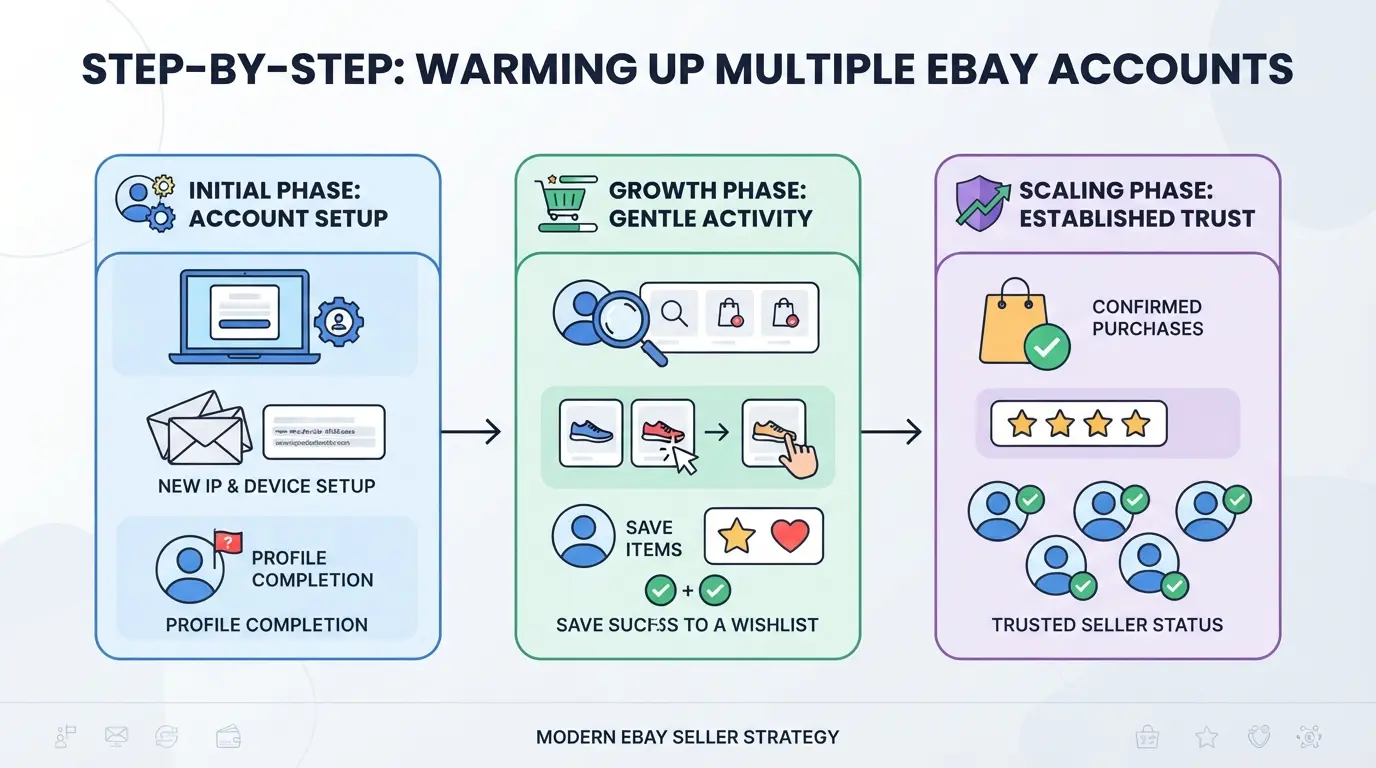
If you want your eBay accounts to last, the routine matters more than any tool or trick. Sellers who treat every step as a real user, not just a bot or script, see fewer bans, less friction, and lower linking risk. You need a clear routine that covers the first month, not just the first login.
Day 1–3: Initial Logins and Profile Setup
- Log in from the same device, IP, and browser profile every time, switching these early is the fastest way to get linked or flagged.
- Enter only the minimum required profile details (name, address, phone), but skip adding payment or business info for now. Extra details too soon can trigger manual review.
- If you get a verification prompt, complete it on the same device. Failing or skipping this step can lock the account.
Day 4–7: Light Browsing and Watching Items
- Browse several product categories, search for random items, and spend a few minutes scrolling, this builds a normal session pattern.
- Add 2–3 items to your watchlist, but do not buy or bid yet. Early purchases, especially on new accounts, are a common flag for bots.
- If you see a CAPTCHA, slow down, too many solves in one week often leads to temporary holds.
Day 8–14: Gradual Engagement and Low-Risk Actions
- Send polite messages to sellers (ask about shipping or item details) from each account, this shows real user behavior.
- Place a single low-value bid or buy a cheap item under $10. Avoid buying from the same seller on all accounts.
- Wait for order confirmation emails. No email? Check the spam folder, missed system emails can signal a blocked action.
Day 15+: Start Listing and Selling Slowly
- List just 1–2 low-risk, non-branded items (think used books or generic household goods). Avoid electronics or “hot” categories for now.
- Set prices close to the average, undercutting by more than 20% gets noticed.
- Do not bulk-upload or use templates yet. Manual listings help avoid pattern detection.
Ongoing: Monitor Feedback and Adjust Activity
- Check for warning emails or “suspicious activity” alerts after every session.
- If you get any warning, immediately reduce activity for 7–14 days, keep logging in but stop new actions.
- Watch for feedback, sales, and returns. Too many returns or complaints early on can get the whole account group reviewed.
This routine works because it mirrors normal buyer and seller activity. Most suspensions happen when actions are rushed or accounts act too similar. Next, it's worth seeing where even careful sellers slip up, those mistakes are usually what sink a whole batch.
Common Mistakes That Lead to eBay Account Suspension During Warm-Up
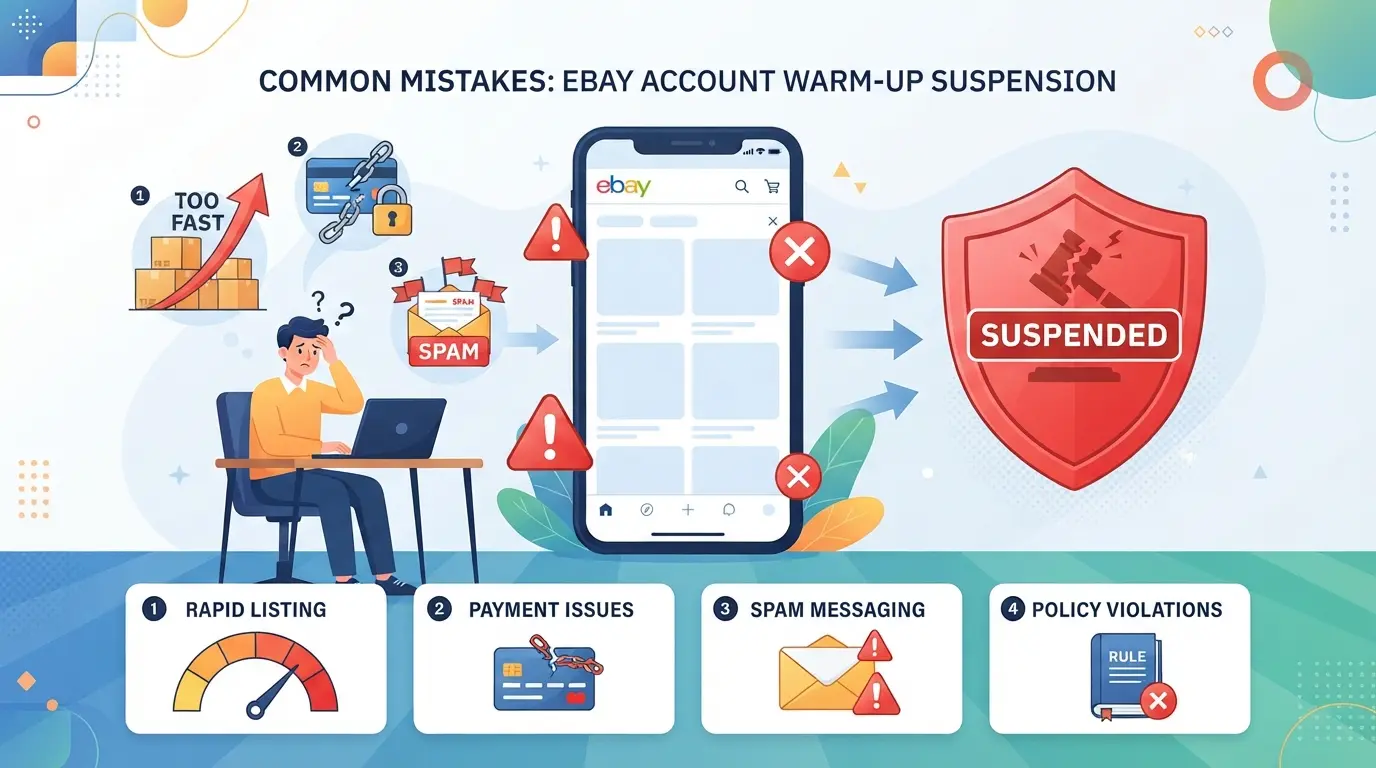
Even with a step-by-step plan, missing a single detail can get all your eBay accounts suspended before they’re even active. The mistakes below catch sellers off-guard and trigger eBay’s risk filters faster than most expect.
Reusing Devices, IPs, or Browser Environments
Running two accounts from the same device or IP, even just once, almost always links them in eBay’s system. A unique browser profile for each account is not optional; skipping this step usually means losing every account in the group.
Rushing Activity or Skipping Steps
Jumping straight to listing or sending messages in day one looks unnatural.
- eBay flags sudden activity spikes as bot-like or “multi-account farm” behavior.
- Ramp up activity slowly, spread logins, browsing, and listings over days, not hours.
Copy-Pasting Content or Patterns Across Accounts
Using the same product descriptions, photos, or templates across accounts is a red flag. eBay’s system can spot duplicate text or images and will often suspend everything tied together. Change titles, descriptions, and even photo backgrounds to keep each account distinct.
Ignoring Warning Signs or Account Messages
If you get a security alert, hold, or restriction notice, pause all actions on that account right away. Keep pushing, and you risk turning a warning into a full suspension that links back to your other accounts.
How to Safely Manage Multiple eBay Accounts with DICloak: Profile Isolation, Proxies, and Automation
After seeing how easy it is to get accounts linked or suspended during warm-up, experienced e-commerce sellers move to a workflow that separates browser profiles, network connections, and routine actions. Instead of guessing which step triggers eBay’s risk system, operators use DICloak to build an environment where each account has its own session, fingerprint, and proxy. This approach cuts down on accidental overlaps and manual errors, what matters in practice is how tightly you keep profiles apart and how you handle repetitive tasks.
Setting Up Isolated Browser Profiles and Fingerprint Configuration
Operators start by making a separate browser profile in DICloak for every eBay account. Each profile keeps its own storage, login session, and fingerprint settings, covering user agent, time zone, language, device type, and geolocation. Customizing these signals for each profile helps avoid cross-account leaks that can trigger platform checks. If you skip profile isolation and reuse the same browser, eBay may link your accounts by hidden session data or device patterns, even if you change IPs. The scope here is limited to the browser-profile layer; it does not change eBay’s platform review rules. 
Configuring User-Owned Proxies for Each Profile
Once profiles are set, users configure their own proxy for each DICloak profile. By entering the proxy’s host, port, username, and password, operators can test the connection and confirm the detected IP and region before opening an account session. This ensures each account has a consistent network route, avoiding IP overlap or sudden location shifts that eBay often flags as suspicious. The responsibility for proxy quality, rotation, and compliance stays with the operator, DICloak stores and applies the settings but does not supply proxies or guarantee platform outcomes. 
Automating Routine Warm-Up Tasks with RPA
Manual warm-up routines, like browsing, watching, or messaging, get messy and inconsistent when managed across dozens of accounts. In DICloak, operators set up RPA tasks to automate approved browser actions for selected profiles. Each task can run once or on a set schedule, with logs and live status available for review. By standardizing these steps, teams reduce the risk of manual errors or missed checks that lead to suspension. The RPA tool acts only at the browser workflow layer; teams must still design tasks that fit platform rules and review results for problems. 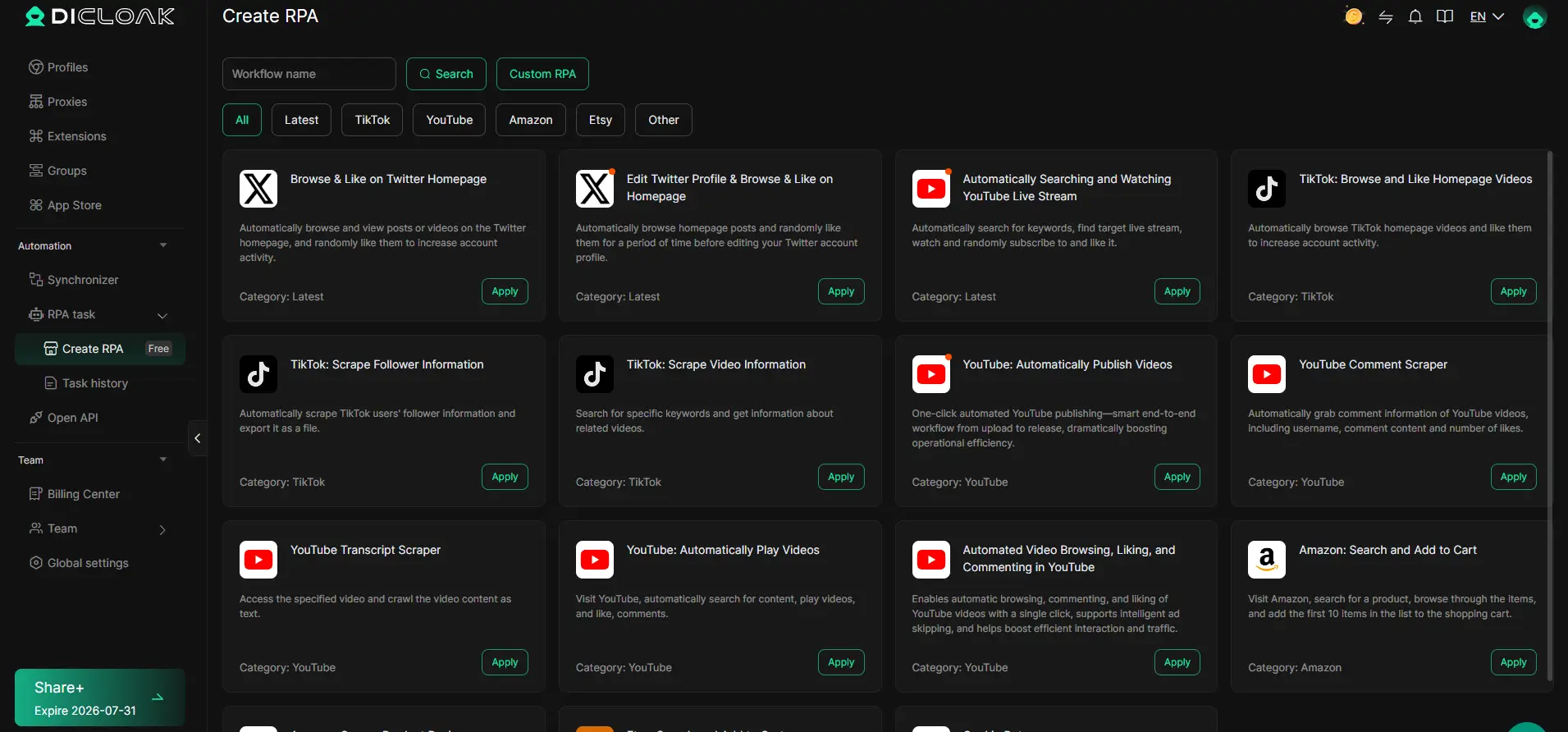
Integrating with Internal Tools Using Open API
Scaling up to dozens or hundreds of accounts usually means integrating profile and proxy management with internal tools. Teams use DICloak’s Open API, choosing between HTTP API for remote management and Local API for desktop workflows, to automate profile creation, session opening, and advanced browser control with tools like Playwright. Supported endpoints cover profiles, proxies, and groups, but differ between API types; always check the official API documentation and blur sensitive keys before sharing screenshots. The scope remains at the integration layer; it does not extend to platform-native actions or content. 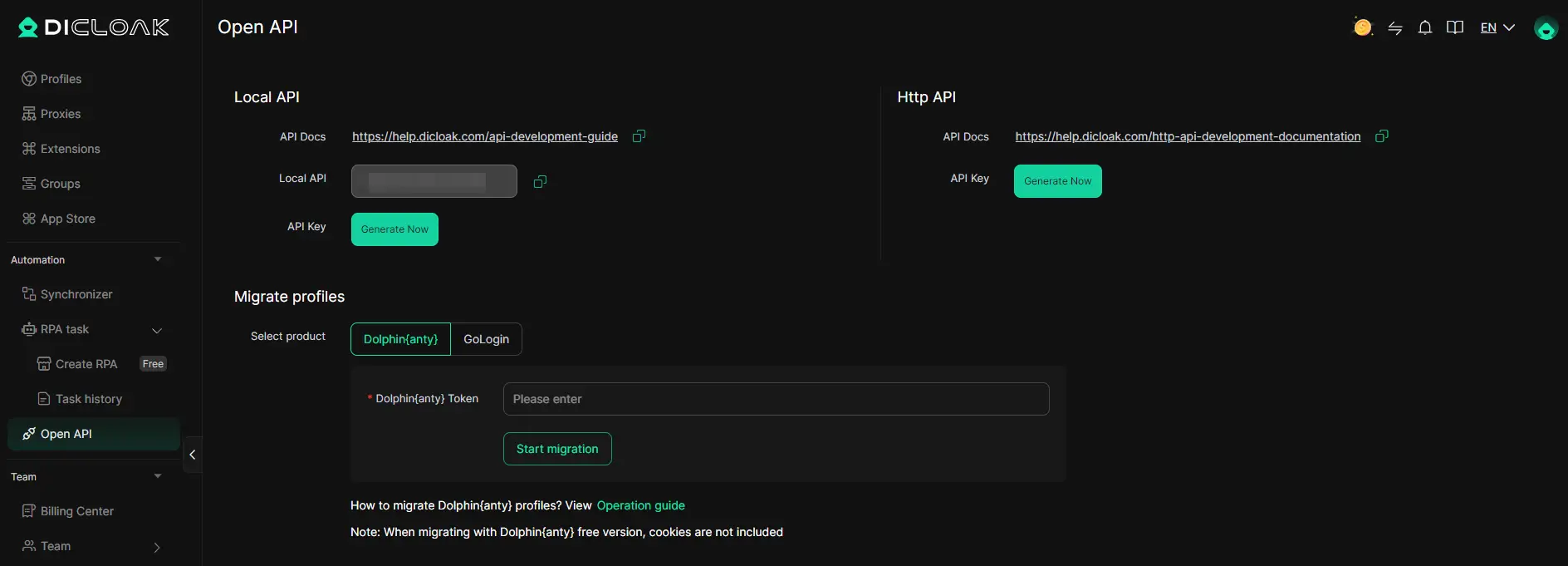
Setting up these controls makes it easier to monitor and adjust your eBay multi-account warm-up process without risking accidental links or manual mistakes.
How to Monitor, Adjust, and Scale Your eBay Account Warm-Up Process
Scaling up eBay operations only works if you keep each account healthy and catch problems before they turn into bans.
Tracking Account Activity and Feedback
- Record every login, listing, and message in a simple log, if you see a spike in “Verify Your Identity” prompts, pause activity on that account.
- Check eBay dashboards for new limits or warning banners after each session.
- Watch for unusual drops in impressions or feedback, these often show a “silent” restriction before a full suspension.
Adjusting Warm-Up Routines Based on Account Signals
- Slow down if you get more than one verification or restriction per week.
- Pause any account that receives a warning and review the last actions, resuming too soon after a warning can trigger a chain suspension.
- Rotate activity between accounts instead of pushing all at once, especially after any flag.
Safely Scaling to More Accounts
- Add only 2-3 new accounts per month, pushing faster links your accounts in eBay’s risk engine.
- Separate records for each account and proxy; never reuse browser profiles or device details.
- Review logs weekly to spot patterns, sudden problems in a batch often trace back to a shared error or device.
When Warming Up Multiple eBay Accounts Is Not the Right Strategy
Trying to warm up multiple eBay accounts to avoid suspension doesn’t always make sense. In some cases, pushing ahead can actually speed up getting flagged and losing access.
eBay Policy Changes or Platform Crackdowns
When eBay tightens enforcement or launches new detection tools, even seasoned sellers get caught. If you notice sudden mass bans or stricter login checks, pause multi-account warm-up, forcing activity during a crackdown usually means losing all your accounts at once.
Limited Resources or Lack of Unique Data
If you can’t set up each account with a unique device, clean browser profile, or dedicated proxy, the risk jumps fast.
- Shared logins or reused info trigger “linked accounts” warnings and fast suspensions.
- Safer move: stick with one well-prepared account, or wait until you can build out proper isolation.
Frequently Asked Questions About warm up multiple eBay accounts to avoid suspension
How long does it take to safely warm up a new eBay account in 2026?
Warming up a new eBay account usually takes 2 to 4 weeks. During this time, slowly increase activity by browsing, placing bids, and making small purchases. Avoid listing high-value items or making sudden changes. If you trigger risk signals, eBay may delay trust-building. Patience and steady, low-risk actions help avoid suspension.
Can I use the same device or browser for multiple eBay accounts?
No, using the same device or browser risks linking your accounts together. eBay tracks IP addresses, cookies, and browser fingerprints. If several accounts are accessed from one device, eBay can suspend them for policy violations. Always use separate devices, browsers, and clean environments for each account.
Is it safe to use the same payment method for several eBay accounts?
Using the same payment method is not safe. eBay flags accounts with shared payment details, which can lead to all accounts being suspended. Each account should have a unique payment method, like different cards or bank accounts. This helps keep accounts from being linked and protects against mass suspensions.
What should I do if one of my accounts gets suspended during warm-up?
If an account is suspended, pause activity on your other accounts right away. Carefully check for shared patterns, such as IP addresses, payment methods, or browser settings. Fix any similarities before resuming activity. Do not repeat the mistake that caused the suspension, as eBay may link and suspend your remaining accounts.
Does using proxies guarantee my eBay accounts won’t be linked?
Proxies can help hide your IP address, but they do not guarantee your accounts won’t be linked. eBay looks at browser fingerprints, account behavior, and device information. To avoid eBay suspension with multiple accounts, combine proxies with unique devices, clean browsers, and separate payment details for each account.
Now is the time to put a strategic approach into action by gradually building trust on each account and using tools that help manage your digital footprint. Taking these steps will reduce unnecessary risks and keep your operations running smoothly. Try DICloak For Free
 Web Proxy Tools
 Free Tools
 Cookie Plugin
 UA Generator
 MAC Address Generator
 IP Generator
 IP Address List
 2FA Code Generator
 World Clock
 Anonymous Check
 WebRTC Leak Test
 UUID Generator
 Free Web Proxy Site
 Proxy Checker
 FB Ad Checker
 AI Web Scraping
 Free SMM Tools
 Twitter Shadowban Checker
 Instagram Name Checker
 UTM Generator
 Username Generator
 AI Hashtag Generator
 LinkedIn Headline Generator
 Social Media Image Resizer