Downloading large files from MEGA can be tricky. Many users hit limits and get frustrated. Free accounts often stop downloads after a few gigabytes. Paid plans help, but not everyone wants to pay. In this article, we explain how to use a MEGA Downloader without limit and share tips to bypass MEGA download limit safely. You will learn practical steps to make your downloads smoother and faster, without breaking rules.
Understanding MEGA’s Download Limits
What Are MEGA’s Download Limits?
MEGA is a cloud storage service that lets you save and share files online. Every user, even those with a free account, can download files from MEGA. But this service does not give unlimited download space or bandwidth. MEGA sets a transfer quota that controls how much data you can download over a set time period. If you go over that quota, you will see messages like “Transfer quota exceeded.” This means your downloads stop until the quota resets.

For example, many free users report that they can download about 5 GB of data before hitting the limit. After that, they must wait for the quota to build up again before downloading more. The exact number can change over time and by region.
Why Does MEGA Impose Download Limits?
MEGA has limits for a few good reasons:
- Fair use for all users: If there were no limits, a small number of users could use all the server power. Limits help spread bandwidth fairly.
- Protect the network: Mega’s servers work best when not overloaded. Limits help avoid slowdowns or outages for everyone.
- Business model: MEGA offers paid plans with higher quotas. Limits help encourage users who need heavy downloads to subscribe.
For example, if a free user downloads many large movies in a short time, other users might see slower downloads. MEGA’s quota system keeps things balanced.
Differences Between Free and Paid Accounts
MEGA has both free and paid account types. The main differences are in storage space and download limits.
Free accounts:
- Get a basic storage space (e.g., 20 GB).
- Have a limited transfer quota for downloads. This quota is usually smaller and resets slowly.
- Downloads can stop when the quota runs out.
Paid accounts:
- Offer much larger quotas — sometimes 1 TB or more per month.
- ou can download large files without hitting limits as fast.
- You can also share part of your transfer quota with others.
A good example is a user who upgrades to a paid MEGA plan so their team can download big design files without stopping mid‑way. With a paid plan, the team sees fewer interruptions and better download speeds.
Methods to Bypass Download Limits
After you know how MEGA limits free downloads, here are some simple ways many users try to reduce that block. These methods do not promise full unlimited access, but they can help you run a MEGA Downloader without limit more smoothly and bypass MEGA download limit in practical ways.
Utilizing Proxy Servers for Downloading
How Proxy Servers Work
A proxy server is like a middleman between your computer and MEGA. When you use a proxy, MEGA sees the proxy’s address instead of yours. This can help when your own address hits the daily quota. Many people use proxy lists with download tools to change the IP address while downloading. This can make the server think it is a new connection and let the download continue past the usual daily cap. Proxies also help hide your real location and can make downloads a bit more private.
Recommended Proxy Services for MEGA
Some proxy services offer lists of working proxy IP addresses that you can plug into tools like MegaDownloader or other download apps. Look for HTTP or SOCKS proxies because they work best with many download managers. You can find quality proxy options from dedicated services that offer stable, fast IPs. Using these can help you bypass MEGA download limit by switching the IP when one reaches its quota. Just be careful to choose proxies that are reliable and safe, so your downloads stay secure.
Third-Party Download Managers
Overview of JDownloader and MegaBasterd
Two popular tools used with MEGA are JDownloader and MegaBasterd. These programs let you add MEGA links and download files without using a browser. JDownloader has a feature to reconnect and try a new IP when a limit is reached, so downloads don’t stop as often. MegaBasterd tries to manage connections too, though some users find it stops around a few gigabytes without extra settings. Both tools give ways to add many files at once, set limits for connections, or use proxies to help avoid hitting MEGA’s daily transfer quota.
Configuration Tips for Optimal Performance
To get better results with these tools, you can:
- Add your MEGA links to the manager instead of your browser.
- Enable features that reconnect or change IPs if a file stops.
- Use proxy lists in the settings so the tool can switch when one IP reaches a limit.
- Adjust the number of connections and chunks per download to balance speed and stability.
For example, putting a few proxies into JDownloader’s settings lets the app try a new IP automatically when one hits its download cap. This keeps a MEGA Downloader without limit working longer before it stops. Tools like these do not give truly unlimited access like a paid plan, but they help you manage large or multiple downloads with fewer interruptions.
Account Management Techniques
When you try to download many large files, sometimes one method alone is not enough. After learning about proxies and download tools, you can also think about how you manage your MEGA accounts. Good account management can help you get more done with a MEGA Downloader without limit mindset, while still trying to stay within fair use rules and respect MEGA’s terms.
Creating Multiple MEGA Accounts
Using Temporary Email Services
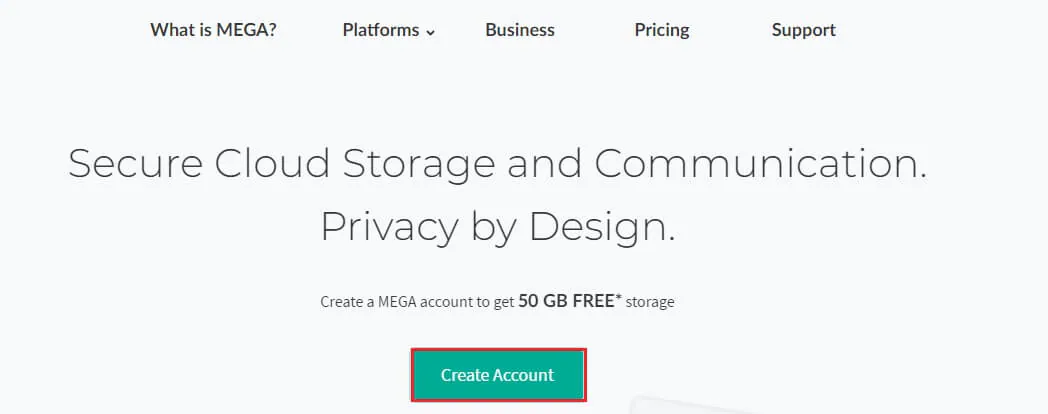
One common idea is to use more than one MEGA account. Some people create a second free account to get a fresh transfer quota. To do this, they use a different email address for each account. There are services online that let you make temporary email addresses fast. These help you sign up quickly.
For example, a user might have two free MEGA accounts. They start downloading big files with the first one. When that account hits the daily quota, they switch to the second. This way, they keep downloading more files without long waits. This approach can help users bypass MEGA download limit in a simple way, but it is important to use this only for personal files and in ways that respect MEGA’s rules.
Managing Multiple Accounts Effectively
When you have more than one account, it helps to keep them organized. You can use a password manager to save login details and keep notes on which account you used recently. This stops confusion and saves time. You can also label each account with a simple name like “Work Files” or “Media Files” so you know which quota belongs to which task.
It is important not to mix up your files. If you upload the same file to multiple accounts, you might lose track of storage space or run into sync issues. Staying clean and organized helps you use a MEGA Downloader without limit strategy in a smooth way.
Switching Between Accounts to Maximize Downloads
Best Practices for Account Switching
Switching between accounts is simple in idea: when one account reaches its quota, you sign out and sign in with another. Many users set a routine to check quota levels before they start a big download. Some people keep a note on their phone or computer of when each account’s quota resets. This helps them avoid waiting in the middle of a long download.
It is a good practice to plan your downloads. Start with the largest files first when your account has full quota, then use the second account for smaller files later. This type of planning helps you handle many downloads in one day.
Avoiding Detection by MEGA
MEGA tracks usage to enforce limits. If you switch accounts in a normal way, it usually looks like normal use. Real users report that careful switching and tracking of quotas works better than aggressive tricks. One person shared that manually rotating between two free accounts helped them download study videos over a weekend with fewer interruptions. They avoided tool-based automation and kept their usage simple.
Managing many MEGA accounts can be tiring. You need to log in and out often as well as avoid alerts and limits. This takes time and focus. An antidetect browser like DICloak can can improve efficiency and lower the risk.
⚡The DICloak Antidetect Browser has become a global favorite for its unparalleled ability to efficiently and securely manage multiple accounts. Designed for professionals in social media management, and more, DICloak offers powerful features like RPA automation, bulk operations, and a synchronizer. Additionally, it allows you to customize fingerprints and integrate proxies for each profile, ensuring top-level security and operational efficiency. It’s the ultimate tool for seamless, secure, and scalable operations.

What Makes DICloak Stand Out?
✅ Manage 1,000+ Accounts on One Device: Stop wasting money on extra hardware! DICloak allows you to manage multiple accounts on a single device, cutting costs and boosting efficiency.
✅ Guaranteed Account Safety, No Ban Risks: Every account gets its own isolated browser profile with custom fingerprints and IPs, drastically reducing the risk of bans. Your accounts, your control!
✅ Flexible Proxy Configuration for Maximum Performance: Seamlessly integrate with all major proxy protocols (HTTP/HTTPS, SOCKS5) and manage your proxy pool with bulk operations. No more struggling with IP management—DICloak has you covered.
✅ Streamlined Team Collaboration for Better Results: Easily manage your team with advanced tools like profile sharing, permission settings, data isolation, and operation logs. Your team works smarter, not harder.
✅ Automate the Grind with RPA: DICloak's built-in RPA saves you hours of manual work. Automate repetitive tasks, streamline workflows, and focus on what really matters—growing your business.
✅ Powerful Bulk Tools to Scale Your Operations: Create, import, and launch multiple browser profiles in one click. DICloak makes scaling your business as easy as it gets.
✅ Compatible with All Major Operating Systems: Based on the Chrome core, DICloak supports simulating Windows, Mac, iOS, Android, and Linux operating systems. No matter what platform you need, DICloak has you covered.
🔗 Ready to Get Started?
Visit the DICloak website to explore more details and choose the plan that’s right for you. Start for free today and experience the power of secure, efficient, and scalable multi-account management!
Technical Tips and Troubleshooting
After learning how to manage accounts and use tools, it helps to understand a few technical tips. These tricks can make your downloads smoother with a MEGA Downloader without limit mindset. They also help you quickly fix common problems that stop downloads or slow them down.
Managing Your IP Address
How MEGA Tracks Downloads
MEGA uses your IP address to count how much data you download. When you download files, MEGA sees your IP and adds the data to that address’s quota. If the quota fills up, MEGA may block new downloads from that IP for a time. This is one main reason people try to bypass MEGA download limit by managing their IP carefully.
For example, if your home internet has a shared IP used by many devices, heavy downloading on one device can affect all devices. MEGA may treat the whole shared IP as one user and slow down or stop downloads when limits are met.
Tips for Using Shared IPs
If your network uses a shared IP, you can try a few safe steps:
- Restart your router: Some home networks get a new IP when the router reconnects. This can give you a fresh quota when your downloads stop.
- Avoid public Wi‑Fi for big downloads: Many users share the same IP on public Wi‑Fi. If one person hits a limit, others may have trouble too.
These steps do not make MEGA truly unlimited, but they can help you keep going when one IP hits its quota. They fit well with tools and account methods that aim to run a mega downloader without limit in practice.
Common Download Issues and Solutions
Troubleshooting Download Failures
Sometimes downloads fail before MEGA limits even matter. This can happen if the connection drops or if the file link is broken.
Try these fixes:
- Check the file link: If the link is old or deleted, MEGA may show an error. Ask the file owner for a fresh link.
- Refresh your browser or downloader: Close and reopen your download tool. This can clear small glitches.
- Try a different download method: If the browser download fails, use a third‑party tool like JDownloader or MegaBasterd. This often works when simple browser downloads do not.
For example, one user shared that a big zip file kept failing in the browser. After adding it to a download manager and restarting the tool, the download completed without error.
Resolving Speed and Connectivity Problems
Slow speed can make downloads take forever. MEGA relies on your internet connection, so if your connection is slow, the download feels slow too.
Here are ways to fix speed issues:
- Pause other downloads or streaming: Other internet use can slow MEGA downloads.
- Connect by cable instead of Wi‑Fi: Wired connections are often faster and more stable.
- Try a different time of day: Sometimes networks are busy during peak hours. Later at night, speeds can improve.
One user found that switching from Wi‑Fi to a wired connection doubled their download speed. They could finish big video files much faster.
These technical tips can help you solve common problems and get the most from your download experience. When you combine them with smart account handling and download tools, you build a reliable approach to use a MEGA Downloader without limit and reduce blocks from the bypass MEGA Download limit tactics.
Conclusion
Using MEGA for large downloads can be tricky, but with the right approach, you can make it smoother. By understanding limits, using tools like download managers, organizing multiple accounts, and managing IPs, you can run a MEGA Downloader without limit and bypass MEGA download limit more effectively. The key is to plan downloads, switch accounts when needed, and fix common errors like slow speeds or failed files. Always use these methods responsibly to stay within MEGA’s rules and keep your files safe, just like users who successfully managed large downloads without breaking the system.
FAQ
1.What does “MEGA Downloader without limit” really mean?
A mega downloader without limit does not mean MEGA gives unlimited downloads for free. It means using smart tools, account planning, and technical tips to reduce interruptions and download more smoothly without hitting limits too fast.
2.Is it safe to try to bypass MEGA download limits?
Using common methods to bypass MEGA download limit, such as download managers or account planning, is generally safe if done carefully. Avoid aggressive automation or risky software, as these may lead to account issues or data loss.
3.Can free MEGA accounts work with a mega downloader without limit setup?
Yes. Many users use free accounts with a MEGA Downloader without limit approach by managing quotas, switching accounts, and fixing common download issues. However, free accounts will always have some limits compared to paid plans.
4.Why does my MEGA Downloader stop even when I follow all steps?
A mega downloader may still stop due to shared IP limits, unstable connections, or busy network times. Checking your connection, restarting downloads, and adjusting settings often helps continue downloading without long waits.
5.What is the best way to avoid problems when bypassing MEGA download limits?
The best approach is balance. Combine download managers, smart account use, and technical troubleshooting. Plan downloads ahead of time and avoid extreme actions. This keeps your MEGA Downloader without limit workflow stable and low-risk.
 Web Proxy Tools
 Free Tools
 Cookie Plugin
 UA Generator
 MAC Address Generator
 IP Generator
 IP Address List
 2FA Code Generator
 World Clock
 Anonymous Check
 WebRTC Leak Test
 UUID Generator
 Free Web Proxy Site
 Proxy Checker
 FB Ad Checker
 AI Web Scraping
 Free SMM Tools
 Twitter Shadowban Checker
 Instagram Name Checker
 UTM Generator
 Username Generator
 AI Hashtag Generator
 LinkedIn Headline Generator
 Social Media Image Resizer