Selling on TikTok is no longer just about posting a video and sending viewers to another website. With TikTok Shop, people can discover a product in a short video or LIVE, tap the product link, and complete the purchase without leaving TikTok. This gives sellers a shorter path from product discovery to checkout.
Still, opening a shop takes more than creating a TikTok account. You need the right identity or business documents, an eligible selling region, compliant products, payment information, and a working shipping setup. A small mistake in one of these areas can delay your application or stop a product from going live.
This guide explains how to open a TikTok Shop from start to finish. It is written for new sellers who want to understand not only where to click, but also what to prepare, what can go wrong, and what to do after the shop is approved.
The exact rules depend on your market. For example, TikTok Shop has different registration requirements in the United States and the United Kingdom. This guide uses the U.S. seller process for many of its practical examples, while pointing out where regional rules may differ. Always check the Seller Center for your chosen market before submitting an application.
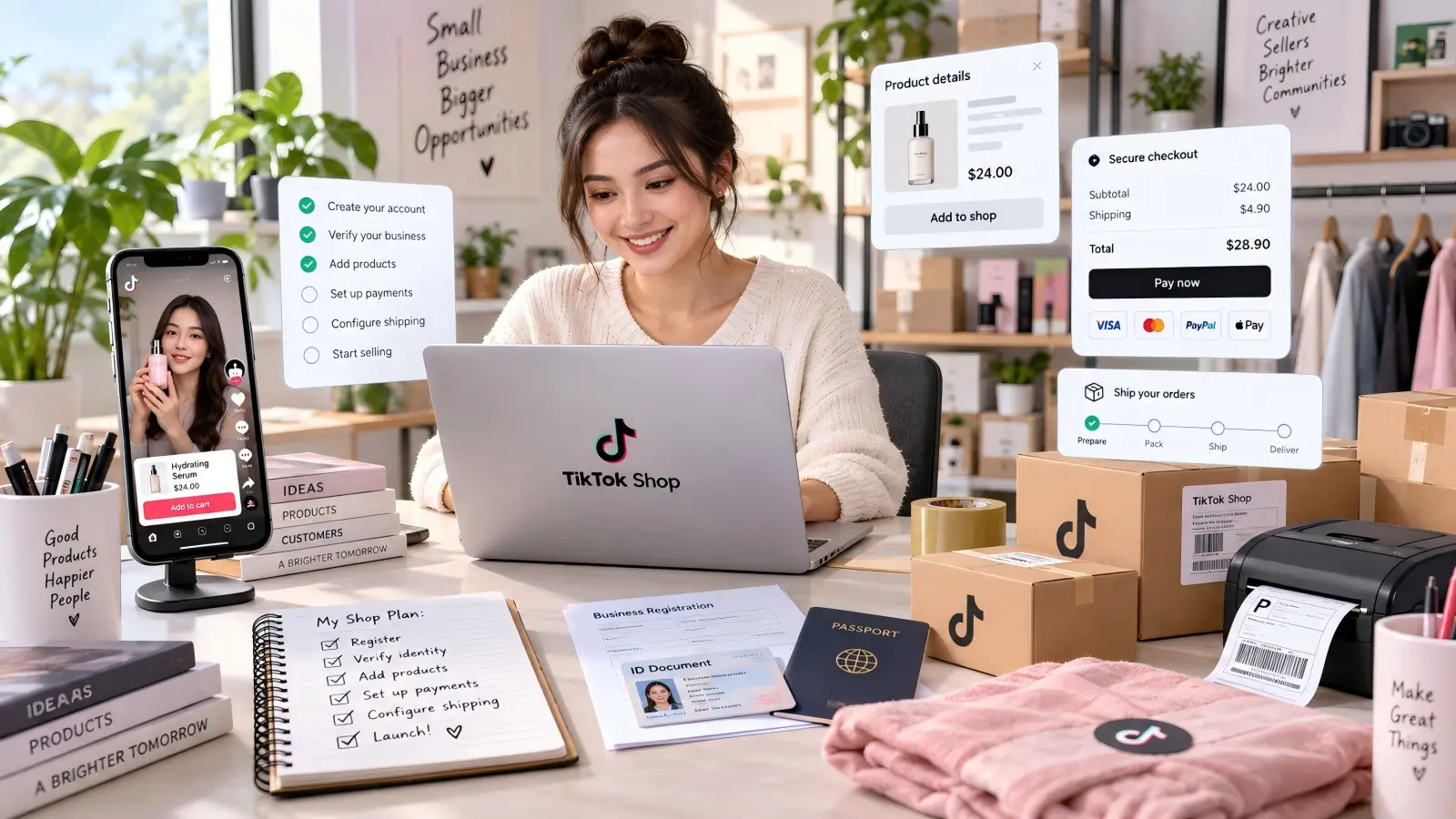
What Is TikTok Shop & Who Should Learn How to Open a TikTok Shop
TikTok Shop is TikTok's built-in e-commerce system. It allows eligible sellers to list products and connect them with TikTok content. Shoppers can discover products through shoppable videos, LIVE streams, seller profiles, and other shopping surfaces inside TikTok. This makes the buying experience different from a normal social media ad that sends the customer to an outside store.
You may also see people search for Tik Tok Shop, tiktokshop, or TikTok marketplace when they are looking for this feature. The official name is TikTok Shop. For sellers, the important point is that content and commerce work together. A video can demonstrate a product, answer a customer question, and give the viewer a direct way to buy it.
Learning how to open a TikTok Shop makes sense for product brands, small online sellers, manufacturers, established e-commerce stores, and creators who have their own products. It can also be useful for businesses that already know how to sell on TikTok through organic content but want a more direct way to turn views into orders.
Core Benefits of Selling on TikTok Shop
The biggest advantage is not simply access to another online store. TikTok Shop connects shopping with content. A customer may see a desk organizer being used in a "clean my workspace" video, tap the product, check the price, and place an order while the product is still fresh in their mind.
For a new seller, several benefits stand out:
- Products can appear inside content. Sellers can connect products with eligible videos and LIVE content instead of depending only on a traditional product catalog.
- The shopping path is shorter. Viewers can move from discovery to a product page without being sent to a separate website.
- TikTok content can explain products visually. This works well for products that are easier to understand through demonstrations, comparisons, before-and-after examples, or tutorials.
- Sellers can work with creators. TikTok Shop Affiliate allows eligible sellers and creators to work together through commission-based product promotion.
- Search can create another source of discovery. TikTok Shop product titles, descriptions, search terms, and other listing information can help the platform understand when a product matches a shopper's search.
TikTok Shop also gives sellers a built-in Affiliate Center. Sellers can use Open Collaboration to make eligible products available to creators or use Target Collaboration to invite specific creators. Creators can then promote those products and earn commission from qualified sales.
Eligibility Requirements Before You Learn How to Open a TikTok Shop
Before asking how to sell on TikTok Shop, first check whether you can register in your intended market. TikTok Shop rules are regional. A business that qualifies in one country should not assume that the same documents or seller types will work in another country.
For example, as of 2026, an individual seller applying for TikTok Shop in the United States must be at least 18 years old, reside in the U.S., use valid identification accepted by TikTok Shop, and provide a phone number and email that meet the registration requirements. Accepted identity documents can include a U.S. passport, driver's license, state ID, or permanent resident card. Applicants may also need information such as their residential address, SSN or ITIN details, bank information, and tax documents.
Business sellers have a different process. A U.S. corporation or partnership may need its legal business name, EIN, business address, ownership information, representative information, and supporting documents. In the UK, seller classifications and identity checks are different again. This is why checking current TikTok Shop news, Seller Center announcements, and official policy pages is worth doing before registration rather than relying on an old tutorial.
Preparations You Need Before You Open a TikTok Shop
A common beginner mistake is starting the application before preparing the information TikTok Shop will ask for. That often leads to rushed uploads, mismatched names, missing documents, or the wrong business type. Spending a little time preparing first can make the actual registration much easier.
Think of this stage as building one clean folder for your application. Your identity details, business records, product information, bank details, and shipping information should all tell the same story.
Gather Required Documents for TikTok Shop Registration
Start with identity and business documents. The exact list depends on your country and business structure, so use your local Seller Center as the final source. Do not assume a document accepted in another TikTok Shop region will be accepted in yours.
For a U.S. individual seller, a useful preparation checklist includes:
| Information or document |
Why you may need it |
| Valid accepted photo ID |
Identity verification |
| Legal name and date of birth |
Account owner verification |
| Residential address |
Seller and address verification |
| SSN or ITIN information |
Identity and tax setup |
| W-9 |
U.S. tax information |
| Proof of address when requested |
Address verification |
| Bank account information |
Receiving seller payouts |
| Email and phone number |
Account registration and verification |
TikTok Shop says submitted U.S. registration documents must be valid, clear, complete, and consistent with the information entered during registration. Files should not be cropped or altered. TikTok also warns against expired documents and photos of documents displayed on another computer or phone screen.
Check every name before uploading anything. If your ID says "Jonathan A. Miller," do not casually enter "Jon Miller" because that is what you normally use online. Verification systems compare formal information, so small differences can create extra review work.
Pick Your Selling Region and Business Type
Your selling region affects almost everything that comes next. It can change which seller types are available, which identity documents are accepted, how tax information works, which products need extra approval, and how shipping is handled. Choose the market where your business actually meets TikTok Shop's current requirements.
Your business type matters just as much. In the U.S., TikTok Shop distinguishes between individual sellers and business structures such as sole proprietorships, corporations, and partnerships. TikTok's U.S. guidance also warns that the selected business type cannot simply be changed after registration, so do not choose "Individual" only because it looks faster if you are really operating through a registered company.
Consider a seller who runs an incorporated home decor company. If the company owns the products, receives the revenue, and has its own business bank account, registering with accurate company information creates a cleaner setup than treating the store as an unrelated personal account. The goal is not to choose the easiest option on the screen. The goal is to choose the option that matches the legal structure you actually use.
Prepare Product Inventory and Compliance Information
Do not wait until your shop is approved to ask whether your products are allowed. TikTok Shop separates prohibited products from restricted products. Prohibited products cannot be sold, while restricted products may require category-level approval, product-level approval, or another qualification process before they can be listed.
Before registration is finished, prepare basic information for the products you expect to launch first. This should include product names, categories, prices, inventory quantities, dimensions or weight when needed for shipping, product images, descriptions, variants, brand information, and any safety or compliance records required by that product category.
For example, imagine that you plan to launch 20 products but only five are fully photographed and ready to ship. It is usually better to prepare those five listings properly than rush all 20 into the TikTok marketplace with missing specifications and weak images. Your first goal is to create accurate listings that you can actually fulfill, not to make your catalog look large.

Step-by-Step Tutorial: How to Open a TikTok Shop
Once your documents and product information are ready, you can move into the actual registration process. The interface may change over time, but the core process normally includes account creation, seller verification, shop setup, financial information, logistics, and product listing.
The following walkthrough uses the current U.S. Seller Center flow as the main example. If your account is in another region, use the same logic but follow the fields and verification instructions shown in your local Seller Center.
Register and Submit Your TikTok Shop Application
Start from the official TikTok Shop Seller Center for your selling region. In the U.S., sellers can register using a TikTok account or use an eligible email address or phone number. If you register with a TikTok account, TikTok will ask you to authorize access before continuing.
The basic flow looks like this:
- Open TikTok Shop Seller Center for your region.
- Create your seller account or sign in with an eligible TikTok account.
- Verify your email address or phone number if requested.
- Choose the correct seller or business type.
- Enter the legal seller or business information.
- Add the requested owner or representative information.
- Set your initial shop details.
- Review everything before submitting.
Do not treat the review page as a formality. Compare the application with your documents line by line. Check your legal name, company name, registration information, address, phone number, email, and business type before you click submit.
Complete Identity and Business Verification
Verification is where many sellers slow down because TikTok Shop is trying to confirm that the applicant and business details are real. The easiest way to reduce problems is to submit original, clear documents and enter information exactly as it appears on them.
For U.S. individual applications, TikTok currently asks for accepted identification and other personal details. Corporate and partnership applications require business information and verification of relevant business representatives. The exact requests can depend on the business structure and application.
Suppose your company registration says "North Peak Home LLC," but your application says "North Peak Home." That difference may look minor to you, but it can make automated checks less straightforward. The same problem can happen when a residential address uses an old address on one document and a new address in Seller Center. Fix these inconsistencies before you submit instead of hoping the review team will understand what you meant.
If TikTok Shop asks for another document after submission, read the rejection or request message carefully. Do not keep uploading the same file without changing anything. Find the exact issue first, such as an expired ID, cropped image, unreadable text, missing side of a document, or information mismatch.
Set Up Shop Profile, Payment and Shipping Settings
Approval is only part of learning how to open a TikTok Shop. A shop also needs operational settings so that customers can place orders and you can receive money and deliver products.
Start with your shop profile. Choose a name that customers can recognize and that follows TikTok Shop's naming rules. You can also link an official TikTok account to your shop. In the U.S., linking the official account unlocks important content-based shopping features such as shoppable videos, LIVE shopping, and the Shop Page.
Next, configure the three areas that directly affect orders:
- Bank account: Add and verify the bank account that will receive your payouts. In the U.S., the beneficiary name should match the seller information used during onboarding. Corporate sellers should connect the appropriate company bank account.
- Pickup or warehouse address: Enter the real address from which orders will be prepared or collected.
- Return address: Make sure customers can return eligible orders to an address that your business can actually manage.
Shipping settings deserve extra attention. As of August 2026, new U.S. accounts use TikTok Shipping as the default setup. Sellers using Seller Shipping need to configure the relevant shipping template, including the shipping origin, delivery regions, and rates. TikTok Shop also supports other fulfillment arrangements depending on seller eligibility.
Upload Your First Product Listing
Once the main shop settings are ready, add your first product from Seller Center. TikTok Shop supports individual product uploads and other methods such as batch uploads, depending on how your catalog is managed.
For a normal listing, prepare the following:
- A clear product title
- The correct category
- Product description
- Price
- Inventory
- Product images
- Variations such as size or color
- Shipping weight or dimensions when required
- Brand information where relevant
- Required category or compliance documents
Do not rush the images. TikTok Shop's current U.S. listing guidance recommends at least five high-resolution images showing the product clearly from different angles. Listings should also use an accurate category and a description that gives shoppers enough information to understand what they are buying.
Imagine you are selling a foldable desk organizer. A weak listing might use the title "Amazing Organizer 2026 Best Product" with one supplier image and almost no description. A stronger listing would identify what the item actually is, its size, material, main use, color options, and what is included. The photos could show the organizer folded, opened, placed on a desk, and viewed from different angles. That information helps both the shopper and TikTok understand the product.
Common Mistakes When You Open a TikTok Shop & How to Avoid Them
Most new-shop problems are not caused by one hidden trick in the TikTok algorithm. They usually come from basic setup errors: the application details do not match the documents, the product breaks a category rule, or the shop cannot process payments and shipping correctly.
These problems are much easier to prevent before launch than to repair after orders begin coming in.
Document Errors That Delay TikTok Shop Approval
One of the easiest mistakes to avoid is submitting poor documents. TikTok Shop's U.S. guidance says documents should be valid, complete, clearly visible, and consistent with the registration information. Cropped documents, expired IDs, screenshots, or files with missing information may be rejected.
Another common issue is mixing personal and business information. For example, a corporation may be registered under one legal name while the owner enters a shortened brand name in a field that asks for the legal company name. A bank account may also belong to a different person or entity than the one used during onboarding.
Create a simple check before submission: compare every important field with the document that supports it. Name against ID. Company name against registration record. Address against proof of address. Bank beneficiary against onboarding information. This takes a few minutes and can prevent much longer delays.
Product Category and Compliance Violations
A product being legal to sell somewhere does not automatically mean it can be listed on TikTok Shop. TikTok maintains its own prohibited and restricted product policies in addition to applicable laws. Prohibited items cannot be listed, while certain restricted categories require extra qualification before sellers can offer them.
The correct category also matters. Do not place a product in an unrelated category simply because that category does not ask you for the same documents. TikTok can request additional qualification information, and incorrect categorization can create listing or account problems.
A good habit is to check compliance before placing a large inventory order. If you want to launch an electronic product, beauty product, supplement, children's item, or another category that may have extra rules, look up its current TikTok Shop requirements first. For example, TikTok's 2026 U.S. rules state that some electronic products can require documentation through the Qualification Center.
Wrong Payment and Shipping Configuration
A product can sell well and still create a bad business result if the order cannot be shipped correctly. Before launching traffic campaigns or creator promotions, place your attention on the boring operational details: warehouse address, return location, inventory, shipping method, package size, and delivery areas.
For U.S. Seller Shipping, the shipping template controls important settings such as the warehouse used, supported delivery regions, and shipping rates. Leaving a state outside your delivery settings can make that area unavailable for delivery. Incorrect weight or package information can also create unexpected fulfillment costs.
Payment details need the same care. TikTok Shop verifies seller bank accounts, and additional proof may be requested to confirm ownership. Do not wait until you expect a large payout to discover that the payout account cannot be verified. Set it up early, confirm the account belongs to the correct person or business, and check the Finances section after the shop is running.
Tips to Boost Sales After You Open a TikTok Shop
Opening the shop only gives you the ability to sell. It does not create demand by itself. Sellers who want to learn how to sell on TikTok Shop also need to understand how TikTok users discover products.
A practical launch plan should connect three things: useful content, strong product pages, and distribution. Your videos bring attention, your listing gives shoppers enough information to make a decision, and creator partnerships can help the product reach audiences outside your own account.
Use Short Videos and Live Streams to Promote Products
TikTok Shop works best when the product has a role in the content. Instead of posting a static product picture and saying "buy now," show why someone would use the item. Demonstrations, problem-and-solution videos, comparisons, tutorials, packing videos, and real use cases often give viewers more reasons to keep watching.
For the desk organizer example, you could show a messy work area at the start of the video. Then organize the same desk using the product and show the final result. The product does not need a long explanation because the viewer can see what problem it solves. If the product is linked to the video, interested viewers can open the listing directly from the content. TikTok Shop currently allows sellers and eligible creators to connect products, shops, categories, or collections with shoppable videos.
LIVE content can serve a different purpose. It gives sellers more time to demonstrate details, compare variations, answer questions, and show products in real situations. If customers keep asking the same question in comments, such as whether an organizer fits a certain desk size, that question can become a useful LIVE demonstration or future short video.
Optimize Product Listings for TikTok Search
When people ask how to sell on TikTok, social content usually gets most of the attention. But product search matters too. A shopper who searches for a product already has a clearer idea of what they want, so your listing needs to tell TikTok exactly what you sell.
Start with the words a real shopper would use. A product title such as "Foldable Desk Organizer with 3 Storage Compartments" gives much more useful information than "2026 Viral Must-Have Organizer." Then use the description to answer practical questions about dimensions, material, use, variations, care, and what comes in the package.
TikTok Shop introduced dedicated Search terms and Product highlights fields for U.S. listings in 2026. TikTok says these fields can help its system better understand products and match them with shopper searches. Seller Center also provides listing and keyword tools that sellers can use to improve discoverability.
Do not turn the description into a keyword list. If your target phrase is "desk organizer for small desk," use it only where it makes sense. Add related terms because they explain the product, not because you want to repeat the same phrase ten times. Good TikTok Shop SEO should make the listing easier for both shoppers and the platform to understand.
Leverage TikTok Creator Partnerships
You do not have to create every successful video yourself. TikTok Shop Affiliate gives eligible sellers a way to work with creators who can promote products for a commission. This can be useful when your own TikTok account is new or when you want to reach several small audience groups at the same time.
Inside Affiliate Center, sellers can use Open Collaboration to make eligible products available to creators or Target Collaboration to invite selected creators. TikTok also provides tools for reviewing creator activity and performance, which can help sellers decide which relationships are worth continuing.
Do not choose creators only by follower count. Look at whether their content style matches the product and whether their audience is likely to care about it. A creator with a focused audience of home-office users may be more useful for a desk organizer than a much larger entertainment account with no connection to workspace products.
You can also make the creator's job easier. Give them accurate product information, clear product benefits, samples when appropriate, and enough freedom to make content that fits their normal style. The best TikTok Shop affiliate content usually feels like useful TikTok content first and a sales pitch second.
Learning how to open a TikTok Shop is therefore only the first part of the process. A strong shop needs accurate verification, compliant products, reliable shipping, clear listings, useful content, and consistent testing after launch. Build those basics correctly, then use your sales data, search performance, customer questions, and creator results to decide what to improve next.
How DICloak Can Help You Manage TikTok Shop Operations
Learning how to open a TikTok Shop is only the first step. Once a seller starts running more products, shops, brands, or team accounts, daily management can become harder. Different TikTok Shop accounts may have separate login sessions, business information, team members, and operating regions. Using all of them in the same normal browser can quickly become messy, especially when several people need access.
DICloak provides separate browser Profiles, proxy settings, and team access controls in one workspace. These features are most useful for agencies, multi-brand businesses, and sellers who manage more than one TikTok Shop. Instead of mixing every shop into one browser session, users can build a clearer working environment for each store and control how team members access it.
Keep Each TikTok Shop in a Separate Browser Profile
DICloak lets users create an independent browser Profile for each TikTok Shop they manage. Each Profile can keep its own cookies, session data, cache, browser settings, and fingerprint configuration. This means a seller can open Shop A in one Profile and Shop B in another without constantly logging out, clearing cookies, or switching accounts in the same browser.
This setup is especially useful after you learn how to sell on TikTok Shop and begin operating several brands or client stores. For example, an agency managing five TikTok sellers can create five named Profiles and keep each shop's working session in the correct place. Users can also configure settings such as operating system, language, time zone, WebGL, Canvas, and other browser parameters for each Profile, making account organization much easier.

Connect a Dedicated Proxy to Each TikTok Shop Profile
DICloak also allows a separate proxy to be connected to each browser Profile. Users can add HTTP, HTTPS, or SOCKS5 proxies, test the connection, and save them for later use. For businesses that operate TikTok Shop accounts in supported markets, this makes network settings easier to organize instead of changing a system-wide proxy whenever someone moves between stores.
A practical approach is to keep one stable network setup with the Profile that uses it, rather than frequently changing locations or connection settings. For example, if a team operates a U.S. TikTok Shop from an approved business setup, the related Profile can keep its assigned proxy and browser configuration together. Sellers should still follow TikTok Shop's regional eligibility, identity, and business requirements, since a proxy does not replace the documents or qualifications required to open a shop.

Control Team Access and Track TikTok Shop Activity
TikTok commerce often becomes a team job. One person may upload products, another may handle customer service, while another works on short videos or TikTok Shop affiliate campaigns. DICloak's team tools let administrators create members and member groups, decide which Profiles they can access, and control permissions such as opening or editing a Profile.
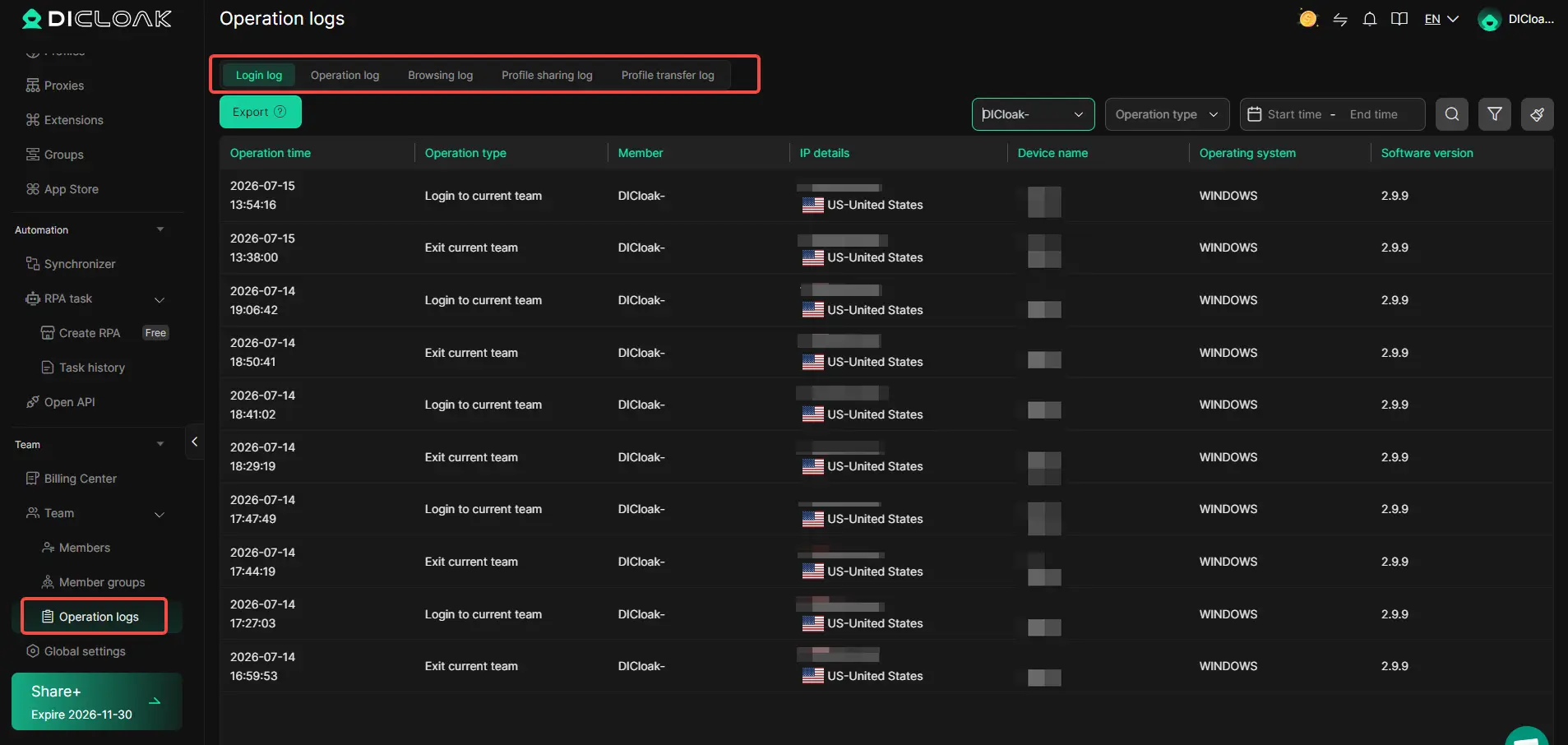
DICloak also provides Operation Logs for checking activities such as logins, browser activity, Profile sharing, and Profile transfers. This gives managers a clearer record of who worked with a shop and when. For an agency or growing TikTok marketplace business, these controls can reduce the need to share the same browser login setup with everyone and make day-to-day TikTok Shop management easier to organize.
Frequently Asked Questions About How to Open a TikTok Shop
How long does it take to open a TikTok Shop?
Approval time can vary by region and seller type. If your documents are clear and all information matches, the review is usually faster.
Do you need a business license to open a TikTok Shop?
Not always. Some regions allow individual sellers, while business sellers usually need valid company information and registration documents.
How much does it cost to open a TikTok Shop?
Creating a TikTok Shop is generally free, but TikTok may charge selling fees, commissions, or other service fees depending on the market and order type.
Can you sell any product on TikTok Shop?
No. TikTok Shop has prohibited and restricted product rules. Some categories also need extra documents or approval before you can list products.
Do you need followers to sell on TikTok Shop?
Sellers do not always need a large follower base to open a shop. After launch, you can promote products through short videos, LIVE content, TikTok Shop affiliate creators, and product search.
Conclusion
Learning how to open a TikTok Shop is not only about completing the registration form. New sellers also need to prepare the right documents, choose the correct business type, follow product rules, and set up payments and shipping before they start selling.
After your shop goes live, focus on clear product listings, useful short videos, LIVE content, and creator partnerships. If you manage multiple TikTok Shop accounts or work with a team, tools like DICloak can also help keep browser Profiles, proxies, and team access organized. A strong setup from the beginning makes it easier to grow your shop and avoid common problems later.
 Web Proxy Tools
 Free Tools
 Cookie Plugin
 UA Generator
 MAC Address Generator
 IP Generator
 IP Address List
 2FA Code Generator
 World Clock
 Anonymous Check
 WebRTC Leak Test
 UUID Generator
 Free Web Proxy Site
 Proxy Checker
 FB Ad Checker
 AI Web Scraping
 Free SMM Tools
 Twitter Shadowban Checker
 Instagram Name Checker
 UTM Generator
 Username Generator
 AI Hashtag Generator
 LinkedIn Headline Generator
 Social Media Image Resizer