You type your password, solve the picture puzzle, and hit submit, then Facebook bounces you right back to the same CAPTCHA screen. The facebook captcha loop isn’t just a minor glitch; it’s the kind of login problem that locks out real users for hours or even days. Sometimes, the loop comes up after a password reset or security review. Other times, it starts out of nowhere, with no warning that your browser or network changed.
Trying to refresh or switch devices rarely fixes it. Many users end up stuck with “facebook captcha not working” errors, or hit a wall where every code is accepted but the site won’t move forward. Clearing cache, switching browsers, or toggling privacy settings often makes no difference. If your account is tied to business pages or ad campaigns, each failed login means lost time, and possibly lost access if Facebook flags your repeated attempts as suspicious.
What actually works is less about luck and more about understanding how Facebook tracks sessions, browser fingerprints, and suspicious behavior. The fixes aren’t just about reloading the page; they involve step-by-step account checks, browser tweaks, and sometimes rethinking how you handle cookies and proxies. Missing even one of these details can keep you stuck in the facebook login loop much longer than necessary.
Start by checking the exact error and confirming if it’s a true loop or a one-off block, here’s what to look for first.
What Is the Facebook CAPTCHA Loop and Why Does It Happen?
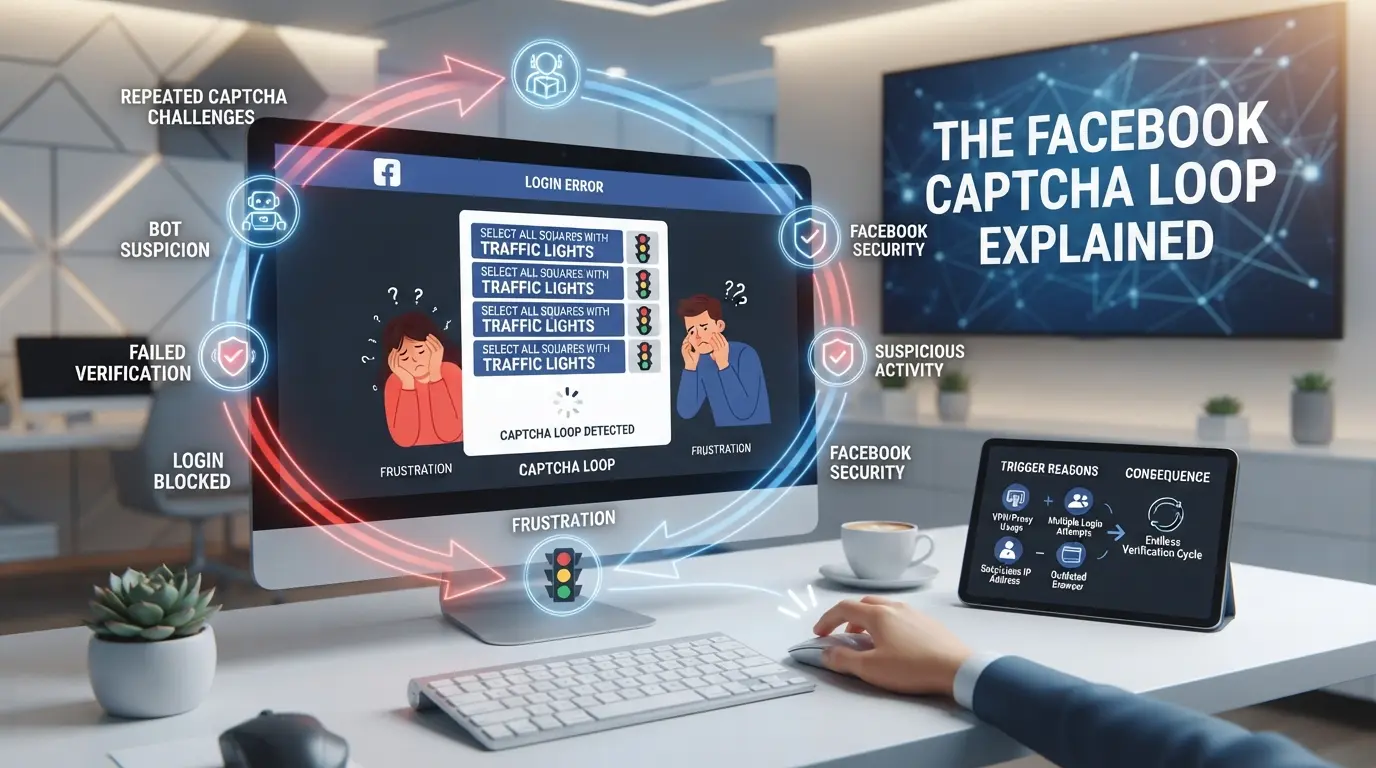
The facebook captcha loop traps users in a cycle where solving the challenge leads right back to another CAPTCHA, locking out normal access. This is not a one-off block, it signals Facebook has flagged your session or account as risky, often due to technical or behavioral triggers.
How Facebook Uses CAPTCHA for Security
CAPTCHA is a gatekeeper. Facebook uses it to test whether a login comes from a real person or a bot. By forcing you to solve puzzles, Facebook tries to stop automated attacks and limit fake account activity, especially on logins from new devices or strange locations.
Common Triggers for the CAPTCHA Loop
You can get stuck in this loop for reasons that seem minor until you try to fix them. Sudden changes in device fingerprints, like clearing cookies or switching browsers, often trigger extra checkpoints. Logging in from a new IP range or using a proxy with inconsistent routing can make Facebook see you as a potential attacker. For business accounts, even routine tasks like batch posting or managing multiple pages from the same machine can cause trouble if browser profiles overlap or session data isn’t handled carefully. The loop gets worse when repeated failed attempts pile up, Facebook starts to see your activity as brute force, and the more you reload, the more the system doubles down. Missing the root cause, like a mismatched browser fingerprint or a session clash, means you’ll just keep solving puzzles with no real progress.
How the CAPTCHA Loop Differs from Other Login Errors
- Password reset: You’re sent a code or prompted to change credentials; solving CAPTCHA doesn’t end the cycle.
- Account restriction: You get a clear warning about policy violations; access is limited or blocked outright.
- CAPTCHA loop: Solving puzzles leads to fresh CAPTCHA requests, not account recovery or a locked screen.
The real frustration comes from not knowing if you’re dealing with a technical mismatch or an actual account flag. Most login errors tell you what’s wrong or send you down a recovery path. The CAPTCHA loop just circles back, leaving you guessing which detail is out of sync. This makes the next step, pinpointing risk factors and mistakes, critical if you want to break out of the cycle.
Why Facebook Accounts Get Stuck in CAPTCHA Loops: Risk Factors and Mistakes
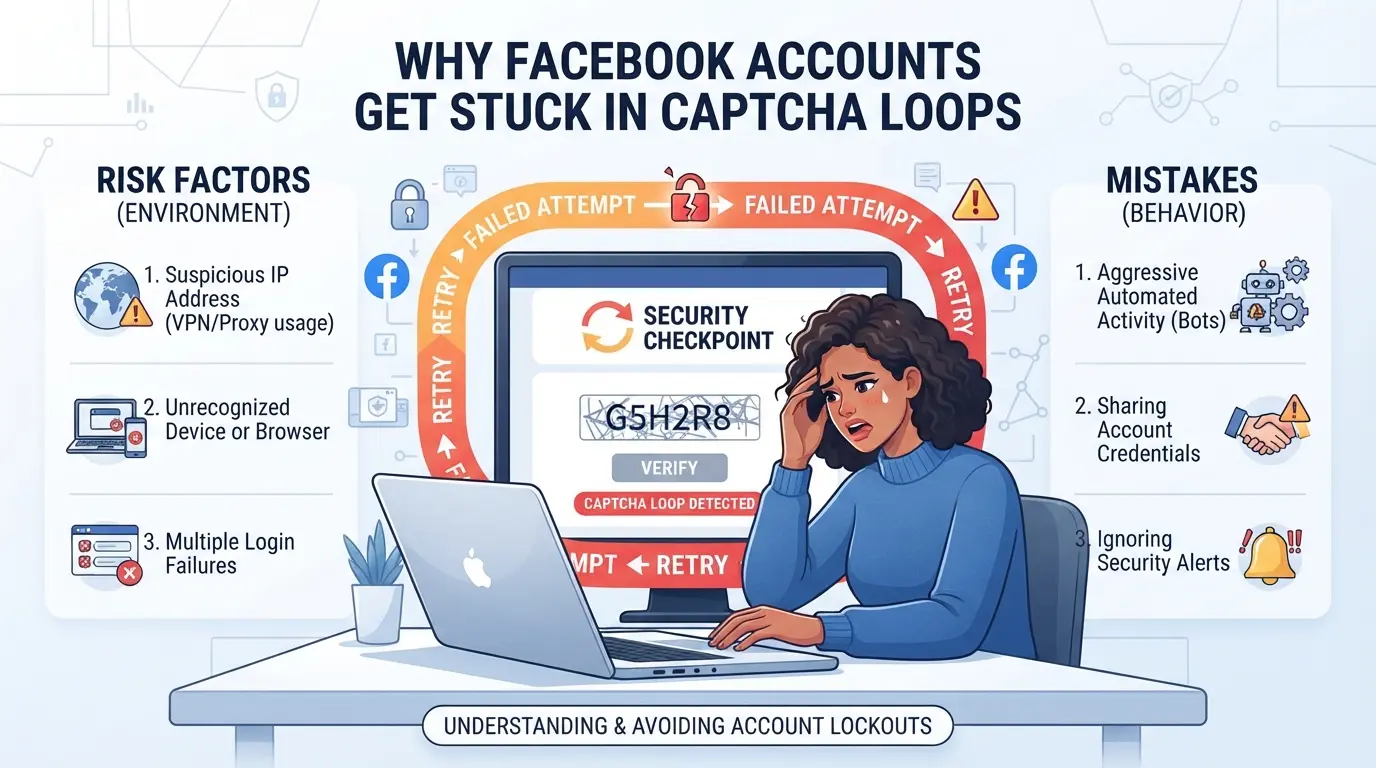
Most users get trapped in a Facebook CAPTCHA loop because their account activity or login setup triggers one or more of Facebook’s automated red flags. The real cause is rarely just “bad luck” , nearly every stuck loop comes from a mix of technical issues and habits that look suspicious to Facebook’s systems.
Frequent IP or Device Changes
Sudden jumps between Wi-Fi, mobile data, or proxy servers confuse Facebook’s risk engine. If your login location bounces from New York to Singapore within minutes, the system will often treat this as a hijacking attempt, even if you’re just switching networks at home. Switching proxies without a fixed pattern increases the odds of being asked to solve CAPTCHAs at every login.
Browser Fingerprint Inconsistencies
Most people focus on IP, but browser fingerprinting quietly drives a lot of failed logins. Facebook collects dozens of signals, browser version, plugins, fonts, screen size, audio stack, even how your mouse moves. If your fingerprint changes in ways that don’t match normal updates, like suddenly adding or removing extensions, changing your screen resolution, or using a browser profile with old cookies from another device, you’ll often get flagged. A classic failure mode is running several accounts in the same browser without profile isolation: you log out of one, log into another, but Facebook sees an “impossible” jump in cookies, local storage, or device IDs. That’s when you get stuck, each “fix” (like clearing cookies or using incognito) just makes the fingerprint mismatch worse, leading to a loop that can persist across browsers. Keeping browser fingerprints stable and isolated is the single most overlooked way to avoid getting trapped in a CAPTCHA cycle. 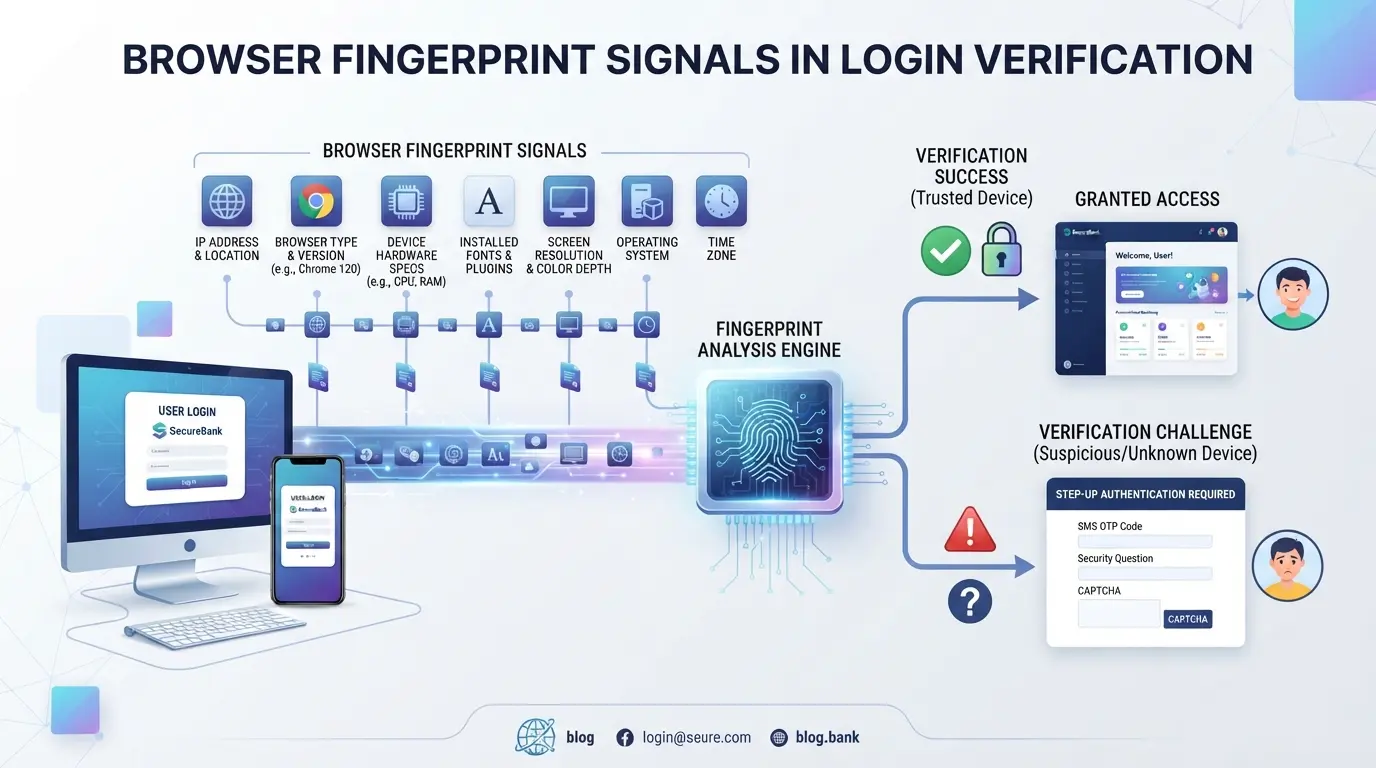
Account Behavior That Raises Flags
- Logging in from multiple cities or devices within short periods
- Using scripts, bots, or rapid-fire actions (like mass liking or commenting)
- Repeating failed CAPTCHA or password attempts, this can escalate a one-off check into a full facebook captcha loop
Even “normal” users can trigger these if they run business accounts on shared computers or let team members log in from different offices. If you’re seeing CAPTCHAs after every login, stop and check what’s changed recently before trying more resets.
When these risks stack up, simple fixes like refreshing the page or switching browsers don’t work. That’s why the next step is a careful, step-by-step troubleshooting process, jumping ahead only makes recovery harder.
How to Fix the Facebook CAPTCHA Loop: Step-by-Step Troubleshooting for 2026
You can break out of the Facebook CAPTCHA loop by addressing session mismatches, browser fingerprints, and network issues, random page refreshes rarely solve the problem. Here’s how to work through the toughest blockers, with each step designed to catch what usually keeps people stuck.
Check Your Network and IP Consistency
- Go to whatismyip.com or a similar service and note your current IP address.
- Switch from mobile data to a stable Wi-Fi connection, or vice versa, Facebook often flags rapid IP changes or proxy mismatches as risky.
- Avoid public Wi-Fi or workplace networks, which can trigger mass bans. If your IP changes after every reconnect, wait 5-10 minutes before trying again.
Clear Browser Cache and Cookies
- Open your browser’s settings and select “Clear browsing data.”
- Delete both cache and cookies for “All time”, session leftovers can lock you in the loop.
- Restart the browser before logging in again. If you skip this, stale Facebook cookies might send you straight back to the CAPTCHA page.
Disable Browser Extensions and Try a Different Browser
- Turn off all browser extensions, especially privacy tools, ad blockers, or automation add-ons, these often block Facebook scripts that verify real user actions.
- Open Facebook in a different browser you rarely use.
- Log in with no extensions enabled. If you still hit the loop, it’s not an extension issue.
Reset Your Facebook Password If Needed
- If you see repeated “suspicious login attempt” messages or get locked out after the CAPTCHA, start a password reset from Facebook’s “Forgot Password” flow.
- Complete the reset using your main email or phone, don’t use third-party login links from old emails.
- After resetting, close all browser tabs, clear cookies again, and log in with the new password. If the CAPTCHA reappears, wait at least 30 minutes before trying again or you risk a temporary lock.
The single most missed step is cleaning out every trace of your old session before retrying, one leftover cookie can keep you stuck even after switching browsers.
Moving too fast between failed attempts or skipping a full browser reset usually makes the facebook captcha loop worse. Next, see which common mistakes can accidentally trap you longer than necessary.
Common Mistakes That Make Facebook CAPTCHA Loops Worse
Most users get stuck longer in the facebook captcha loop because they skip basic checks or keep repeating actions that trigger extra security reviews. Recognizing these mistakes can cut hours off your recovery time.
Using Untrusted or Low-Quality Proxies
Choosing random proxy providers is a fast way to make the loop worse. Facebook flags IPs from unreliable sources, and you’ll often see more verification screens or get locked out entirely. If you switch between free or low-cost proxies, Facebook can treat your login as suspicious, even if your credentials are correct. Consistent proxy quality matters more than price, one bad node can extend the lockout by days.
Rapid Switching Between Devices and Browsers
Jumping between laptops, phones, and browser types just to “try something else” confuses Facebook’s session tracking.
- Stick to one device for troubleshooting.
- Use the same browser where the loop began.
- Pause before switching, wait at least 5 minutes between attempts.
Ignoring Facebook Security Notifications
Every ignored prompt adds friction and can trigger more loops. If you skip alerts, Facebook may re-issue CAPTCHA requests or block your account.
- Read every notification and follow its instructions.
- If Facebook asks for ID, submit it before retrying login.
- Check your email for extra security requests, don’t ignore them.
Moving forward, account isolation and careful proxy setup can help avoid these traps.
How Social Media Managers Use DICloak to Lower Facebook CAPTCHA Loop Risk with Profile Isolation and Proxy Control
Social media managers who handle several Facebook accounts often face a stubborn login problem: even after fixing obvious mistakes, new sessions get stuck in the facebook captcha loop. The real issue is that Facebook sees repeated logins from similar browser profiles or identical network signals. For teams managing multiple accounts, this risk grows as workflows overlap. If these readers also need to organize account sessions separately, using DICloak to isolate browser profiles and configure proxies becomes a practical step. The scope is limited to browser-profile access and network configuration; it does not change Facebook’s verification process.
Using Profile Isolation and Fingerprint Configuration for Each Facebook Account
Operators can create a new browser profile in DICloak for every Facebook account they manage. This means each session runs in its own separate browser profile, no shared cookies, history, or storage. Teams can configure fingerprint settings for each profile, including device information like User Agent, time zone, interface language, and screen resolution. For example, a social media manager assigns a profile to a specific account, sets device signals to match the expected platform behavior, and keeps those settings consistent. This reduces the chance that Facebook will see multiple accounts as coming from the same device or browser. The system does not promise invisibility or guarantee account acceptance, what matters most is that every account workflow gets its own isolated environment, lowering the risk of accidental overlap. Operators remain responsible for choosing the right settings and reviewing them before login.

Configuring Proxies for Account Separation and Network Consistency
Separate network signals are just as important. Operators can configure their own proxy connection for each DICloak profile, adding custom proxy details or selecting from saved options. Before starting a Facebook session, they test the proxy’s connectivity and check the exit IP, region, and time zone. This keeps each account’s network consistent and avoids having multiple logins flagged for sharing the same connection. The operator decides which proxy to use, DICloak simply stores and applies those details. Teams must supply their own proxies and review each setup; DICloak does not provide or sell proxies, nor does it guarantee that using a proxy will bypass Facebook’s checks. If a proxy fails the connectivity test, the session won’t start smoothly, and a mismatched region or time zone can trigger extra verification steps.

As workflows scale, keeping browser profiles and proxies separated helps social media teams avoid the pitfalls that prolong login loops. The next section moves into long-term prevention strategies for avoiding these issues in 2026.
Long-Term Prevention: How to Avoid Facebook CAPTCHA Loops in 2026
Maintain Consistent Login Habits
Switching devices or networks too often is the fastest way to trigger a facebook captcha loop. Stick to one main device and avoid logging in from new locations unless needed, even a single odd login can make Facebook suspicious for weeks.
Monitor Account Activity and Security Alerts
- Check Facebook’s Security Center weekly for unknown logins.
- Respond to security prompts within 24 hours, delays can lock you out.
- Review recent activity and remove any devices you don’t recognize.
Use Trusted Tools and Proxies for Multi-Account Workflows
Relying on random free proxies or mixing accounts in one browser window quickly leads to issues. Instead, only use paid residential proxies and session-isolated browsers.
- Assign each account its own clean browser profile.
- Use proxies with real ISP ranges, not cheap datacenter IPs.
- Clear cookies fully before adding a new account to your workflow.
When Facebook CAPTCHA Loops Signal Deeper Account Issues
If you keep getting stuck in a facebook captcha loop even after fixing browser settings and cookies, it’s usually a sign your account is flagged, not just a glitch. Ignoring the loop and retrying can trigger more restrictions or lockouts.
Signs of Account Restriction or Suspension
Look for warnings in your Facebook notifications, such as “Account temporarily locked” or “Suspicious activity detected.” If you see limited access or can’t change your password, your account may already be restricted. The fastest way to check is opening the Security and Login page, if options are missing or greyed out, you’re facing deeper problems.
When to Contact Facebook Support
If normal fixes fail and Facebook blocks you from accessing essential settings, you risk permanent suspension.
- Don’t rely on repeated attempts, each failed login can make recovery harder.
- Submit a support request with screenshots and the exact error message. Use Facebook’s Help Center, not generic email, to get a case ID and improve your chances.
Frequently Asked Questions About facebook captcha loop
Why does Facebook keep asking for CAPTCHA even after I solve it?
Facebook may trigger a captcha loop if your IP address changes often, your device fingerprint doesn’t match past logins, or it detects behavior that seems suspicious. For example, logging in from different browsers or countries can confuse Facebook’s security checks and cause repeated captcha prompts.
Can using proxies help or hurt when dealing with Facebook CAPTCHA loops?
Using proxies can sometimes cause more problems with captcha verification. Low-quality or shared proxies increase the chance Facebook will flag your login as suspicious. Good proxies set up correctly, with consistent IPs and browser fingerprints, can help avoid Facebook login loop issues, but mistakes may trigger more captchas.
Is the Facebook CAPTCHA loop a sign my account is hacked or restricted?
A captcha loop usually means Facebook wants to check you’re human, not that your account is hacked. If you see warnings about account restrictions or can’t access features, it could mean a deeper issue. Check for messages in your account, sudden password changes, or login attempts you don’t recognize.
What should I do if none of the troubleshooting steps fix the CAPTCHA loop?
If you’re stuck on captcha and nothing helps, review your account for warnings or restrictions. Try logging in from a trusted device and network. If the problem continues, contact Facebook support for help and check your account status for any security alerts or blocks.
How can social media managers prevent CAPTCHA loops when handling multiple accounts?
Managers should use separate browser profiles for each account, keep device fingerprints consistent, and avoid switching IPs frequently. Good proxy setup and careful login habits reduce the risk of getting stuck on Facebook captcha not working screens. Always monitor account activity for unusual access or errors.
Taking proactive steps, such as updating your browser or seeking alternative solutions, can help you avoid getting stuck in repetitive verification challenges. When standard troubleshooting methods are not effective, exploring specialized tools designed to bypass such issues could make your experience smoother. Try DICloak For Free
 Web Proxy Tools
 Free Tools
 Cookie Plugin
 UA Generator
 MAC Address Generator
 IP Generator
 IP Address List
 2FA Code Generator
 World Clock
 Anonymous Check
 WebRTC Leak Test
 UUID Generator
 Free Web Proxy Site
 Proxy Checker
 FB Ad Checker
 AI Web Scraping
 Free SMM Tools
 Twitter Shadowban Checker
 Instagram Name Checker
 UTM Generator
 Username Generator
 AI Hashtag Generator
 LinkedIn Headline Generator
 Social Media Image Resizer