You’re typing, editing, or just browsing Claude, and suddenly you’re kicked out, no warning, just a login screen staring back. Plenty of users hit the same wall: “why does cladue keep logging me out?” Sometimes, Claude keeps logging me out after only a few minutes, even when I haven’t closed the tab. Other times, a session expires quickly right in the middle of a draft. The problem isn’t always obvious, did you trigger a security check, or was it just a cookie glitch? Most people assume it’s a bug or a random timeout, but the real reason is usually buried in session rules, browser fingerprint mismatches, or account-sharing setups that don’t play well with Claude’s login logic.
Trying to fix it by just refreshing or re-entering your password rarely solves the root cause. If you’re sharing accounts, toggling between devices, running privacy extensions, or using proxies, you’ll see “Why am I logged out of Claude?” even more often. Sometimes, a single browser setting can break session persistence. The frustration ramps up when you realize there’s no clear error message or standard fix, and the platform’s help docs rarely address these edge cases.
What matters most is figuring out which logout triggers are under your control, and which aren’t. If you only focus on basic troubleshooting, you’ll miss the patterns that cause repeat lockouts, especially for business teams or shared accounts. This guide cuts through the guesswork and shows why Claude logs you out, what breaks session reliability, and which fixes actually work in 2026.
Here’s what you need to check first.
What Usually Causes Claude to Log You Out Repeatedly?
Claude logging you out over and over usually comes down to session timeouts, browser changes, or security triggers, not just “user error.” If you wonder “why does cladue keep logging me out” even when you haven’t changed anything, it’s often a technical mismatch between your session and the platform’s security checks.
Session Expiry and Inactivity Timeouts
Leave Claude idle for 30-60 minutes, and the session may expire, even if the tab stays open. Most platforms use short timeouts to cut off inactive sessions, so you’ll get logged out if you step away too long or multitask in other apps.
Browser and Device Changes
Switching browsers or devices confuses session tracking. Claude links your login to a specific browser profile, change that, and it treats you like a stranger. For example, logging in on Chrome at work, then opening Safari on your phone, will trigger a forced logout on one or both devices. Clearing cookies or cache wipes the local data Claude uses to remember you. If you use “Incognito” or privacy-focused extensions, your session token may not even survive a page refresh. The same happens when automated tools, browser profile managers, or script-driven environments rotate user agents or fingerprints. The platform sees a new device or location and ends the old session to avoid cross-account risk.
Many users miss that even small tweaks, like updating your browser, switching networks, or restoring a backup, can break session persistence. When that happens, Claude’s security system logs you out without warning. If you notice this pattern after certain actions, check for cookie-clearing extensions, profile switches, or recent browser updates before digging into account settings.
Security Policies and Suspicious Activity
- Multiple locations: Login from one city, then another, and Claude may force logout for safety.
- IP or fingerprint changes: Using proxies or changing device details can look suspicious and end your session.
- Several failed logins: Too many wrong password attempts signal risk and prompt logout.
Most repeat logouts trace back to one of these checks, not to a broken account. Understanding which trigger matches your situation is the first step in fixing the issue. Next, it’s worth looking at how your browser, device, and network settings affect Claude login stability, small changes there can make all the difference.

How Device, Browser, and Network Settings Affect Claude Login Stability
If you keep seeing Claude log you out, it’s not always your fault, your device, browser, and network setup can quietly break session stability. Figuring out where the problem starts is key. Some settings force logouts every time, and others only break things when you switch locations or try to share an account. Here’s where most users go wrong.
Browser Compatibility and Updates
Claude’s web app works best on the latest versions of Chrome, Firefox, and Edge. Using an outdated browser can trigger instant logouts, missing buttons, or blocked login screens. If your browser is more than six months behind on updates, expect session drops or errors when you try to refresh the page.
Cookie and Cache Management
Every Claude session depends on browser cookies, lose them, and you’ll get kicked out right away. If you clear cookies, use incognito mode, or run “privacy cleaners,” your login won’t last. The less obvious trap is strict cookie settings: if your browser blocks third-party cookies or deletes them on exit, you’ll find yourself stuck in a login loop.
One common failure: running both an ad blocker and a privacy extension can silently wipe Claude’s login cookie right after you authenticate. That means you’ll type your password, pass any 2FA prompt, and still get dropped back to the login page after a few clicks. The tradeoff is clear, tight privacy settings look safer but can break session persistence for any web app that relies on stable cookies. If you manage accounts for a team, this gets messier. Logging in on another device or browser can force the platform to expire your old session for “security,” even if you’re using the same IP. Worst case, you’ll log in, work for a few minutes, then see a sudden “Session Expired” banner with no warning. Fixing this usually means relaxing cookie settings and double-checking that your browser isn’t set to auto-clear data on close. If you skip this, you’ll stay trapped in the logout cycle.
- Switching Wi-Fi networks or moving between home and office can trigger forced logouts.
- Using a proxy with dynamic IPs often causes Claude to see you as a “new” user, ending your session.
- Shared or changing IPs (especially on mobile data) will break login persistence, even if your device and browser stay the same.
If Claude logs you out right after you change networks, check your IP and try logging in from a consistent connection. If that fixes it, you’ve found the weak link, addressing network shifts is the fastest way to cut repeat logouts.
Next up: the most common mistakes that trigger Claude logouts, and how to avoid them.

Common Mistakes That Trigger Claude Logouts (and How to Avoid Them)
The main reason Claude keeps logging you out is user-side mistakes that break session tracking. If you’re asking “why does cladue keep logging me out,” the answer is usually a mix of device confusion, security tweaks, or browser changes, most of which can be fixed once you spot the pattern.
Using Multiple Devices Without Proper Sign-Out
Switching between your phone, laptop, or tablet without logging out on the old device makes Claude think you’re trying to run two sessions at once. That’s when the platform pushes a forced logout to both devices. If you need to use Claude on several devices, always sign out fully before logging in elsewhere. Skipping a proper sign-out can trigger lockouts for days, especially if you’re part of a team sharing credentials.
Frequent Password or Security Setting Changes
Every time you reset your password or tweak security settings like two-factor authentication, Claude will drop all active sessions, sometimes without warning. If you keep changing these, expect repeated logouts.
- Avoid password resets unless you’re locked out or see suspicious activity.
- Don’t toggle security settings during active work sessions.
- Change passwords at low-traffic times; mid-day changes kick everyone off.
Browser Extensions and Privacy Tools
Extensions that block scripts, clear cookies, or rewrite headers can break Claude’s login flow. Even a simple privacy tool that wipes cookies after each session makes logouts happen much more often.
- Disable privacy extensions on Claude’s domain before logging in.
- Don’t use browser modes like “Incognito” if you need to stay logged in.
- Check for automated cookie cleaners and pause them while using Claude.
If you skip these checks, you’ll keep chasing login errors without knowing the root cause. Fixing the logout pattern means correcting these habits first, then moving on to deeper troubleshooting. Next, see which step-by-step solutions actually fix persistent logout issues for good.
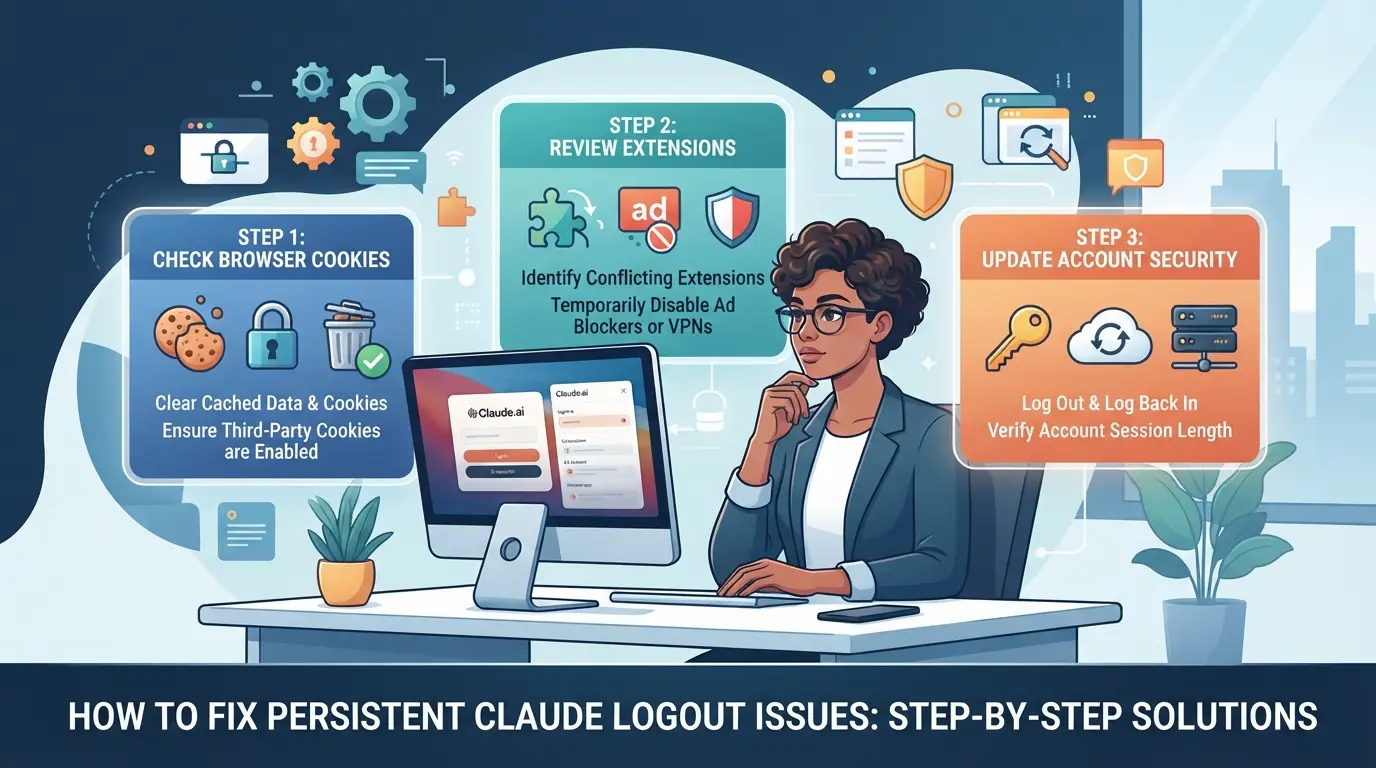
How to Fix Persistent Claude Logout Issues: Step-by-Step Solutions
If Claude keeps logging you out, you’re dealing with more than just annoying popups. The real fix depends on catching session breakers early, browser quirks, cookie settings, network shifts, or account-level triggers. This walkthrough targets each trouble spot directly, so you don’t keep spinning in circles.
Check and Update Your Browser
- Open your browser’s settings and check the version number. If you’re running anything older than the last major release, update now, Claude’s login logic often breaks on outdated browsers.
- Switch to Chrome or Firefox if you’re using a less common browser. Edge cases with Brave, Opera, or Safari can trigger session mismatches that don’t show clear errors.
- Restart your browser after updating. If Claude still logs you out instantly, move on to the next step.
Review Cookie and Privacy Settings
- Open your browser’s cookie controls. Make sure “Allow cookies” is set for Claude’s domain; if you see “Blocked,” session tokens won’t stick.
- Disable privacy extensions like uBlock or Ghostery for Claude. These can silently drop session cookies, causing sudden logouts even if the login looks fine.
- Add Claude’s site to your whitelist in all privacy tools. If you forget this, new sessions will fail every time you reload the page.
Stabilize Your Network and IP Address
- Stay on the same WiFi or network while logged in. If your IP changes mid-session, say, when switching from home WiFi to mobile data, Claude treats it as a new device, and your session expires.
- If you’re using proxies, pick one and stick with it for the whole session. Random proxy rotation can trigger security checks that force logouts.
- If you see logouts right after a network shift, try logging in again and avoid switching networks until you’re done.
Log Out Properly Before Switching Devices
- Click “Log out” in Claude before closing your browser or moving to another device. If you just shut the tab, session artifacts stay behind and confuse the platform.
- Wait for the confirmation screen. If you see a spinning icon instead, your logout didn’t finish, refresh and try again.
- Start your next login on the new device only after the old session is cleared. Otherwise, Claude may force a double logout as soon as it detects overlapping sessions.
Contact Claude Support for Account-Specific Issues
- If none of these steps work, reach out to Claude’s support team through their official help portal.
- Include screenshots, your browser version, a list of privacy tools, and any network details. Support can’t troubleshoot “keeps logging me out” without exact info.
- If you only get canned replies, reply in the morning (UTC) when queue times drop and agents are more responsive.
A stable login isn’t just about fixing user-side errors; platform quirks and account limits can still trip you up. For teams sharing accounts, that risk gets even trickier, next, you’ll see how specialized tools can reduce logout headaches.
How Teams and Power Users Can Share Platform Accounts More Safely with DICloak
If you run into session drops or “why does Claude keep logging me out” when several people share the same platform account, the real trouble often starts with mismatched browser setups, inconsistent IPs, or exposed credentials. Teams and advanced users who need to share access safely can use DICloak to build a more stable handoff. Here’s how the actual workflow fits.
Keep Shared Account Sessions Consistent with Unified IP and Fingerprint
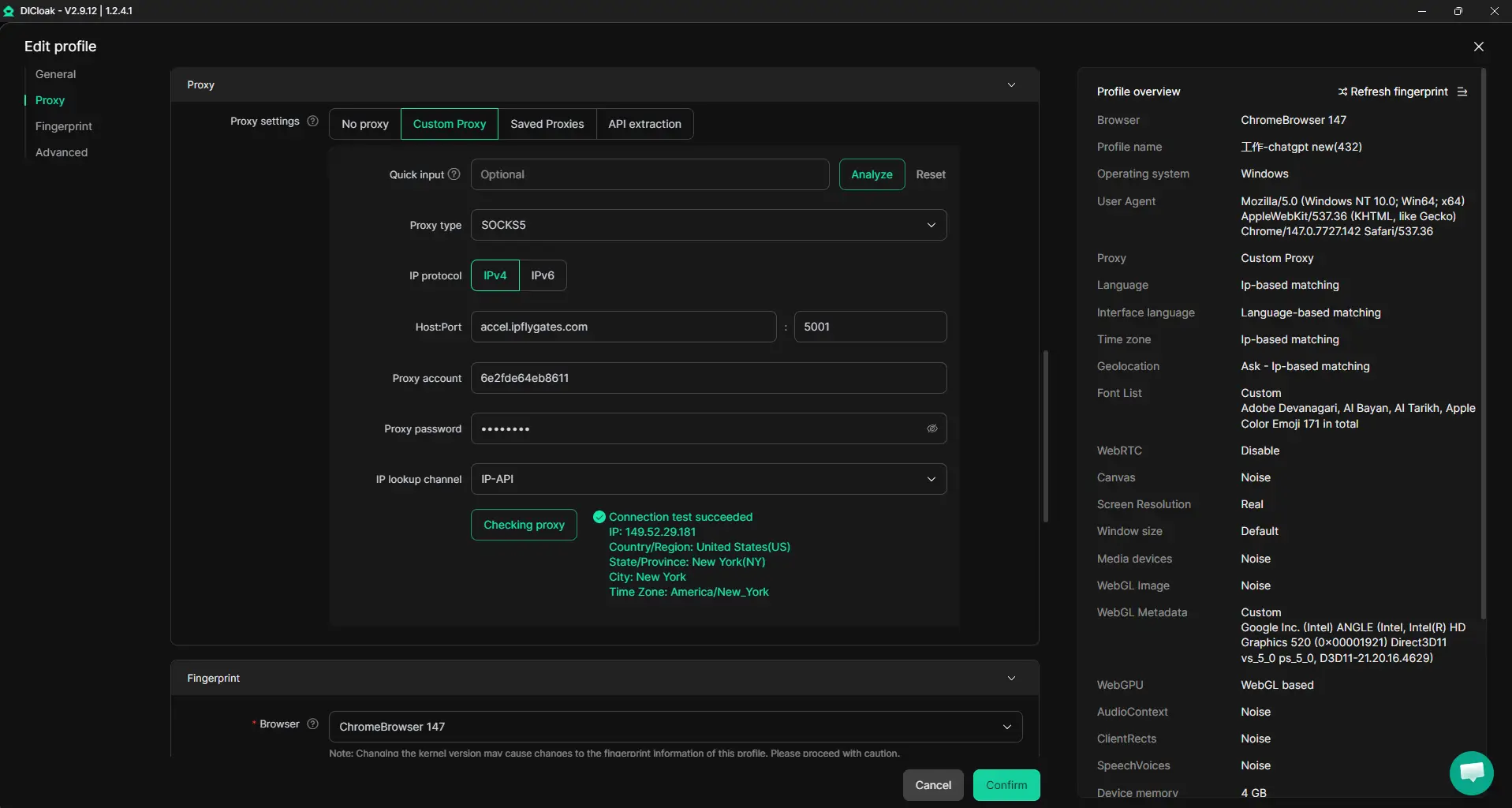
Session instability often comes from team members logging in from different devices, IP addresses, or browser setups. Admins can prepare a shared DICloak profile for a platform account, set a consistent fingerprint and proxy, and share it with all authorized users. When each person opens that profile, they use the same browser profile and network route, reducing session conflicts that trigger logouts. The setup only works if everyone uses the same shared profile and user-provided proxy; it doesn’t guarantee the platform will always treat the session as a single user.
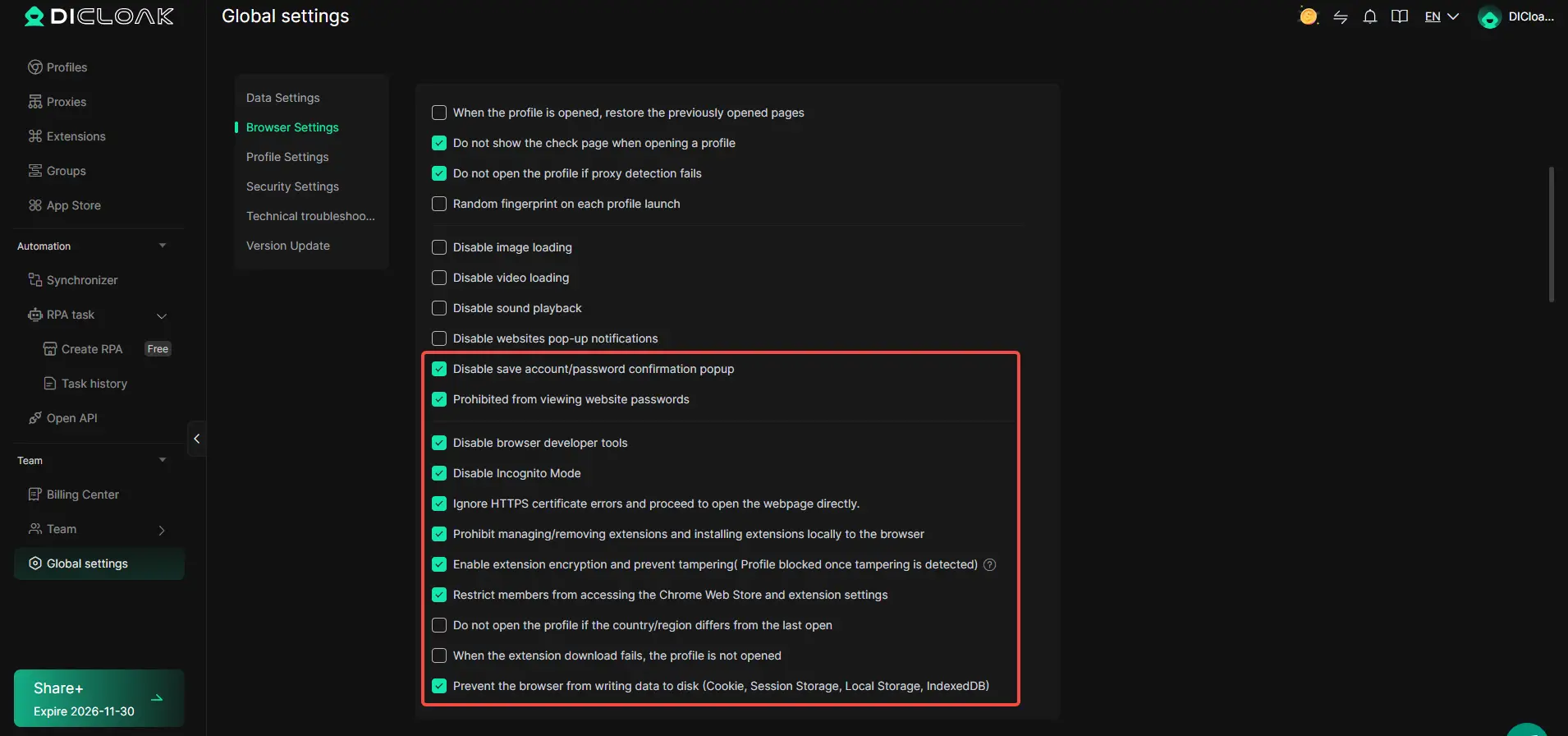
Browser-Profile Access Controls for Shared Account Workflows
Credential leaks are a common risk when teams share logins. Admins can use DICloak security settings to reduce exposure of passwords, cookies, and sensitive pages during shared use. For example, with password and cookie protection enabled, team members can use the account but can’t see or copy credentials. Cookie encryption and developer tool restrictions, where available, add another layer, but the scope is limited to browser-profile access; it does not change the connected SaaS tool.
Control Team Access with Flexible Permissions
Not every team member should have the same level of access to shared profiles. Admins can organize users into groups and set which profiles and actions each group can access inside DICloak. This means only the right people can open or modify sensitive profiles, supporting least-privilege setups that cut down mistakes and data leaks.

When session instability keeps coming back, it’s often a sign that bigger security or compliance gaps are still open. That’s where the next section goes deeper.
When Persistent Logout Problems Signal a Bigger Security or Compliance Issue
Repeated logout problems start to look less like random glitches and more like warning signs when you notice security alerts or unfamiliar login activity. If Claude boots you out right after you log in, especially with no clear error, you could be dealing with something bigger than a browser bug.
Signs of Account Compromise or Unauthorized Access
When you see unexpected password resets, security warnings, or logins from locations you don’t recognize, your account might be compromised. If Claude session expires quickly, always check for new login alerts and change your password right away.
Platform Policy Violations and Automated Restrictions
Platforms often kick users out for breaking their terms, like sharing accounts or triggering anti-fraud systems.
- You might get logged out if the system detects multiple people using the same account, even from different devices.
- The safer move: stick to single-user access, avoid browser automation, and review your activity history for sudden changes.
If you keep asking “why does Claude keep logging me out,” but the usual fixes don’t work, it’s time to look at account security and compliance issues as the root cause. This is the point where basic troubleshooting stops helping, now, regular reviews and clear access logs matter more than tweaking browser settings.
Best Practices to Keep Your Claude and Other Platform Accounts Logged In and Secure in 2026
Getting locked out isn’t always random, small habits have a big impact. If you’re tired of wondering "why does cladue keep logging me out," here’s what actually works.
Use Strong, Unique Passwords and Enable 2FA
Weak passwords and missing 2FA are the fastest way to lose session stability. Password managers keep credentials fresh and help reduce login errors. Enabling 2FA not only blocks forced logouts but also protects against session hijack attempts. If you skip this, expect more random logouts and fewer recovery options.
Regularly Review Connected Devices and Sessions
- Check your session list for unknown devices weekly.
- Revoke access from old phones, browsers, or team laptops.
- Log out all sessions after any password change.
Coordinate Team Access with Secure Tools
Shared access needs structure, random sharing causes session collisions and surprise logouts.
- Assign roles and limit concurrent logins.
- Set up device approval for each team member.
- Audit access logs monthly for strange activity.
Frequently Asked Questions About why does cladue keep logging me out
Why does Claude keep logging me out after a few minutes?
Claude may log you out due to session timeouts, inactivity, or security reasons. If you leave the window idle or your internet drops, the session can end early. Sometimes, frequent logins from different locations or devices also force a logout to protect your account.
Can using proxies or changing my IP address cause Claude to log me out?
Yes, using proxies or having your IP address change often can cause Claude to log you out. The system may see rapid IP changes as a security risk and end your session. This helps prevent unauthorized access if someone else tries to use your account.
How can I keep my Claude account logged in across multiple devices?
To use Claude on more than one device, log out from the first device before logging in on another. Avoid being logged in on several devices at once, as this can cause automatic logouts. Switching devices carefully helps your session stay active.
Does clearing cookies or using privacy extensions affect Claude logins?
Yes, if you clear cookies or use browser extensions that block cookies or scripts, Claude may log you out. Cookies store your session information. If they are deleted or blocked, you’ll have to log in again, and your session won’t be saved.
Is it safe to share my Claude account with team members?
Directly sharing your Claude login can cause frequent logouts and security problems, especially if multiple people log in at the same time. For safer collaboration, use secure tools designed for sharing access. This helps avoid unexpected logouts and keeps your account protected.
If persistent sign-outs are disrupting your workflow, it may be time to consider alternative solutions that better suit your needs. Switching to a more stable and privacy-focused platform can help you avoid unnecessary interruptions and maintain a smoother online experience. Try DICloak For Free
 Web Proxy Tools
 Free Tools
 Cookie Plugin
 UA Generator
 MAC Address Generator
 IP Generator
 IP Address List
 2FA Code Generator
 World Clock
 Anonymous Check
 WebRTC Leak Test
 UUID Generator
 Free Web Proxy Site
 Proxy Checker
 FB Ad Checker
 AI Web Scraping
 Free SMM Tools
 Twitter Shadowban Checker
 Instagram Name Checker
 UTM Generator
 Username Generator
 AI Hashtag Generator
 LinkedIn Headline Generator
 Social Media Image Resizer